Best Of
Dashboard Filter enhancement
My stakeholders prefer having filters at the top, but they have to scroll a lot to interact with them. Is it possible to create a fixed section, similar to how Excel allows you to freeze panes, so the filters remain visible while scrolling?

Manage Dashboards Enhancement - Search
The current "Manage Dashboard" dialog is functional, however if you have access to a large number of dashboards, it becomes difficult to manage having to slowly scroll through a long list to make sure you don't miss the dashboard you're looking for if you want to add a sub-Dashboard.

I think there are 2 aspects of this dialog that could be separated to provide better functionality.
Adding a Sub-Dashboard/Editing Dashboard Name:
- Search functionality to find the dashboard you're after
- This then filters the list to that dashboard with the same arrows to collapse/expand that dashboard tree
- Either add a sub-Dashboard or edit Dashboard name should then be available
Re-ordering Dasboards/sub-Dashboards:
- Whilst Drag-and-Drop functionality is simple and intuitive for an end-user, when the list of dashboards becomes too long it doesn't work as well; especially inside a smallish pop-up dialog
- As much as I don't like to compliment Microsoft, the method for managing columns in SharePoint list views works quite well by using check-boxes to hide/un-hide and a number drop-down to adjust the position in the ordering.
- Even if the method isn't changed from the drag-and-drop, the dashboard re-ordering should be accessed via a dedicated page within the user's profile settings.
The Manage Dashboards link could be broken into 2 buttons
- "Edit Dashboards": brings up the dialog with search
- "Arrange Dashboards": links directly into the page within the user profile settings
 Craig_Lynch
Move Dashboards for Non-Admins
The location of a dashboard can be an essential part of the appearance and structure within a DOMO instance. However, as we know, the original location a dashboard is created may or may not be the best location; or the best location for that dashboard may change with your organisation's structure.
Admins are able to move the dashboards, however Admin level access is understandably restricted to a small number of people so any requests for page movements usually end up going to the same few people.
I would like to suggest/propose that the ability to move dashboards is enabled for editor and above access levels limited to dashboards that they are an owner of.
ie. They must be an owner of the dashboard being moved, and the dashboard it is being moved under.
This would then provide more control to the dashboard developers and minimise the requirement for people with Admin access to make dashboard moves. It's especially useful when the user has access to a large number of dashboards, trying to find the correct dashboard to "Add a sub-Dashboard" can be clunky. A dashboard could be added, and then moved under the required dashboard.
Craig_Lynch
App Studio on Android Phones - Landscape View Distorts Page
I had originally posted an idea about Android phones not turning to Landscape view and being stuck in Portrait Mode in App Studio apps.
That appears to be fixed now, however, when I turn my phone to Landscape View on the app I created, the view is quite distorted. I have attached a few screen shots below.
In the first screenshot, at the top the District Selector and Store Selector are supposed to be drop down menus. I can't get to the drop down menus when it shows like this.
Also, there is not enough space to see the cards we created with the pages view and controls overlapping on where there should be cards.
In the second screenshot I had scrolled down to look at some of the other cards on the page and in that view, you can only see 1 card and there was white space to the right. It looked nothing like either option (Desktop or Mobile View) in App Studio where I set up the cards in a way so they look visually appealing and sized appropriately.
It would be really awesome if there was a third option for editing the cards in the pages for App Studio where you could have desktop, mobile portrait, and mobile (or tablet) landscape options. Then we would have the ability to rearrange and change the settings for all 3 potential ways that our users will be consuming the data.
Thanks for considering!!!
-Katie Moore

 KMoore
Cloud Amplifier dataset views can't be remapped to use datasets from other CA connections
We use separate users and databases for our DEV and PROD environments. When we use traditional Snowflake connectors and build dataset views, we can remap the dataset views between datasets from our DEV and PROD accounts with no problem.
However, Cloud Amplifier does not support this capability. So, if we build a dataset view on a DEV Cloud Amplifier dataset, we have to rebuild it entirely in PROD. It also means we must perform any maintenance to two dataset views instead of one.
This is likely a common use case (separate users and databases for different environments), and Cloud Amplifier connections should function the same way as standard connectors. The point of Cloud Amplifier is to connect our clouds, and this is a critical part of that.
 akeating
Increase number of dimensions allowed in the pivot table
Currently the pivot table chart only allows 10 dimensions on the top (rows fields). We need more than 10 dimensions often for data analysis.
Thanks!
Domolola
Drilling from Table Card
One of the most common questions I answer from Domo users is why a drill doesn't work as expected on a table card depending on where the user clicks. For example, a user would look at the table below and click "200" to drill to transaction detail for Customer B. Instead, they receive an error message saying "An issue has occurred during processing. We are unable to complete the request at this time." The current resolution for this is to click on "Customer B" instead of the amount.

While this behavior makes sense when considering that the drill view is designed to filter to records with the same field value as what the user clicks, it is not very intuitive from an end user's perspective. It would be helpful to align table card functionality with user expectations and implicitly drill based on the dimensions displayed in the top table regardless of where the user clicks within that row.
 MichelleH
Waterfall Chart - Dynamic colour for first bar
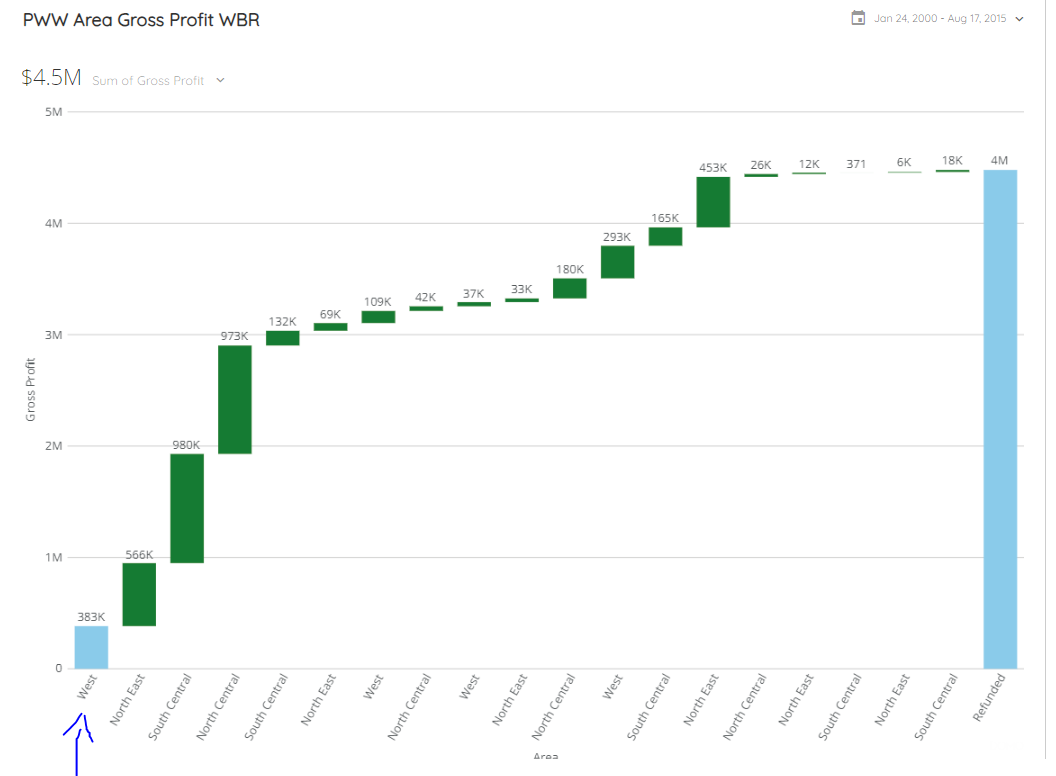
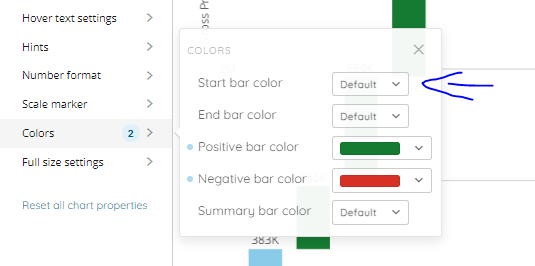
The colour of the first bar in the waterfall chart does not seem to respect dynamic colour change. In our case, all positive values show green bars, and all negative values show red bars. The colour of first bar of the waterfall card does not change dynamically.
In Pic 01, you can see that the first bar is Blue. Pic 02 shows that positive bars are set to Green and negative bars to Red.
Can we have an option where the colour of the first bar also respects dynamic colour change for positive and negative values?
Add scroll to HTML Table
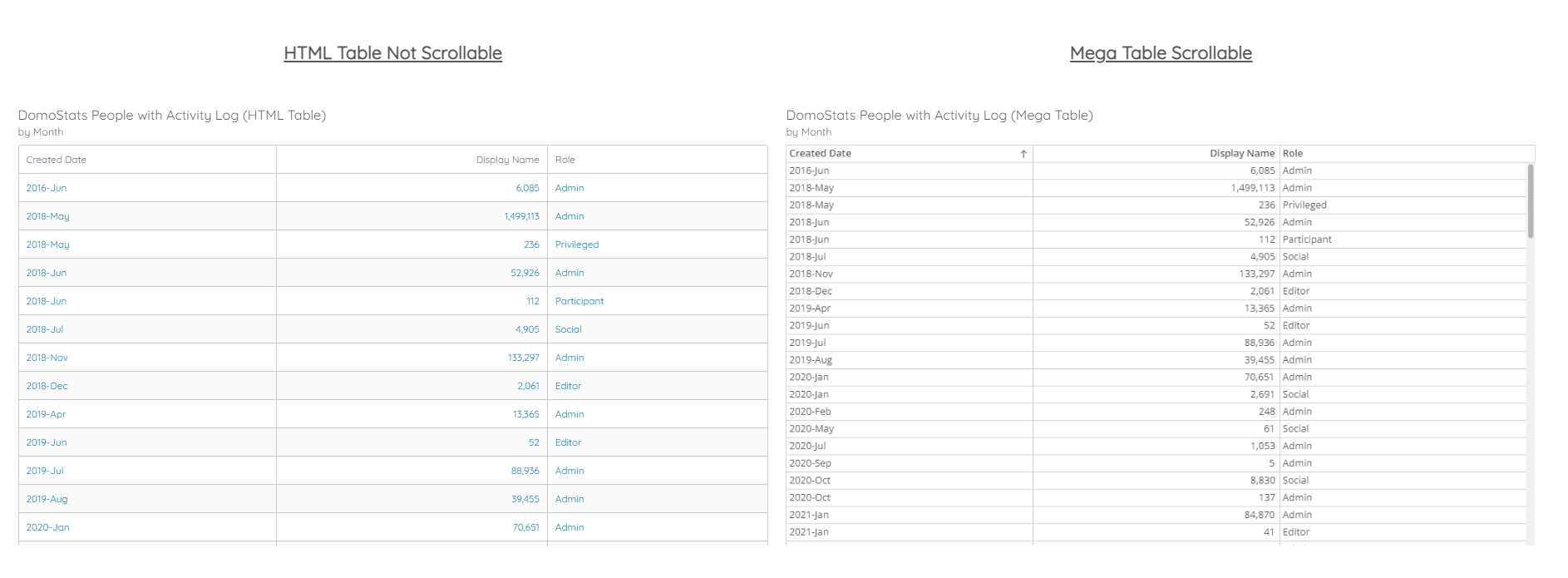
I understand that HTML tables were introduced before Mega tables. With Mega tables, users have the option to scroll through to see the entire data. With HTML tables, the scroll feature does not exist.
Can we have the scroll feature enabled? The HTML table allows for certain formatting within a cell that we cannot do in a Mega table. For example, in a single cell we can show the sales of the current year and at the side of that value we can show the change as compared to the previous year. And the colour of that change can depend if it is a +ve or -ve values (green or red).
While we use the HTML table to allow for this, users are unable to scroll through the table to see all the rows. They would need to either expand the table or open it in another window/tab.
Would be really good to allow for users to scroll through an HTML table. A screenshot has been attached to show the difference.
Data sharing rules
Once data is shared to a group, we currently have the situation where users in that group can share data to individuals. Thereby 'breaking' the concept of having the group. We need a way to stop that from being able to happen. I know current way of working is standard DOMO, but for us (particularly in relation to any datasets that contain PII data) we don't want sharing to be able to happen.