Best Of
Allow hiding incomplete quarter on a period over period card
For now, any period over period card doesn't offer the setting to hide an incomplete quarter without data yet, this should be made possible so that the incomplete quarter can be hidden at user's choice. Also, the legend value 'Year to Date' should allow editting, because this isn't very accurate when setting the card to be graphed by quarter.

 Warangel
Number Abbreviation Options
Can we please have the option to fix the number abbreviation at a certain level, i.e., have all numbers always displayed in K, M, or B? Currently the abbreviations are automatically determined, but dashboard users have found it confusing to mix the units of measures in the same table.

 sopche03
Copy Page to Another Tab in App
Would love the ability to duplicate an entire page within an app and put it in another tab.
Parker_Lake
App Studio Forms: Page Filter Integration and Table Section for Multi-Row Entries
Description: I’d like to propose the addition of two key features for Domo App Studio Forms that would significantly enhance its functionality and usability. These omissions currently present challenges in how we collect and manage data through forms, and addressing them would improve the overall user experience.
1. Page Filter Integration with Form Submissions
There is currently no known mechanism to automatically capture and save page filters when forms are submitted. This missing functionality makes it difficult to understand the specific context (e.g., region, date, category) a user had applied during form submission.
Use Case:
Often, form submissions need to be tied to specific filter values, such as regions or timeframes. Having these filters saved with the form responses would provide vital context and allow for better analysis and application of the input data.
Proposed Solution:
Introduce the ability to save page filter values as part of form submissions, ensuring that users’ inputs are tied to the specific data context in which they are working.
2. Table Section for Multi-Row Entries
Currently, there is no built-in table section that allows users to populate a form with data from a dataset and manipulate multiple rows at once. Users are forced to input data row by row, which is highly inefficient for bulk entry tasks. This functionality is available in the existing version of forms and is one of the most used features, making its absence in App Studio a significant limitation.
Use Case:
For processes that require users to edit or input data for multiple rows at a time (e.g., updating multiple records or entries in bulk), a table section that pulls from a dataset would allow users to efficiently manage larger sets of data without repetitive, single-row entry.
Proposed Solution:
Reintroduce or enhance App Studio forms with a table section that allows users to populate forms with rows of data from a dataset and manipulate them in bulk. This would greatly improve productivity for tasks requiring bulk data input.
Thank you for considering these ideas. I’m happy to provide additional context if needed.
pimogo
Alleviate the jumping cursor causing BeastModes and SQL queries to be overwritten
For a couple of weeks, now, we have been experiencing a "jumping cursor" when editing BeastModes in cards and SQL queries (in both SQL and Magic 2.0 dataflows)
When typing first line — whether it be the name of the object being created or the first line of code for the object — the cursor will inexplicably "back up" over the text typed, obliterating a handful of characters, depending upon how fast you type.
We submitted a ticket to Domo Support and were told that there was no resolution available even though the developers had tracked down the root cause.
From the ticket response(s):
"[The cause is ] a third-party product… called CodeMirror (https://codemirror.net/5/#description). It is an application used in the majority of web browsers to help implement a text input field with support for many editing features. Domo does not specifically embed this application, but browsers such as Chrome, do use this for their text fields."
Our dedicated rep suggested that we ask "to have Domo modify the editor windows to help alleviate the cursor jumping place causing the text to be overwrittren [since] you are seeing this not only when editing beastmodes, but when writing a query within Domo using any browser."
So, that's what I'm asking for: Can Domo be modified to allow CodeMirror to function as it is intended in Chrome (our browser of choice) and other browsers so that the cursor won't back-up over the first line(s) of text that we type in Beast Modes and SQL queries?
September Community Highlights 🍁
Hello Domo Community!
Happy October?! The fall season is going too fast. We share monthly highlights on the Community so you can easily see the most popular discussions and get to know our Community members. Please let me know in the comments if you enjoy these posts or if there are any stats/activity data you'd like to see included in these posts.
Follow the discussion, ideas, and user links to contribute to September's top content 🔥
Leaderboard Top 3
Huge thank you to @ArborRose, @GrantSmith, and @MarkSnodgrass for all their help last month (and always).
- @ArborRose, 485 points
- @GrantSmith, 376 points
- @MarkSnodgrass, 256 points
Top 3 Posts
Of the hundreds of discussions that were had in September, these three got the most views and engagement. Follow the links and leave a reaction if you found them helpful too.
Shoutout to the following community members for asking and answering our top discussions this month: @ARosser @ggenovese @ArborRose @michaelg25 @Manasi_Panov @sourabh05 @GrantSmith @MattTheGuru
Top 3 Ideas
The Domo product is always improving because of your ideas. Of the 50+ ideas added in September, the following three got the most votes. These all have a VERY high upvote count! Click the links below and give these ideas additional upvotes to increase their chances of getting implemented into Domo.
- Add scroll to HTML table (30 upvotes)
- Waterfall chart (24 upvotes)
- App studio on Android phones (15 upvotes)
Congrats to these community members for coming up with innovative ideas: @KMoore and @warrenrebello
Reminder: Our product managers are amazing and deeply care about your feedback. They regularly review your top-voted ideas and consider them for the roadmap. However, implementing all the ideas is not feasible. Check the idea status highlighted in yellow if you'd like an update.
New Rank-ups 🚀
- @RobynLinden, Coach!
- @Jbrorby, Contributor
- @carreyes, Contributor
- @LiliRestrepo, Contributor
- @lesienebrecount, Contributor
- @dmurgit1, Contributor
- @Stefano, Contributor
- @mpoudel, Contributor
- @mbelmont, Contributor
- @ggenovese, Contributor
- @Geoff B, Contributor
- @dp4ge, Contributor
This is a record-breaking month for rank-ups! Ranking up is not possible unless you are helping users by answering questions. Thank you to everyone on this list that has dedicated time to mentoring other users.
September Community Member of the Month: @ggenovese
@ggenovese has been a community member since 2022, but has really stood out this last month (see the rank up above too). @ggenovese has helped in many discussions, most of which have which solved with best answers this month. @ggenovese has received a lot of likes and positive reactions. Thank you @ggenovese for your contributions to the Community.
If you've collaborated with @ggenovese on the Community, please leave a thank you and congratulations in the comments below.

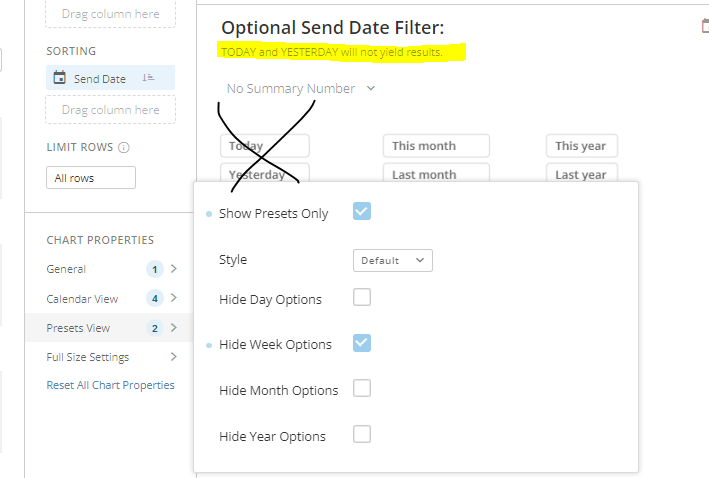
Date Selector Filter - settings
I would love to see an enhancement to chart properties on Date Selector, specifically for the PRESETS menu.
Our data is not live, it runs nightly. So any filter for "TODAY" will always yield no results.
The Chart Properties > Presets View has options to exclude Week, Month, and Year options - please add the option to hide TODAY and hide YESTERDAY -- meaning the earliest/most recent preset would be Last 7 Days. This will avoid a lot of confusion in my instance, which I am currently managing with card descriptions. I can hide the Day options, but I do like them starting with Last 7 Days, so I haven't opted to do that.
This is not the first time I've submitted an idea related to "Today" data - reminder of my other suggestion here, from 2021
: !

Variable Selectors Update to Reflect variable options
Hi,
I love the functionality of variables on dashboards, but I often start editing the options throughout building dashboards. It would be brilliant if the variables selectors, both in-card controls and on the page level, would update with any adjusted changes. They only seem to inherit updates of the default value, they never update the options that populate or name changes.
Best,
Sam
 Samuel.
Multi-Select Variable
The ability to toggle a variable to be multi-select (in string type only) that will create a comma delimited string of all the values selected from the variable.
Change Bar Colors based on another Column instead of a fixed value
As a user, I want to see a bar chart where the color of a bar is dependent on another value within my dataset. Example: I want the color of the bar to be Red if the Y-Value is greater than the value of Column XXX. I want the color of the bar to be Green if the Y-Value is less than the value of Column XXX.
Unfortunately, right now, all I see is an option to choose a color based on a hard coded value … not dynamic.
gkonkoff