Best Of
Re: Using RegEx to split a column at a delimeter
You can use a formula tile and the REGEXP_REPLACE function to get just the value of your match. There isn't a regex substring function so you essentially have to match the entire string and then replace it with your value:
REGEXP_REPLACE(`field`, '^(?:[^_]+).*$', '$1')

Re: ANNOUNCING SKI DAY: Join Us In Person for Domopalooza 2024
Can't wait to be there! This will be my first time skiing!
 Ashleigh
Re: Custom Date & Timestamp Formatting in Analyzer View of Cards
This is extremely cool, great work @Jonathan53891!

Re: Filtering Out Letter Values, Leaving Numeric Values
You can use the REGEX_REPLACE() function. REGEXP_REPLACE(yourField, '[^0-9]+','')

Re: Can't open Course Builder
If you have checked for updates and you trust the source, you could go the Mac's Gatekeeper settings and try to bypass.
Adjust Gatekeeper settings to allow apps from unidentified developers to be opened.
- Open "System Preferences" from the Apple menu.
- Click on "Security & Privacy."
- In the "General" tab, look for something stating that the app was blocked from opening. Click the "Open Anyway" button next to it.
- Confirm your action when prompted.
- Retry opening the Course Builder App.

Re: How to retrieve e-mail campaign information via API
@ArborRose
Thank you for your suggestions. I may be mistaken but I believe your solution is not quite what I'm looking for, since what I am trying to do is connect to Domo from an external source to extract data from Domo. Not the other way around. Let me know in case I misunderstood what you meant
 PedroM
Re: How to retrieve e-mail campaign information via API
Interesting, did you also try 'x-domo-developer-token' as the header? Not sure if it is case sensitive. Did you also have 'Accept' and 'Content-Type' as application/json in the request? I find that this can sometimes cause the request to fail.
 ellibot
Re: Route map
@ColinHaze You can visualize routes with 3 legs on a route map by structuring your data to include one row per leg with lat/long like this:
- Point A to Point B
- Point B to Point C
- Point C to Point A
Then add a beast mode with your lat/long variables like this:
Latitude:
case
  when `Point` = 'A' then `Point_A_Lat_Variable`
  when `Point` = 'B' then `Point_B_Lat_Variable`
  when `Point` = 'C' then `Point_C_Lat_Variable`
end
Longitude:
case
  when `Point` = 'A' then `Point_A_Long_Variable`
  when `Point` = 'B' then `Point_B_Long_Variable`
  when `Point` = 'C' then `Point_C_Long_Variable`
end

Google Analytics advanced connector not working
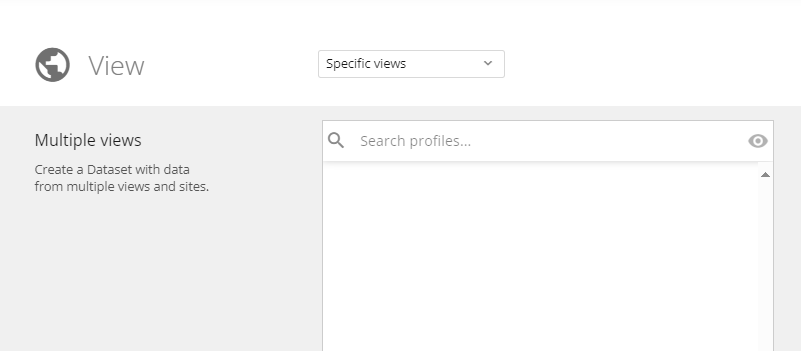
Hi, I am trying to connect our Google analytics account to Domo. I am using the Google Analytics advanced connector, but the views are not showing. It should show 2 views, like what we have in Google analytics, but it is empty. I am using a free Google analytics account. Can you please let me know how I can connect the GA4 account to Domo or is it a technical issue with Domo? Thanks
 vaco
vaco