Best Of
Linked Table - new column data type and control
Hi — just tried the Linked Table function in App Studio. I was able to create a linked table card with editable columns so users can add comments.
It would be great if the Domo team could consider adding the following features to make the Linked Table more practical for real use:
- Allow the card creator to hide the “Add column” icon at the top right of the table, so users can update editable columns but cannot modify the table structure.
- In addition to Text, Date, and Calculated field types, add a dropdown field type to restrict users to pre-set options.
- Provide data validation settings to alert users when invalid values are entered.
- Add a column length limit setting for text fields, ideally with a visible remaining character counter.
 hmmark
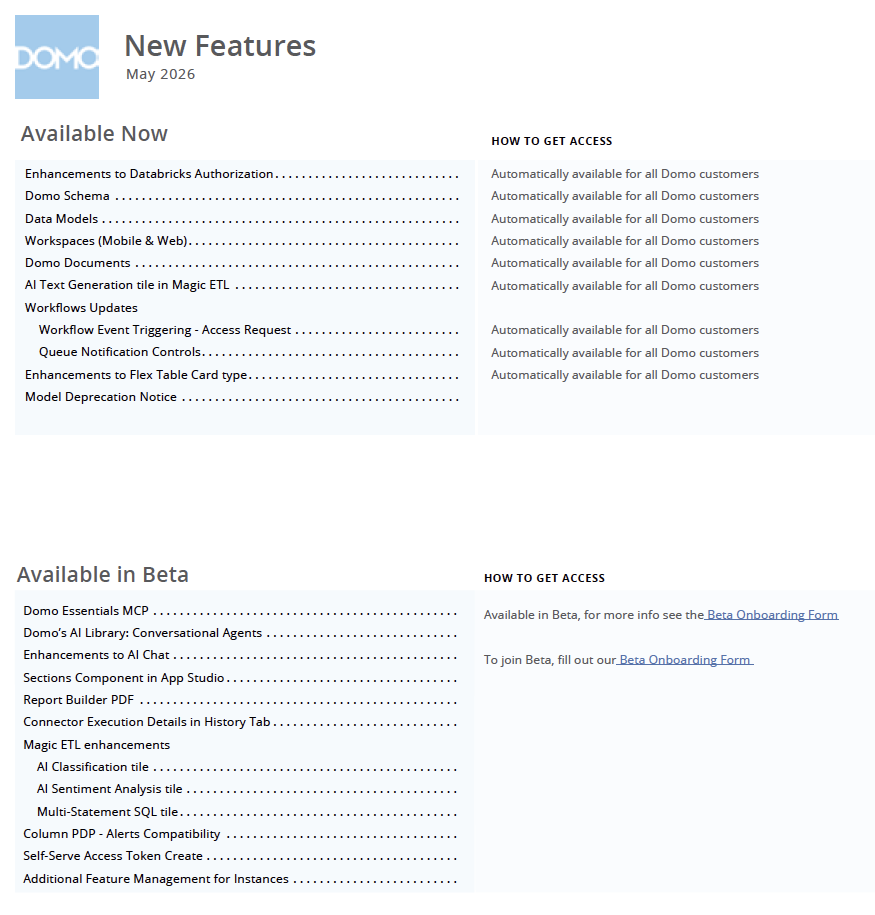
May 2026 Domo Feature Release
You should see the pop up announcements in your Domo instance today for a feature release which will be turned on next Tuesday (after the long weekend).
As always, there could be last minute adjustments and when the features are turned on next week there will be additional in product messaging as well as updates to the Domo website and Knowledge Base.
There are a ton of amazing features in this release and I cannot wait for all of you to take them for a ride!

Add Yearly Scheduling Option for Scheduled Reports
Hello Team,
Scheduled reports can only be configured to run on a weekly or monthly basis. Many users would benefit from having an additional yearly scheduling option that allows reports to be generated once per year on a specified date and time.
This feature would improve flexibility for organizations that need to capture annual metrics, perform yearly audits, or maintain yearly archives of their reports without relying on manual processes or external workarounds.
Adding yearly scheduling capabilities would enhance the reporting functionality and better meet diverse business needs.
Thank you for considering this improvement.
Add Yearly and quarterly Scheduling Option for Scheduled Reports
Hello Team,
Currently, scheduled reports can only be configured to run on a weekly or monthly basis. Many users would benefit from having additional quarterly and yearly scheduling options, allowing reports to be generated automatically on a specified date and time.
These options would greatly improve flexibility for organizations that need to track quarterly performance, capture annual metrics, support yearly audits, or maintain long-term report archives—without relying on manual processes or external workarounds.
Adding quarterly and yearly scheduling capabilities would enhance the overall reporting functionality and better support a wide range of business requirements.
Thank you for considering this enhancement.
Best regards,
Priya Kadam
Domo Support
Bulk Filter Paste For App Studio
A couple months ago DOMO launched a bulk copy+paste filter function for Dashboard filters.
Currently, this functionality does not work for the App Studio. It would be great to have that be a universal capability across DOMO as it's very helpful when filtering for 100+ items.
Inheriting PDP policies for a given user when querying the dataset?
Hi,
So we're trying to build a user facing app that will be fed DOMO data. In particular its a chatbot that will be able to query and read in DOMO data for user insights and actionable recommendations.
The issue we're facing is, each of our users have particular data policies and these policies are encapsulated in a PDP that is attached to the dataset. When the user requests a view of the data we want that user to be able to only view data that is defined in these policies. The dataset api doesnt appear to restrict the view of the data per user via the parameters but rather when say the pydomo client is instantiated the views are inherited via whatever policy is attached to the client id and client secret.
Is there a way to get a user of our app to only see the data the would see in the DOMO dashboards? Or do we have to reimplement the PDPs on our backend?
Ability to customize Request Access for card/pages
Dear all,
We need an ability to modify/customize the request access responce or existing button where we can add some steps like how to get access to this dashboard, page or card instead of it's just asking to request for an access.
Please advise how can we modify this message here


Highlight current period
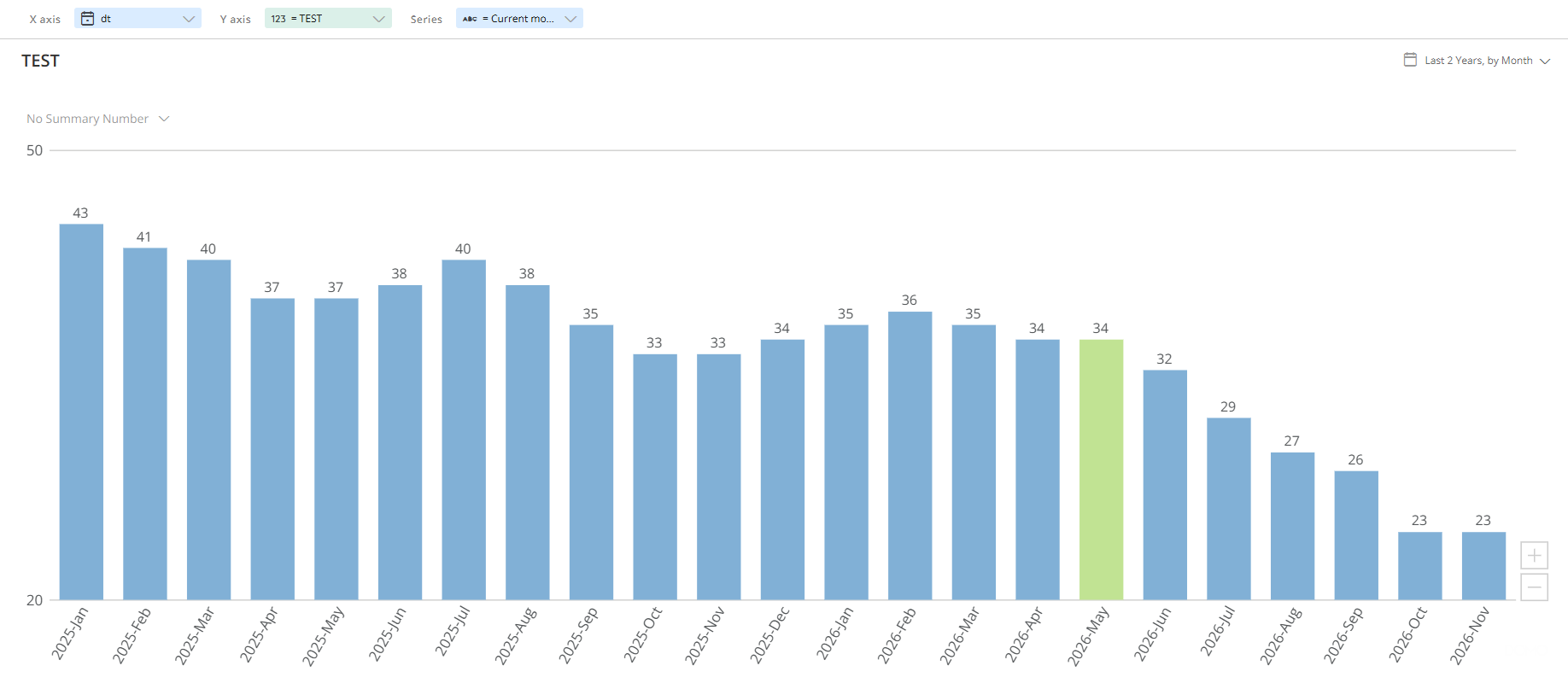
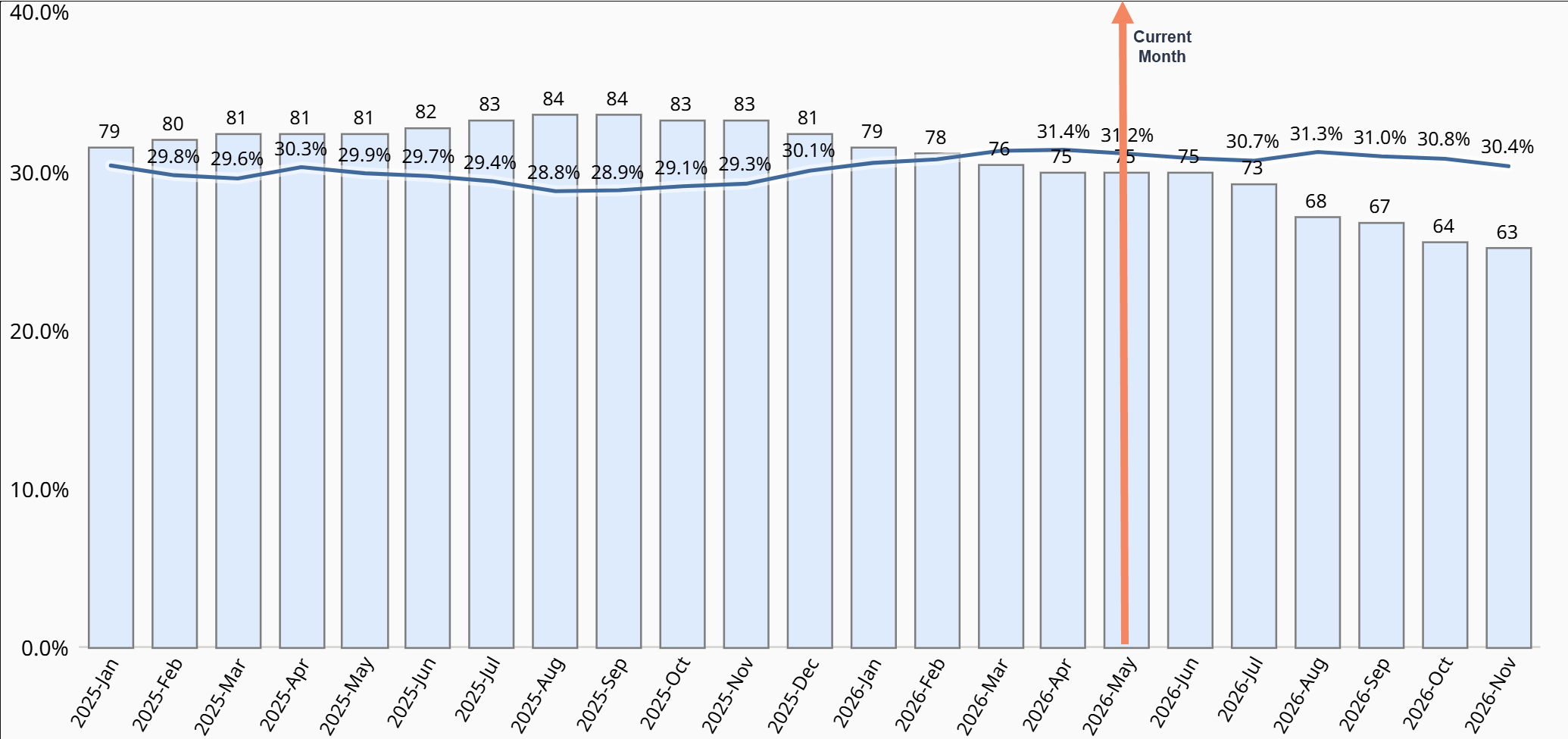
There needs to be a simple way to highlight the current period (year, quarter, month, week, day) on all bar and line charts, whether that's a formatting option to change the color/symbol for current period or a line marker that drops a vertical line on current (preferred). This would be hugely valuable when displaying both past and future data so the user can easily see where "today" is. Currently there is a workaround for simple bar/line charts with only one series by creating a second series for the current period. But this does not work on more complex charts like multi-series, Bar + Line, etc.
Current workaround:
Ideally we could easily drop in a vertical line or other clear indicator on the "current" on all chart types:
 MattGo
Per dashboard brand kit themes
The ability to choose the brandkit theme on a per dashboard level would be amazing. All our different business units have different branding and we cannot individualise the branding across different dasboards within our DOMO instance.
In general, changing colors of items in charts is cumbersome and clunky. It's great for coloring charts based on the values, but not so dynamic when trying to color via the x axis/category/legend etc. Having to hard-code each individual option isn't fun, quick or intuitive.
TL;DR - Dashboards should be able to select their own themes.
Kal
Custom Reports in Sage Intacct REST Connector
Currently, the Sage Intacct REST Connector in Domo supports only standard objects available through the Intacct REST API. However, many customers rely heavily on custom or saved reports within Sage Intacct for their business workflows.
The Sage Intacct REST API documentation indicates that it is possible to access report data via API endpoints. Enabling support for custom reports within the Domo connector would significantly enhance its functionality and provide a smoother transition from the legacy connector, which previously supported this capability.
Business Impact:
- Customers migrating from the legacy Sage Intacct connector are losing access to critical custom reports
- Rebuilding complex reports using standard objects and ETL processes requires additional time and effort
- Limits adoption of the new REST connector due to missing parity with previous functionality
Requested Enhancement:
Add support in the Sage Intacct REST Connector to:
- Retrieve custom/saved reports via available REST API endpoints
- Allow users to select and import custom reports similarly to the legacy connector
Additional Context:
This feature would greatly improve usability and reduce migration friction as the legacy connector is being deprecated. It would also align the connector more closely with the capabilities offered by the Sage Intacct API.