Best Of
Native Array Filtering in Analyzer
The Problem: To use an array/multi-value field (like tags) as a dashboard filter, we currently have to UNNEST the data in the ETL layer.
On large datasets (our base table is 8.7B rows / 8.5 TB), unnesting explodes the data size exponentially. This forces us to write heavy, complex windowed Beast Modes to avoid double-counting metrics, causing dashboards to take minutes to load.
The Request: Allow Analyzer to natively handle array fields for filtering.
- Drop an array field into the Filter bar, and let users multi-select individual elements.
- Under the hood, evaluate the filter as a
CONTAINSorARRAY_CONTAINSoperation, rather than a strict string match on the whole array.
The Benefit:
- Massive Performance: Eliminates the need to artificially duplicate billions of rows just for a filter.
- Simpler Math: We can use standard
SUMandAVGinstead of heavy window functions. - Storage Savings: Drastically reduces Domo storage footprints.
Report Builder Filters Carried Through When Linked Back
When you schedule an old dashboard as a report, the user can easily click on the report in the email and it takes them to the dash with the same filters. When you have an app and use Report Builder the best you can do is setup a button to take you back to the report without filters. I would like to have the defualt here to apply the same filters as those used when generating the report. I would suffice to have the ability to add a link of my own where I could include p_filters.
 John689
Domo // Build - What can I present that is impactful to you?
I think everyone here knows about Domo // Build coming up on June 23rd. But if not - Here’s a link - go get registered and I'll wait for you here -
Ok - now that you are back I wanted to know what YOU want out of this? Here is the deal - I have 8 minutes. I'm not going to get into a code review session. But I also don't want to talk to developers like you don't know what AI is.
For what it is worth, I'm going to talk about a bit about a journey we have gone on with pricing and data validation and most importantly - automation. I want to share a few things we learned that aren't the normal technical things I see in sessions like this.
Keep it real - What can I present that is impactful to you? If it is nothing, just tell me, and I'll just do my best not to suck and be boring - but I make no promises.
 SeanPT
Claude Connector for DOMO
Please add support for a Model Context Protocol (MCP) server integration, which would allow AI assistants like Claude to connect directly with Domo. MCP is an open standard developed by Anthropic that enables AI tools to interact with external platforms securely and efficiently
robynm
Return to active tab from Analyzer and on refresh
Whenever an app is refreshed or after exiting Analyzer the app always resets to the first tab. We use tabs a lot and can have many on a page. This behaviour is very frustrating, could this setting be changed to remember the previously active tab and return to that?
 TC777
Build Pro Code Apps With Visual Studio and GitHub Actions
If you have been wanting to build pro code apps in Visual Studio and then publish them to Domo without having to use the Domo CLI, this video is for you.
In this video, I walk through how to develop an app in Visual Studio, create versions and branches with GitHub and then use the GitHub Actions feature to automate the publishing to Domo on every pull request.

Consolidate DomoStats "People" and Domo Governance "Users" datasets
There are two ways to pull a user list using the Domo connectors. The DomoStats "People" report has all the same columns as the Domo Governance "Users" report plus key additional columns like Employee ID and Department, but can only be scheduled to run once per day.
The Domo Governance "Users" has less columns and doesn't have all the key columns we need, but has the "advanced" scheduling options like hourly, every X hours, specific days, etc.
I'm using the Users dataset to drive a custom landing page with links to pages a user has access to based on profile/group, so being able to run the Users report several times per day is very useful to us to keep up with new user creation/access changes. However, I also use the "People" report because I need the additional fields for other purposes. It would be nice if the People report allowed for the advanced scheduling so we don't need to have two tables that are nearly identical.
ccccc4
Allow Groups as Owners of DataFlows
Today, groups cannot be assigned as the owner of any dataflows. This means, that any output of a given dataflow is by default set as the same owner. It also means that by default, error alerts are only sent to one person instead of a team.
We have a use case involving a development team who cannot be granted the manage datasets grant due to securiy permissions. Without that grant, they cannot see any datasets that are not in their name or assigned to a group they belong to. If one of these users creates a new output on an ETL they don't own, they will not be able to view the new output by default.
We'd like to be able to assign groups as owners of dataflows to alleviate these issues. It's already possible for datasets, so it makes sense to be added to flows as well.
Re: Card Limitations
I also get the sense that Domo has diverted resources to AI at the expense of the core product. At this point Editable tables are not stable enough to use for testing and are a feature my org has identified as vital.
Allow Column Width Adjustment For Pivot Table Card
At the moment, column width in pivot table card can't be adjusted, and longer values in pivot table will get truncated with ellipses ("...") when viewing it in the Domo app on mobile devices, example as below:
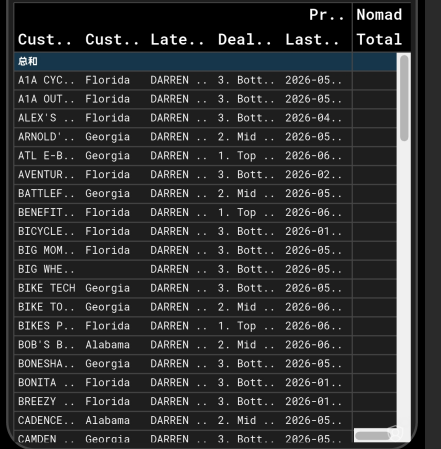
I'd suggest adding options to allow column width adjustments in pivot tables
fliu0818