Best Of
Last / Next Date Range Option
Recently captured this gap/challenge from a user in the shipping/logistics industry:
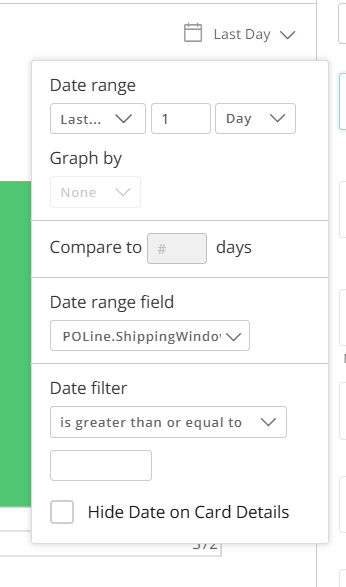
• We would like to see a "last/next" date range option added to the Date Range selection drop box in Analyzer, since this is a very common feature used in our industry.
• When you go into Edit Analyzer, and want to set the date range, there is currently no option for Last/Next. There is every other option, except this one. Instead of you have to get into the complexities of beast modes or variable date control with a workflow. Since last/next is a likely a common way users like to view data, It would be easier, if that option was available in below.
Thank you!

Domo DataStats Datasets
There is currently no way to map a nested Beast Mode to the formula for nested Beast Modes.
Examples:
Domo Governance Beast Modes dataset has a column for Beast Mode Formula.
Below is an example of a formula that is nested.
- (DOMO_BEAST_MODE(12768) / DOMO_BEAST_MODE(12764))
However, those # ID's aren't found in any other field in the Domo Governance Beast Modes dataset. The Beast Mode ID column is the ID for the Beast Mode, but it looks like: calculation_80fe8c64-2f5d-4d70-a97b-05503a9a285f
Switching to the DomoStats Beast Modes dataset, those # IDs do appear in the ID column, but the dataset does not have a formula column. There is no ID that maps to the Beast Mode ID column from the Domo Governance Beast Modes dataset.
Meaning, you cannot map to the formulas behind nested beast modes. I opened a support ticket, but they said that is the intended behavior and the mapping I'm after is a product enhancement. 🤨

Horizontal tab placement flexibility
Whilst we have the option to place a tabbed section vertically anywhere on an app page there is no way, at present, to adjust the horizontal layout, the tabs always fit to the full page width so nothing can be added to the right or left of the tab area.
We have several use cases where we would like to have a fixed chart or control to the left of the tabs area rather than above it.
Is this possible to include in a future release please?
 TC777
TC777
Show How Many Places a Card Exists Before Deleting
When deleting a card, it doesn't specify how many places the card exists. There's workarounds to look at this, but some of those workarounds only work if you have access to the other dashboards / apps to where the card exists. It would be good to give visibility to what the impact would be (even as simple as just a number of places the card exists) to expose to the user that is wanting to delete a card. This could decrease inadvertent impact from happening when deleting a card.

Variables Manager
Would be awesome to have a Variables Manager section (similar to Beast Mode Manager)
We are programmatically assigning variables and it's really hard to keep track of these, a dedicated management area would be very useful.
TC777
Run only when all input datasets have been updated
Please add a run trigger that will trigger only when ALL the input datasets I selected have been updated. That applies to both Magic ETL and Jupyter notebook.
Currently, when setting a run trigger and adding a condition to run when selected input datasets have been updated since the last successful run, the dataflow will run as soon as just one of the input dataset has been updated. The result is an incomplete input and therefore outdated output that is expected to be up to date. The workaround now is to use schedule instead if a schedule can be selected.
Re: Inconsistent Interaction Filter Behavior
@ckwright, would know better than me, but I thought this would be true for the legend but not for the summary number. Not removing the legend of the card that you're clicking on makes some sense, because the legend can also be clicked on as an interactive filter, so it gives you another way to click/unclick the fields, and if it disappeared you would lose that ability.
But in my tests, the summary number is changed on both cards. I just posted some screengrabs on this other thread where that was true.
I tested a few other places and it seemed to be true where the summary number was changed on all cards, not just the non-clicked card.

How can I add global variables to my AI Agents' instructions
I have several data retrieval agents which all need to use a base instructions across all of them, however, you cannot insert variables into instructions. This is an issue because we are just copy and pasting a large amount of the exact same text at the top of our agents instructions, going against coding DRY principals.
I have thought about a couple workarounds:
- Inserting into prompt
- having long prompts affects the output of the agent
- Using a file
- could reference a file within a fileset in the instruction
- however, clunky due to needing to be stored in a whole separate file
Is there something I am missing here?
Thanks
Enhance PDP to Allow SQL Filtering
PDP is currently limited and does not allow users to permission based on a condition in a given column/row.
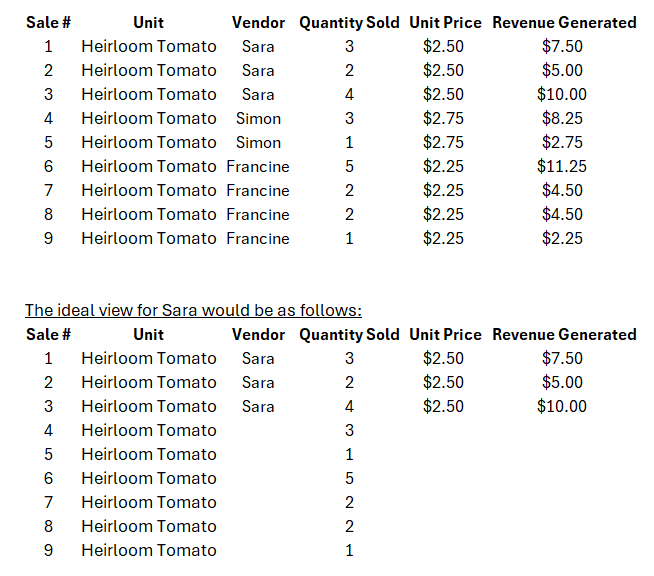
Current State Example: The group that runs the farmers market can see the revenue that each vendor generated. Each vendor should be able to see the quantity sold for all farmers market sales, but they're not entitled to see revenue or which vendors benefited from a particular sale, except their own. Each vendor is allowed to see their own quantity sold and the total sold quantity for any items they sale.
There needs to be a way to apply conditional PDP for individual intersection masking. Users should be allowed to add SQL statements that cross-reference row level governance. Sara can only see the value in the column Vendor, Unit Price, and Revenue Generated if a certain criteria is met within the row of the vendor column. Simply filtering out the rows doesn't work for Sara because she needs to see the total market possible at the farmers market to aid in her production decisions for the upcoming harvest.
 Jemiller
New Microlearning Video Resource Available
Introducing the Domo Video Library: Short Videos, Real Answers
We're excited to share something new with the Domo community: the Domo Video Library, a free microlearning video library built to help you get more out of Domo, faster. And we're letting Domo Community members in on it early.
What Is It?
The Video Library is a growing collection of short videos covering Domo features, workflows, and use cases. Content is contributed by Domo product managers, solution experts, and other Domo team members who know the platform inside and out. Videos are focused and to the point, generally under 10 minutes and often closer to 3, so you can find what you need and get back to work.
As a bonus, the Video Library was built as a Domo app using Domo tools. It is made available to you publicly through our Domo Everywhere tools.
How to Use It
Browse or search the library to find videos on topics relevant to you. Each video has a Share button that generates a direct link you can share with a teammate. No login required. Here's the link: https://embed.domo.com/cards/2W9VW
Visit the Domo Public Video Library
What's Coming
We'll be adding new videos on a regular basis, covering more features, use cases, and how-to content as the library grows. This is just the beginning.
Suggestions Welcome
You know better than anyone what you wish you had a quick video for. If there's a topic, feature, or workflow you'd love to see covered, post your suggestion right here in the comments. We'll use community feedback to help shape what gets added next.
We hope this microlearning library becomes a resource you leverage often.
 zcameron