Best Of
Change default background color for expanded card
This applies to App dashboards:
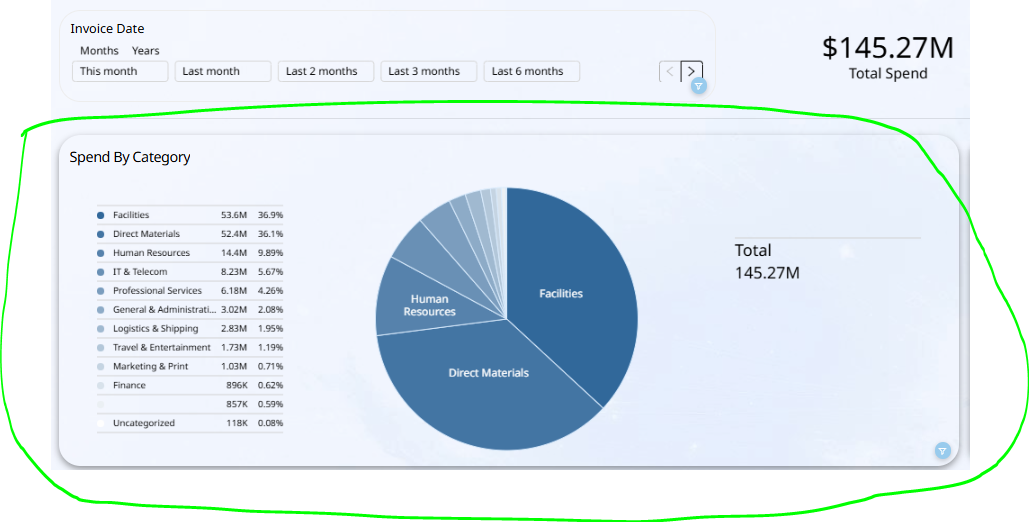
When the page has a picture fill and the card in the page has a transparent (0% opacity) fill, then the card default color when exanded is steel grey. This steel grey color interferes with other card elements, and I'd like this color to be changed to plain white when the card is expanded.
App page with transparent card on a page with background image:
Card in expanded mode:
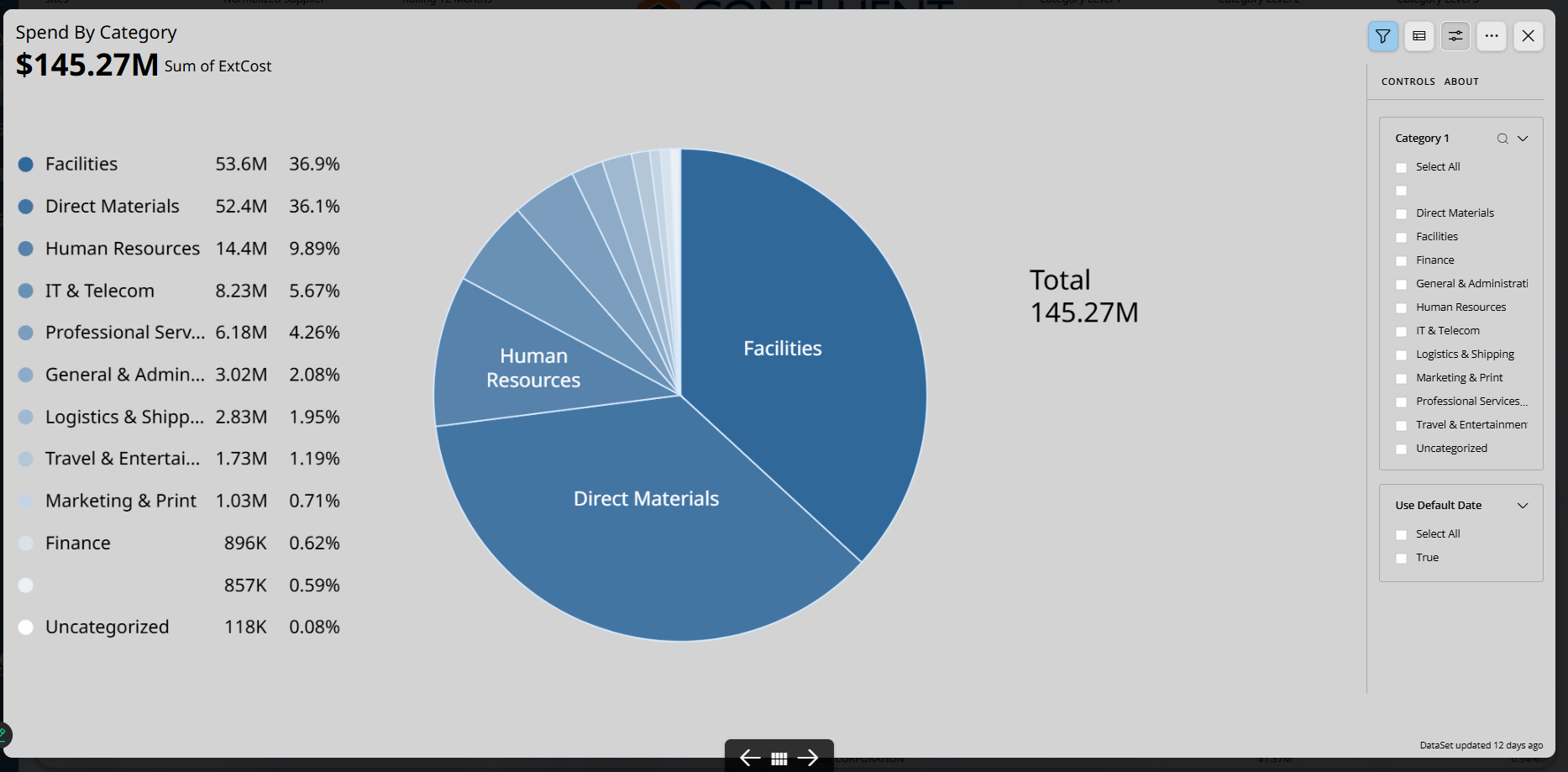
Desired fix is to change that steel grey color to white color when the page has image fill and the card is transparent.
 Jorli
Jorli
Analyser Default Templates
Could we have the option to create one or more default starting templates for Analyzer where we can pre-define options, chart type etc. for each new card creation which would be far more efficient.
 TC777
TC777
Run Dataset Input From Inside Magic ETL
There is often a situation where I am developing or troubleshooting a dataflow where I need to have the most updated version of a data input in order to continue my work in Magic ETL. The current process is to click on the dataset in Magic, go to the Details tab, click the link to open the dataset, click the options button, then Run Now. Then I have to navigate back to the flow, save my changes, refresh my browser, then edit the flow again.
Ideally, I would like to click on a data input tile, click on a Run Now button in the configuration tab, a "refresh" animation/notification would pop up, indicating that it was running and finished. Then continue my work without having to navigate away.
 smaiolo
Disassociate 'Card Name' with 'Dashboard Card Name'
I would like the ability to change the title of a card on a dashboard without it renaming the card everywhere in Domo.
Often when the card is on the dashboard it has additional context surrounding it to give it meaning and this allow the card title to use a more concise title such as 'Revenue'. The problem is that doing this currently changes the card name everywhere in Domo. Viewing the card anywhere outside of that dash it is no longer clear exactly what that card may represent.
Native Alerting and Email Actions Inside Magic ETL
Proposed Enhancement:
Add a new tile type or function in Magic ETL, for example:
1. Alert Tile
- Triggers when a specified condition is true (e.g., when a dataset contains rows, when a metric exceeds a threshold, etc.)
- Can optionally write an alert message to the activity log or push to Domo notifications.
2. Email Tile
- Sends an email to designated users or groups.
- Can use dynamic fields from the ETL (e.g., dataset name, counts, timestamps).
- Supports optional HTML/text templates.
3. Webhook Tile (optional)
- Allows Magic ETL to send a simple webhook payload to external systems (Slack, Microsoft Teams, PagerDuty, ServiceNow, etc.) without requiring a separate Domo Workflow.
Example Use Cases:
- Notify admins if any dataset has not updated within its expected frequency.
- Send automated data quality reports when a validation check fails.
- Alert analysts when a data feed stops due to expired Workbench credentials.
- Push summary status messages after ETL jobs complete successfully or with warnings.
Benefits:
- Reduces dependency on manual alert setup via Domo cards.
- Enables true end-to-end automation within ETL pipelines.
- Simplifies operational monitoring (no need for external scripts or workflows).
- Improves real-time awareness of data issues.
Example UI Concept:
A new Magic ETL tile named “Send Alert / Email” with configuration options such as:
- Trigger Condition: (Boolean expression or row count condition)
- Recipients: (User list, group, or dynamic field)
- Subject / Message Body: (Free text with variable substitution)
- Delivery Options: Email, Domo Notification, Webhook
Impact:
This feature would make Magic ETL a more complete data automation platform, aligning it with modern ETL tools that support in-flow alerting. It would also greatly reduce the operational overhead of maintaining separate monitoring dashboards and alerts.

Allow Inverse Scale Marker Ranges in Line Charts
Currently the “Range” scale markers available in line chart types allow users to choose a fill color for Y-axis values within a selected range. It would be helpful to choose upper and lower range colors as well. For example if a metric has an acceptible value range, I'd like to shade anything above the upper limit as red and below the lower limit as green to add context. The SPC chart type seems to have the closest functionality to this with the UCL and LCL lines, but they can't be manually set based on business rules instead of standard deviations.

View-only permission for datasets
I would like to request a new role permission option for datasets: a “view-only” access level that allows users to view and analyze dataset contents but does not allow editing, updating, or deleting the dataset.
Currently, users with dataset access can make changes that may unintentionally affect data integrity. Introducing a view-only role would allow:
- Safe access for users who need to consume and build reports from datasets without risking accidental modifications.
- Better governance and compliance with internal data policies.
- More flexibility in managing team permissions, especially for larger organizations.
This feature would greatly enhance dataset security while supporting user productivity. We would greatly appreciate your consideration of this enhancement.
Thank you for your time and support.
Importing/Updating List from Dataset into Variable
We have found many use cases for a way to update a variable by bringing in a distinct list from a dataset. We've created a work around to do this through Workflows but having this be an included feature of variables would be ideal.
Lindsay Gillespie
Analytics Practice Manager | Graphable | lindsay@graphable.ai
💡 Need expert help? Let’s connect! https://www.linkedin.com/in/lindsay-gillespie/
Say thanks by clicking 👍 on helpful posts