Best Of
Re: How to change colors of the chart based on timeframe
You can do this by creating beast modes for each of your series for current/future months and another for historical months. Since you have 3 bars, that would indicate you have 3 items in your series, so you would need to create 6 beast modes. Each would look like this:
Series A Historical Beast Mode
CASE WHEN seriesname = 'A' AND LAST_DAY(dt) < LAST_DAY(CURRENT_DATE()) THEN value END
Series A Current/Future Beast Mode
CASE WHEN seriesname = 'A' AND LAST_DAY(dt) >= LAST_DAY(CURRENT_DATE()) THEN value END
Series B Historical Beast Mode
CASE WHEN seriesname = 'B' AND LAST_DAY(dt) < LAST_DAY(CURRENT_DATE()) THEN value END
Series B Current/Future Beast Mode
CASE WHEN seriesname = 'B' AND LAST_DAY(dt) >= LAST_DAY(CURRENT_DATE()) THEN value END
Series C Historical Beast Mode
CASE WHEN seriesname = 'C' AND LAST_DAY(dt) < LAST_DAY(CURRENT_DATE()) THEN value END
Series C Current/Future Beast Mode
CASE WHEN seriesname = 'C' AND LAST_DAY(dt) >= LAST_DAY(CURRENT_DATE()) THEN value END
Drag all of these int your Series.
Now that they are all individual fields, you can use Color Rules to assign specific colors to each (i.e. Green and Light Green for the 2 Series A items, etc.)

Re: Magic ETL 2.0 - Remove Duplicates needs an "ADD ALL COLUMNS" option
Such a good callout. I am going to review this with the team. Like Jae said - it probably makes sense to have an "add all" for any tile where you can add columns one at a time.

Re: RANK() in pivot table issues
@Jones01 The rank is likely what's causing the issue here. Since beast mode is dynamic, it is having trouble ranking a dimension while simultaneously also defining that same dimension. Here are a couple options you could consider instead:
- Change your chart type to a bar chart, where you can use the native "Max Number of Bars" option in chart properties
- Calculate the rank in a dataflow using the Rank and Window tile, which you can then reference in your buckets. Note that this ranking will not respond to card filters

Min, Max and Average Calculations on Bar Graphs w/ Series
When I try to get min, max and average lines on bar graphs with a series (e.g.: single bar graph with colors for different categories), nothing seems to happen. The option is present in the properties list but never seems to respond.


Aggregating a column in Beast Mode
Is it possible to aggregate an entire column in a beast mode calculation within analyzer? (I have found videos explaining this within a SQL ETL, but not as a calculated field in analyzer).
For example: In the table below I want to divide the value in the "efficiency" column by the averge of all values in the column. Right now, the "aggregation" column is a calculated field with the formula =AVG('Efficiency'). It returns the value in the "Efficiency" column, so if I were to divide, I would always get "1." But I want each efficiency value divided by 57.14 - which is the average of all efficiency values.
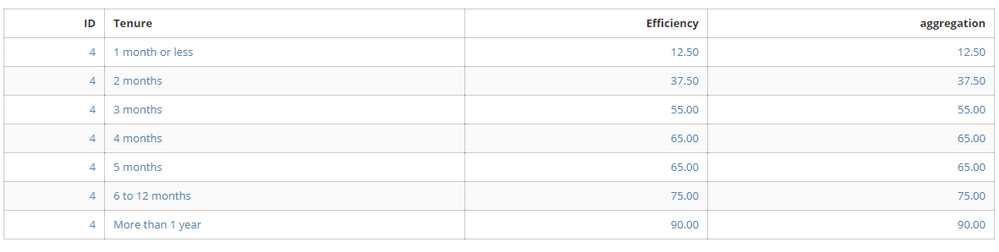
Is this possible with a Beast mode calculation, or do I need to edit the ETL? If I do need to edit the ETL, the card using this aggregation is the third frame of a drill path. Will the path be affected?
Thanks for the help!
 gbuckley
Dynamic PDP
What could be stopping data from showing after applying a dynamic PDP?
I created a dashboard that has about 5 ETL Datasets. I then created a user lincesed group of 27 people and all theses users I created an attribute called GROUPING and assign the locations they can only access or see that locations' data.
I then set a dynamic PDP on each of the 5 datasets using the GROUPING attribute which is based on a location ID. When I preview them in the PDP setting page, it seems to work perfectly.
But when I go to the dashboard where these datasets are feeding to, users aren't able to see data at all, not even data pertaining to their assigned locations.
Strangely, when I toggle users from PARTICIPANT category and assign them as ADMINS they are able to see data.
What could be going on here please?
Any ideas and direction would be greatly appreciated.
 carthur
Re: When I export an dashboard to pdf, the card description doesn't show in the pdf, how do I fix this?
I reached out to Domo support on this over a year ago, and they said that card descriptions were not supported in pdf/ppt exports. I submitted this product idea, if you want to up-vote it and/or comment on it.

Fix colour rules across multiple datasets?
Hi There,
Can we copy colour rules to a new data set instead of having to create a new set of rules? Generally, we use the same colour rules across various datasets, if these could be set to default against a similar field name it would be a HUGE benefit. For context, there are 3-6 repeated categories that require 3-5 different colours each. Additionally, we use custom colours for all and de-select the 'Apply format to table row' for all.

For example, when the field in a dataset is like 'RAG status' then default to 'RAG colours Rule'
Small help - if that is not possible is there a way to set a theme to change these default colours

and an option to default these checkboxes to be de-selected:

Help appreciated
NateBI
Re: A way to show the UTC timezone conversion in the timestamp?
To display a timestamp in Domo with both the converted time zone (PST) and the corresponding UTC offset, use Beast Mode to manipulate the timestamp field by adding or subtracting hours (based on your location). You can calculate the UTC offset for PST (UTC-8:00) and append it to the timestamp using CONCAT.

Re: Is there a way we can merge the columns in DOMO table card?
I don't believe merge is available on an html table. The following shows how you can do it on a blank brick.

