Best Of
Re: How to create a card that includes top 3 rows (based on top 3 values)?
Hi @svetlana
You could always use a Pie or Donut Chart. Just in the General Chart Properties enter 3 as the maximum slices:


You can even get more details on the "Other" category by just moving your mouse over that pie piece:


Re: How to create a card that includes top 3 rows (based on top 3 values)?
Using a table card per @GrantSmith you can do something like this:
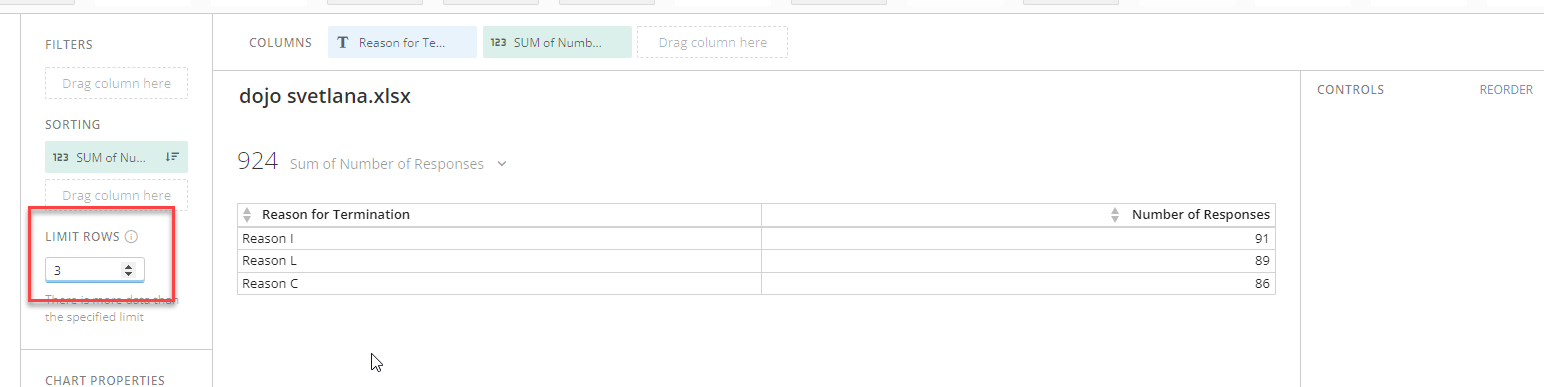
In this case, I added a Pareto to the drill path, but there is one extra step required in order to view all of the categories. You need to first drill into a single reason,

And then click on the "x" to remove the filter:

Conversely, you could just have the top three table card displayed above this pareto in a dashboard layout:

Re: Year = current year
Hi @RajNadar
It would help to understand what format `Booking Year Nbr` is in.
CASE
WHEN `Booking Year Nbr` = YEAR(CURDATE()) THEN 'CY'
WHEN `Booking Year Nbr` = YEAR(CURDATE())-1 THEN 'PY'
ELSE 'Other'
END
Re: Outgoing email address
Hi @Jones01 you can do both using an add-on called the Domo Campaigns App: https://domohelp.domo.com/hc/en-us/articles/360042933494-Domo-Campaigns-App

Re: Add Grant Access button to pages for Admins
Alternatively just allow admins to automatically load into the page without having to request access or have it added to the page list.


Re: Year = current year
Some minor tweaks to your beast mode:
CASE
WHEN YEAR(`Booking Year Nbr`)= YEAR(CURDATE()) THEN "CY"
ELSE "PY"
END
Re: Pivot Table showing correct grand totals but not all records
@dgsinclair are you sorting by anything? That will usually mess up totals.
 Ashleigh
Re: Automatically update the column value by current month and year in Magic ETL
Hi @nica_tc I don't believe there is a way to dynamically name columns in ETL, and having that many columns would likely be messy to manage anyway (one month's worth of data would result in 30 individual columns and you'd have to manually edit cards every time you want to add a day). I recommend keeping a separate date column and creating a pivot table card instead. The benefit of this is that it's also much easier to filter by timeframe and add dates.
Re: formula to include values that don't contain string
When you want to exclude something that contains a certain string, you need to use NOT LIKE. So your beast mode would look like this:
case when `EVENT_NAME` like '%Add-To-Cart%' and `EVENT_PARAMS_PAGE_LOCATION` not like '%/shop/%' then 'Add to Cart from XXX' end
