Best Of
Re: Timezones
You can use the CONVERT_TZ function to convert one timezone to another. You just pass in the field you're wanting to convert, the timezone the data is in and then the timezone you wish to convert to.
CONVERT_TZ(`Timestamp`, 'UTC', 'US/Central')

Re: help needed to create weekly cohorts
Make your cohort_id the start of the week for the sign_up_date.
Before you apply that to a large dataset, you might want to use a RANK_WINDOW function to find the
"first row when a user signed up" (row_number order by date asc partition by user)
or
"first row when a user signed up with this product_type"
Then filter to row_number = 1
Then apply your cohort_id formula tile.
Now you can JOIN that back to your master transaction table (consider using DatasetViews if the performance is good enough)

Re: Query in card building in DOMO.
@PRC your data is going to need to be restructured to get to the visual you are trying to achieve. You will need a single column (i.e. category) that holds the value of 'Completed', 'Engaged',or 'Transferred' and then use that column in your pivot table row.
Data structure:
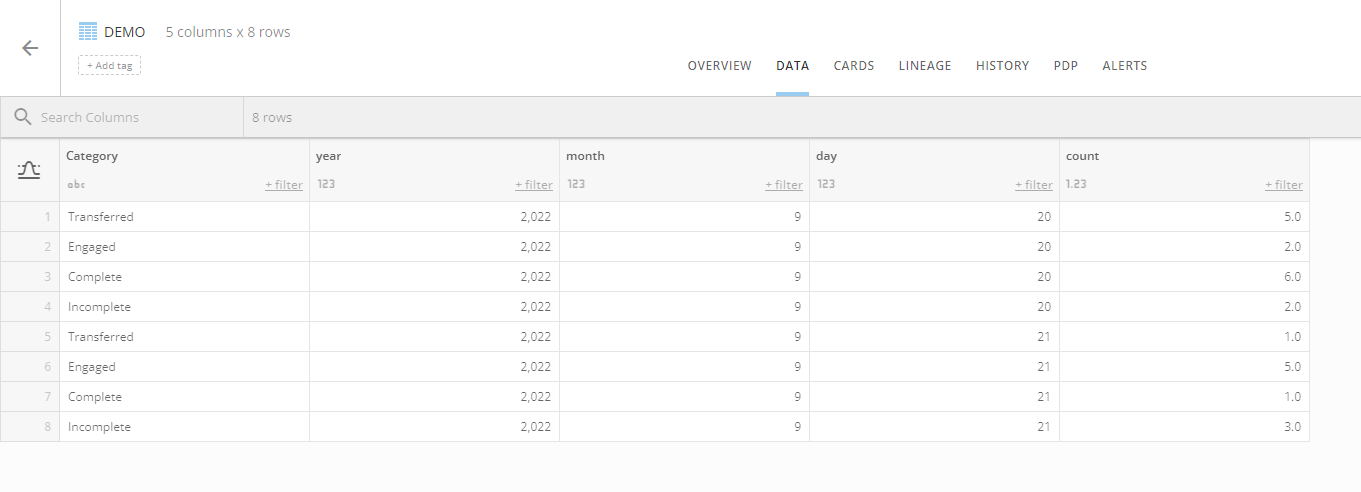
Card:

KB Article: https://domohelp.domo.com/hc/en-us/articles/360043429473-Pivot-Table
 mhouston
Re: Query in card building in DOMO.
@PRC you can't take something that you built (i assume) as a spreadsheet (not an actual pivot table) in excel and then expect a 1:1 match in Domo.
In order to have one row for each metric, you'd have to have a column that contains the different values "All, "avg. duration", "transferred", "engaged"... etc. with the appropriate rows of data for each section.
the first two rows would be "all data" the last 4 would be "only rows where the status = ..."
once you get that down the metrics columns should be easy. unless they are percent of total, in which case you can either use the FIXED function
https://domohelp.domo.com/hc/en-us/articles/4408174643607-Beast-Mode-FIXED-Functions
or a window function with a CASE statement referring to the All Rows
sum(sum(case when status = 'all' then <metric>)) over ()
Re: Division Question
You can use a beast mode and a case statement to conditionally Sun your values the following will give you the percentage of offline. Create another beast mode for ONLINE
  SUM( CASE WHEN `appt_source` = 'OFFLINE' THEN 1 END)
/SUM(1)
Re: Display Data based on User?
You’ll want to look into using PDP as you can define which rows are available to specific users without having the other data exposed to them.
https://domohelp.domo.com/hc/en-us/sections/360007334593-Personalized-Data-Permissions-PDP-
Re: Release Notes - What Changed
We love DOMO, and it would be SO helpful to have minor release notes when small things like this change! You may think that no one will read them, but trust me, THIS crowd will definitely read them!! I wish I could upvote this a million times.
 ellibot
Re: Request for Topics
- +1 on Account Management. I have spent a ton of time creating dashboards to audit my instance (more advanced than just DomoStats). In order to monitor what is coming in, going out, and managing users (especially across multiple instances). Learning how/why to create custom roles would also be a good part of that.
- +1 on Domo Everywhere content. Best practices for creating published jobs would be good. Especially since each job creates a new federated dataset. I made a mess when I started and now I have to clean it up 🙃
- How to utilize new features once they come out, I always struggle creating content for my users regarding new features so then we just don't end up using them for a while. Having some concrete examples would be useful (ex. I never got to using Segments and I still couldn't tell you how to use them).
- Best practices for instance health. I have so many users creating so many flows and rows of data that could be much more optimized. Going over Magic ETL best practices for a clean instance and quicker run time would be useful.
- Creating alerts to manage data. This is one I learned to do myself by doing error checking in flows to create error datasets, making error checking cards, and more recently just putting alerts on a dataset. Knowing your data is wrong before it has time to make it to the end user is very useful.
 Ashleigh
Re: Request for Topics
- Account Management best practices, any tooling to manage accounts.
- How to manage POCs, DEV, and Prod pipelines in Domo.
Re: Request for Topics
- How to optimize data pipelines in Domo (DSV, Magic 2.0, Upsert connectors, etc.)
- Dashboard design best practices (What makes a dashboard stand out? How do you tailor your dashboard to the intended audience?)
- More Domo Everywhere content!! This feels like a black box at times, as I haven't seen very many public-facing training videos on the topic.
Thanks Professor!! Love the new video!
ellibot