Best Of
Re: Why Is the Pivot Tile not Working as I Expected
There isn't, but you could reduce the available data on the pivot table card using filters or pre-aggregate the data in an ETL.

Re: Can I sum 2columns one being Aggregation SUM and other (No Aggregation) fixed number?
I'm not 100% I understand what you're saying, so I'm going to say what I think you're saying, and then you can correct me if I missed something. (GrantSmith's suggestion is a good one, and likely to lead to a faster/better answer.)
I think your data looks something like this:

And then you have BeastModes like this:

and:

In a table card, you put a "Sum" on the Aggregation beastmode and "No aggregation" on the Expenses. You added a total row and transposed and got something like this:

The Aggregation column (transposed to a row) gives you what you expect, but the Expenses does not. That's because, even though you told it not to aggregate, when you added a Total row, you contradicted yourself and you told it to aggregate after all. Not knowing which function you wanted, it defaulted to a SUM, so instead of counting the "-2294.62" expense once for "the Offspring", it counted it for every row where "the Offspring" appeared.
To fix this, you need to tell your BeastMode for Expenses how you want to aggregate the column. ColemanWilson was correct that you'll want to use a FIXED function. Based on what I assume about your data, it would probably look like this:
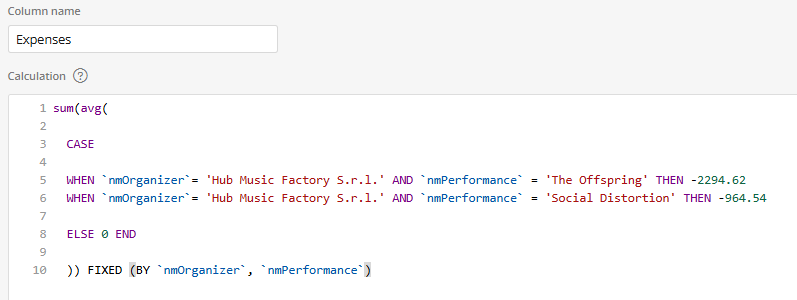
You average it by nmOrganizer & nmPerfomance, which has the effect of using one value for all the rows where the organizer and performance are the same (instead of repeated values), and then sums across those averages.

Re: Can a map chart have bubbles?
Find a table with the lat/long of the provinces and join it to your table of values so you can use the lat/long map. There aren't that many provinces, so if you don't want to bother with a join, it wouldn't be that hard to do it in a BeastMode for lat and Beastmode for long. Something like:
— Latitute
Case
when Province = 'Saskatchewan' then 55
when Province = 'Prince Edward Island' then 46.25
…
END
I haven't checked these, but this came up in a quick Google search:
Re: New User - Help with Filling Forward Previous Incident Date
Hello @CRBrown,
Providing a sample of your data would be helpful. Based on my understanding of your request, you can use the 'Group' tile to find the MAX('Citation Date') for each location and then join it back to the main dataset.
For the second question, the following Beast Mode formula should meet your needs.
DATEDIFF(CURRENT_DATE(), MAX(CITATION_DATE))

Is there any chance to disable filter view on drill down chart?
I was able to disable filter view on a primary card but global dashboard cards are showing once chart drill down.

Any posibility to disable this view?

Re: Filter Month based on Last working Day
Not to be outdone by John 😁, I created a video that walks you through how to do what I explained.

Re: Apply a % Model based on an identifying field
This might be the most in depth and detailed response I've ever received to a challenge before! Thank you so much.. When I am back on this project, I will be implementing this solution!
Re: Bullet chart color rule
@ArborRose Yeah, with arrows like that, you could also make your target 100% transparent and just use the data label as the target (centered data-label from tool-tip, symbols-only data-label):

Case
when Price* Quantity >= Budget then '🔹'
when Price* Quantity < Budget then '🔻'
END
Re: Sentiment Analysis on Facebook Comments
I don't see any reason why you couldn't. You could use the Python tiles to create a custom model or leverage built-in libraries. Use Domo's social media connectors to pull comments or posts to Domo or call with API. Or consider using Domo's Jupyter Notebooks (Python).
Something like this
from vaderSentiment.vaderSentiment import SentimentIntensityAnalyzer

import pandas as pd


# Load the dataset

df = pd.DataFrame(input_data)


# Initialize VADER

analyzer = SentimentIntensityAnalyzer()


# Analyze sentiment

def analyze_sentiment(comment):

    scores = analyzer.polarity_scores(comment)

    return scores['compound']


# Apply sentiment analysis to comments

df['sentiment_score'] = df['comment'].apply(analyze_sentiment)


# Label sentiment as Positive, Neutral, or Negative

def label_sentiment(score):

    if score > 0.05:

        return 'Positive'

    elif score < -0.05:

        return 'Negative'

    else:

        return 'Neutral'


df['sentiment_label'] = df['sentiment_score'].apply(label_sentiment)


output_data = df

Re: Bullet chart color rule
@DavidChurchman - I really like this trick. How about maybe point up or down based on budget?
- Up arrow: ↑ (Unicode:
U+2191)
- Down arrow: ↓ (Unicode:
U+2193)
- Up-pointing triangle: ▲ (Unicode:
U+25B2)
- Down-pointing triangle: ▼ (Unicode:
U+25BC)