Best Of
Re: Any ideas for a Pro-code Brick that would allow PDF downloads for embedded apps?
Similar questions like yours have been asked previously in the forum. The base problem appears to be capturing the state of filters.
We can manually export via the UI, but there's no export to pdf action available. And Domo does not expose the API endpoint as far as I know.
A possibility may exist if you try to create a brick that can snapshot the screen. But I think the best you would get is the ability to capture what you create on the brick's canvas, not the native Domo dashboard or cards themselves. For example, I created a brick that maps locations and hurricane movement. I could add something to grab that canvas and export it.
Capturing a brick might be done using html2canvas or dom-to-image libraries to get a png or jpg. You could then try to hand it off to a pdf library.

Re: Ever wished you had more space in the formula editor?
"that massive CASE statement should probably really be a join to a lookup table. "
I hope to you see at Domo Connections - Dallas.
In my situation, I use a CASE statement to standardize insurance company names. Since users can enter these names in thousands of different ways, my CASE logic reclassifies them. With just a single ILIKE condition, I can often capture a wide range of variations. It’s surprising how many different entries exist just for BCBS (Blue Cross Blue Shield) and its related companies.
BCBS is only one entity. Now multiply that need by hundreds of entities.

Ever wished you had more space in the formula editor?
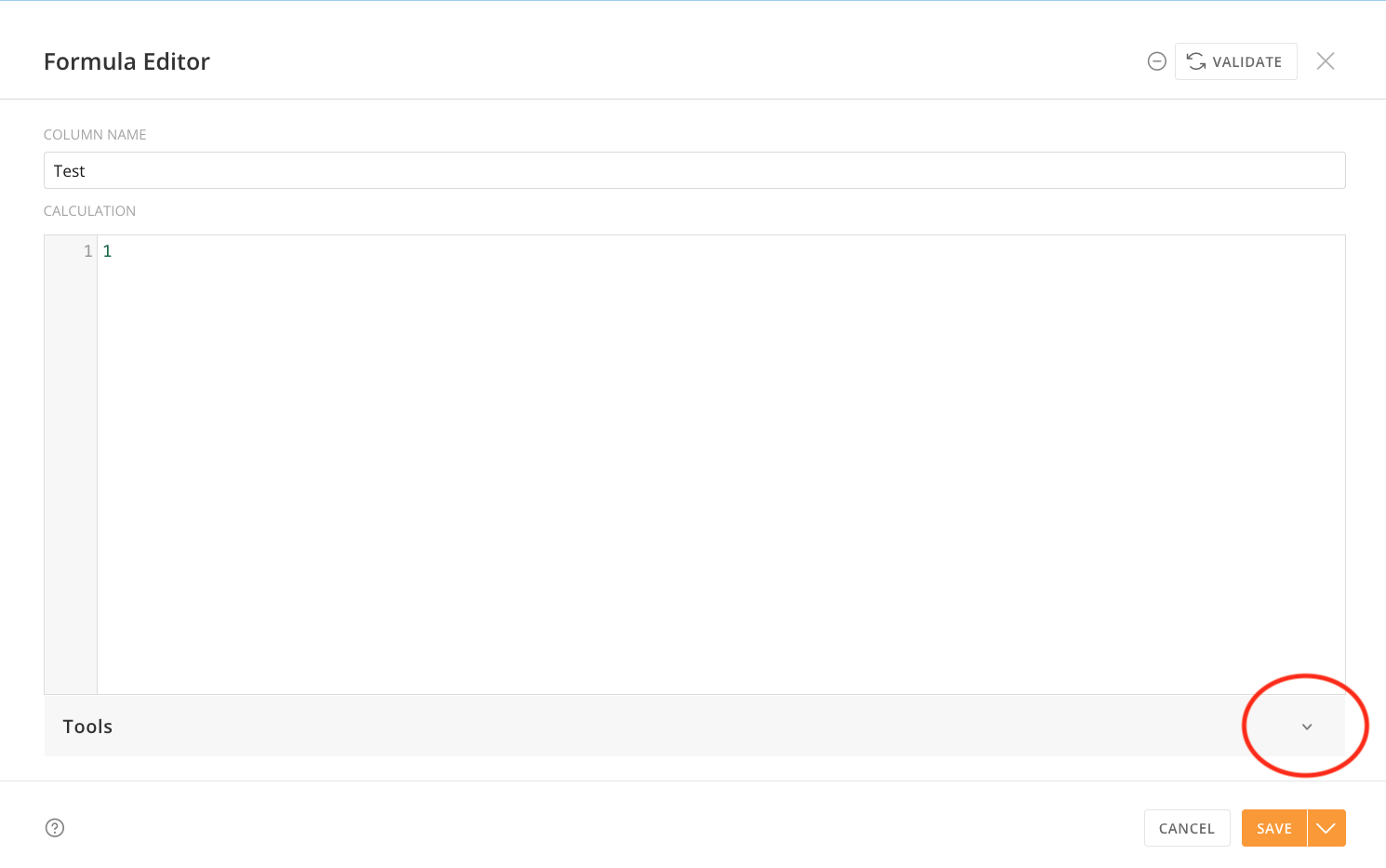
The days of trying to construct a long and complicated formula in an itty bitty little formula editor are over - you asked and we heard you: we've now added the ability to collapse the Tools section of the expanded formula editor in Magic ETL. This went live in your Domo instance yesterday. Just open the expanded formula editor in one of the tiles where you write formulas (Add Formula, Join Data, Filter Rows, or Group By) and click the caret on the Tools bar to collapse all of that documentation and noise. Click the caret again to bring it back when you need it for reference.
My team and I love being able to slip in these little quality of life updates, amid our bigger feature efforts. We hope this makes the process of writing that formula more pleasant and improves your life just a little bit.
(…although I hate to tell you this, but that massive CASE statement should probably really be a join to a lookup table. #justsaying)
— Your Friendly Neighborhood Magic ETL Product Manager 🙌

Re: Is it possible to create case when for ALL?
The easiest thing would be to use a Slicer filter instead of a Radio filter, which gives options to select multiple or select all. But, a more literal answer to your original request is using a variable:
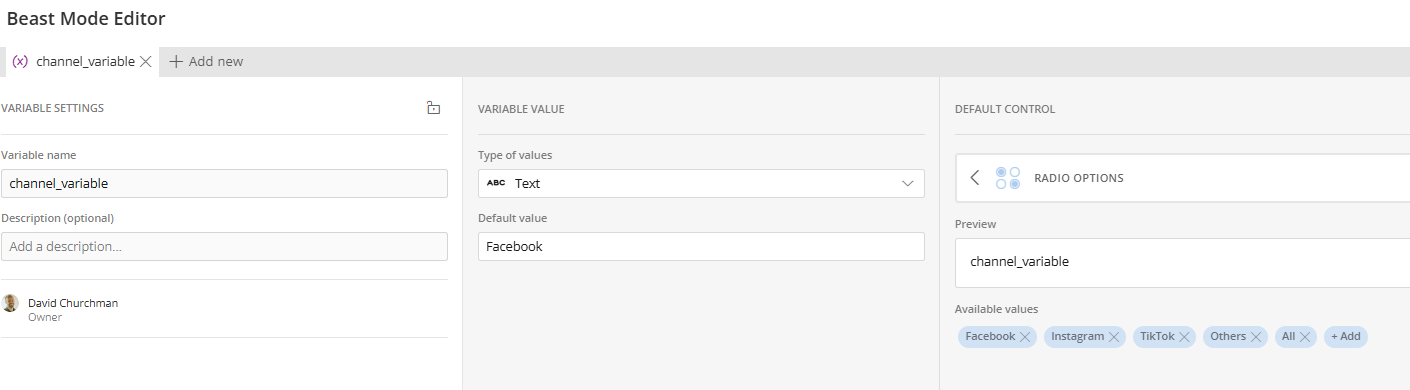
- Create a variable (let's call it
channel_variable, with the possible values of 'Facebook', 'Instagram', 'TikTok', 'Others', 'All'
- Create a BeastMode (let's call it
channel_filter) using that variable. I haven't tested this, but I think this would work:
CASE
WHEN channel_variable = 'Facebook' AND channel_id = 1 then 'Include'
WHEN channel_variable = 'Instagram' AND channel_id = 2 then 'Include'
WHEN channel_variable = 'TikTok' AND channel_id = 3 then 'Include'
WHEN channel_variable = 'Others' AND channel_id in (1,2,3) then 'Include'
WHEN channel_variable = 'All' AND channel_id in (1, 2, 3, 4, 5) then 'Include'
ELSE 'Exclude'
END
3. Create a filter on the car using the channel_filter BeastMode, filtering for 'Include'
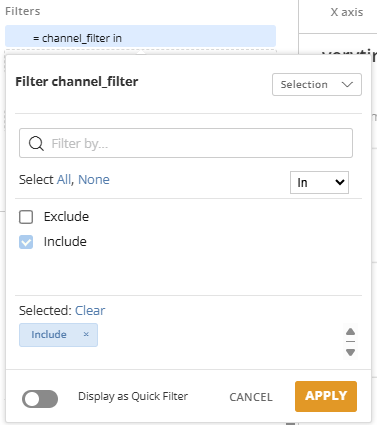
4. Add the channel_variable as a control to your page.

Re: Is there a way to have a workbench job run & the results placed (in excel) in a folder on our Shared
You can look into using the SharePoint Writeback Connector to push a Domo dataset to a sharepoint directory. Here's the KB article to look into how to set it up.

Re: Is there a way to have a workbench job run & the results placed (in excel) in a folder on our Shared
@Roman_K you could also use schedule report with an email attachment and then set up a power automate job to grab that attachment and place it into a SP folder.
 Ashleigh
Re: Trigger a workbench job from a sql script
I don't think they have the documentation available anymore but if you run
wb.exe --help
from the command line it'll tell you the different commands it can run for you with documentation for parameters.

Re: Pivot Data
I like your solution. I think what I would have done (not necessarily better), is filter two datasets, one for Products one for Sales, find row number for both, and join on row number. P
Re: Is there a way to bulk-swap values in Pivot table cards?
In Domo, there isn’t a direct out-of-the-box bulk edit feature to replace a specific value or column used in multiple existing cards across different datasets or views all at once. However, here are some practical approaches you can consider:
1. Use a Data Pipeline or ETL Approach
If possible, modify the underlying datasets or views so that the “Old Revenue” column is replaced or aliased by “New Revenue” at the data preparation layer (for example, in Magic ETL or a SQL transform). With this approach, the cards referencing “Old Revenue” will automatically reflect the updated values without needing to update each card individually, as long as the column name remains the same.
2. Duplicate and Update Datasets with Column Aliasing
You can create a new dataset or view that renames “New Revenue” to “Old Revenue” (matching the column name expected by the cards). Then, you can switch the cards to use the new dataset. This method reduces card-level changes, though it does require managing the new dataset.
3. Card-by-Card Update
If modifying the datasets isn’t feasible (e.g., due to dataset structure or dependencies), you would need to manually update each pivot table card to replace “Old Revenue” with “New Revenue.” To speed up this process, you could group cards by dataset and open multiple cards in different browser tabs for editing.
4. Use the Domo API for Automation (Advanced)
If you have access to development resources, Domo’s REST API allows you to automate card updates programmatically. This would involve:
1. Listing all pivot table cards,
2. Retrieving each card’s configuration,
3. Updating the JSON configuration to replace “Old Revenue” with “New Revenue,” and
4. Pushing the updated configuration back to Domo.
This is the only true bulk update method, but it requires programming knowledge and careful testing.
Summary:
-There is no built-in bulk replace for card fields.
-Updating at the data prep level is the most efficient non-API solution.
-Otherwise, manual edits or API-based automation are needed.

Re: Descriptions in PPT and PDF Outputs
I'm shocked that this is a thing. My customer spent a bunch of time creating cards for her board meeting, including descriptions on each that are needed to understand what's included in the report. Now she has to go either manually update every card or add text to every one in her powerpoint. She is NOT happy.