Best Of
August Community Recap 📚
August was an exciting time in the Community, lots happening. Read up on the major highlights and and monthly stats below.
August Domo Drop release 📡
The highlight of August was the many product enhancements! ICYMI, find all Product release summaries HERE. And the official release notes HERE. Also, this Formula editor updates post from Andrea Henderson (Magic ETL product manager) got lots of love.
Digital Chatter Challenge
The Digital Chatter Challenge was a huge hit! Many of you sparked conversations beyond our Community Forums. Winners and prizes will be announced here by EOW. Stay tuned!
Most Active Discussions in August
These conversations sparked the most engagement—be sure to check them out and chime in with a reaction or comment:
@Ankur, @verytiredgirl, and @USWJA great questions. They've resonated with other community members too. Thank you @ArborRose, @DavidChurchman, and @pauljames,for your answers! rest of the community too. 50+ views on all of these posts.
**FYI – with the recent updates to the Forums, questions automatically filter out all responses to only display the accepted answers. To see the entire conversation, tab over to the "All replies."
Leaderboard Top 3
@ArborRose in 1st place again! Welcome back to the top @GrantSmith and @MichelleH. Thank you for being stellar Coaches. A gift card from Domo will be in your inbox soon.
- @ArborRose, 303 points
- @GrantSmith, 108 points
- @MichelleH, 72 points
Top Idea
This idea from @zacpolin has gotten some great traction. Give it an upvote if you agree, or add additional insight with a comment.
Enable AI chat only on specific dashboards/apps
August Community Member of the Month
@MichelleH has been a Community Coach for a few years now. She's consistently helpful and active, but really showed up this month and answered several questions. It's also worth mentioning, Michelle has 9k reputation points! That's nearly 10x Coach rank. Thank you for being one of Domo's best!

Help me thank and congratulate @MichelleH in the comments below.

Re: Ending a workflow when in parallel logic
Thanks Dan.
I've tested that option and it works as per my requirements, so that's another problem solved!

Re: Is it possible to create case when for ALL?
I believe what @pauljames is saying is that in beast mode each row only evaluates to one value. You can't return "Facebook" and "All" for the same row. Using the formula provided, if the user selects nothing, that effectively means "All".

Re: Jira Cloud Connector - How to Load Data Using the "Issue Query" Report
Just confirmed they are working for me as well! Thank you for letting me know!

Re: Any ideas for a Pro-code Brick that would allow PDF downloads for embedded apps?
Similar questions like yours have been asked previously in the forum. The base problem appears to be capturing the state of filters.
We can manually export via the UI, but there's no export to pdf action available. And Domo does not expose the API endpoint as far as I know.
A possibility may exist if you try to create a brick that can snapshot the screen. But I think the best you would get is the ability to capture what you create on the brick's canvas, not the native Domo dashboard or cards themselves. For example, I created a brick that maps locations and hurricane movement. I could add something to grab that canvas and export it.
Capturing a brick might be done using html2canvas or dom-to-image libraries to get a png or jpg. You could then try to hand it off to a pdf library.
Re: Ever wished you had more space in the formula editor?
"that massive CASE statement should probably really be a join to a lookup table. "
I hope to you see at Domo Connections - Dallas.
In my situation, I use a CASE statement to standardize insurance company names. Since users can enter these names in thousands of different ways, my CASE logic reclassifies them. With just a single ILIKE condition, I can often capture a wide range of variations. It’s surprising how many different entries exist just for BCBS (Blue Cross Blue Shield) and its related companies.
BCBS is only one entity. Now multiply that need by hundreds of entities.

Ever wished you had more space in the formula editor?
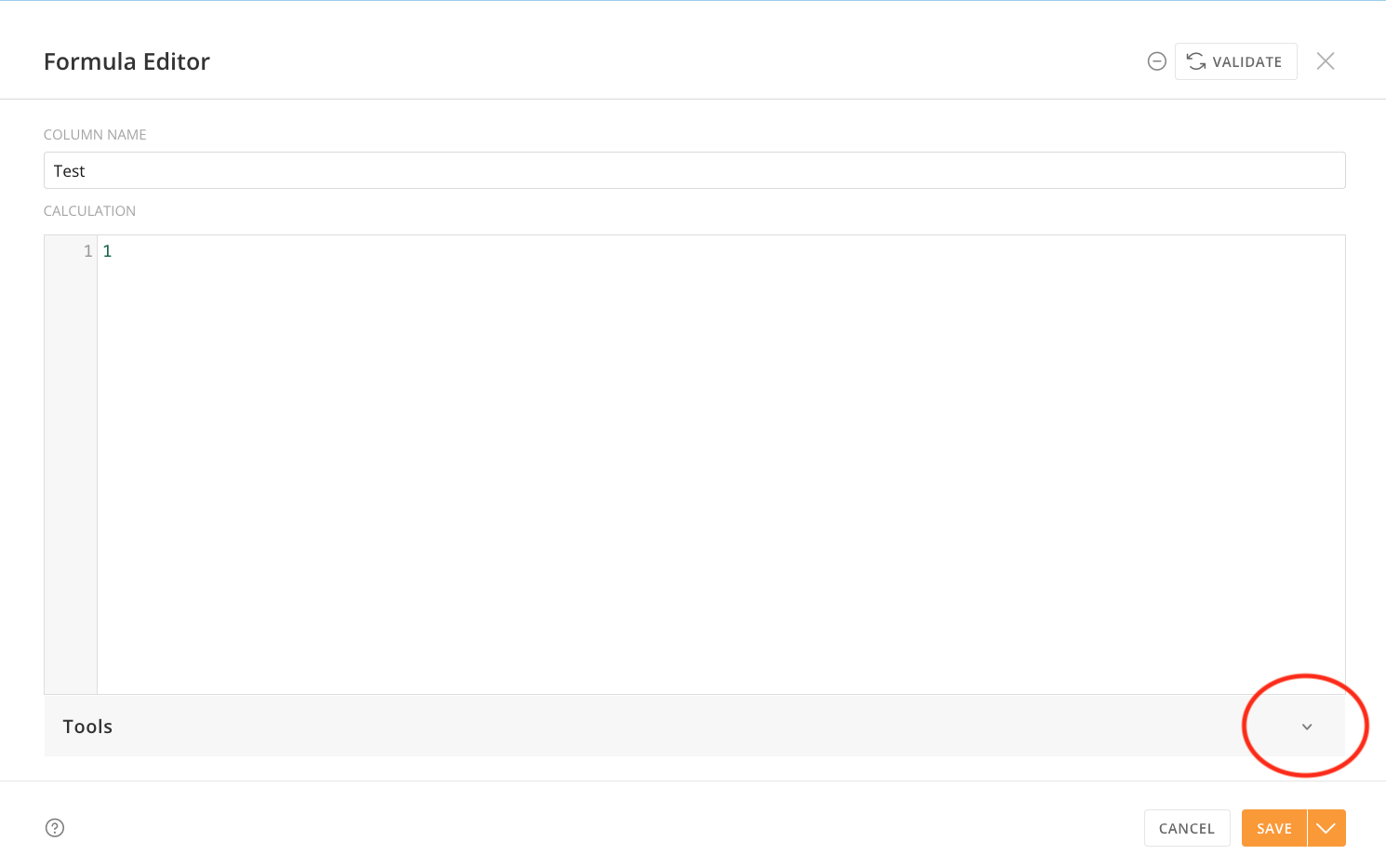
The days of trying to construct a long and complicated formula in an itty bitty little formula editor are over - you asked and we heard you: we've now added the ability to collapse the Tools section of the expanded formula editor in Magic ETL. This went live in your Domo instance yesterday. Just open the expanded formula editor in one of the tiles where you write formulas (Add Formula, Join Data, Filter Rows, or Group By) and click the caret on the Tools bar to collapse all of that documentation and noise. Click the caret again to bring it back when you need it for reference.
My team and I love being able to slip in these little quality of life updates, amid our bigger feature efforts. We hope this makes the process of writing that formula more pleasant and improves your life just a little bit.
(…although I hate to tell you this, but that massive CASE statement should probably really be a join to a lookup table. #justsaying)
— Your Friendly Neighborhood Magic ETL Product Manager 🙌

Re: Is it possible to create case when for ALL?
The easiest thing would be to use a Slicer filter instead of a Radio filter, which gives options to select multiple or select all. But, a more literal answer to your original request is using a variable:
- Create a variable (let's call it
channel_variable, with the possible values of 'Facebook', 'Instagram', 'TikTok', 'Others', 'All'
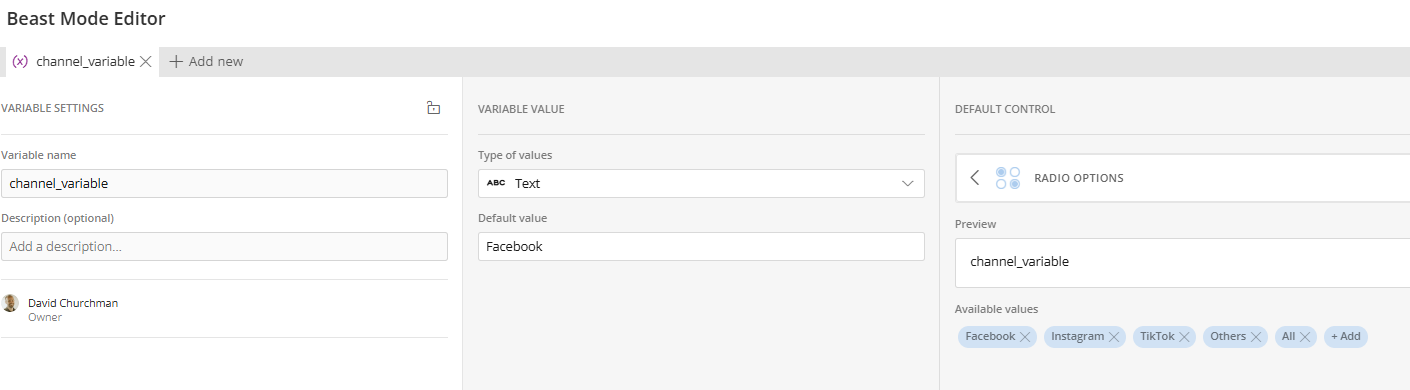
- Create a BeastMode (let's call it
channel_filter) using that variable. I haven't tested this, but I think this would work:
CASE
WHEN channel_variable = 'Facebook' AND channel_id = 1 then 'Include'
WHEN channel_variable = 'Instagram' AND channel_id = 2 then 'Include'
WHEN channel_variable = 'TikTok' AND channel_id = 3 then 'Include'
WHEN channel_variable = 'Others' AND channel_id in (1,2,3) then 'Include'
WHEN channel_variable = 'All' AND channel_id in (1, 2, 3, 4, 5) then 'Include'
ELSE 'Exclude'
END
3. Create a filter on the car using the channel_filter BeastMode, filtering for 'Include'
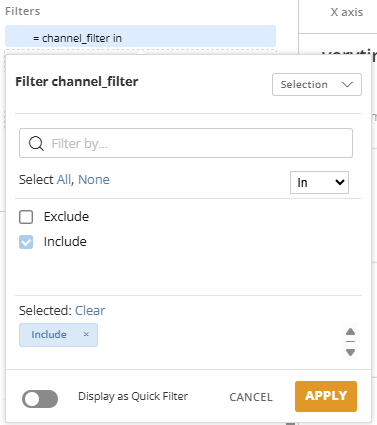
4. Add the channel_variable as a control to your page.

Re: Is there a way to have a workbench job run & the results placed (in excel) in a folder on our Shared
You can look into using the SharePoint Writeback Connector to push a Domo dataset to a sharepoint directory. Here's the KB article to look into how to set it up.

Re: Is there a way to have a workbench job run & the results placed (in excel) in a folder on our Shared
@Roman_K you could also use schedule report with an email attachment and then set up a power automate job to grab that attachment and place it into a SP folder.
 Ashleigh