Best Of
Re: Calculating Time Difference
You can create a beast mode formula to convert month wording or abbreviations into datetime, or into month numbers.
When I create ETLs, I typically have a value for numeric month such as month(`transaction_date`) and the alphabetic monthname such as monthname(`transaction_date1). I use the wording for display and the numeric form for sorting.
For what you describe, you would need something like
CASE

  WHEN `MonthAbbrev` = 'Jan' THEN 1

  WHEN `MonthAbbrev` = 'Feb' THEN 2

  WHEN `MonthAbbrev` = 'Mar' THEN 3

  WHEN `MonthAbbrev` = 'Apr' THEN 4

  WHEN `MonthAbbrev` = 'May' THEN 5

  WHEN `MonthAbbrev` = 'Jun' THEN 6

  WHEN `MonthAbbrev` = 'Jul' THEN 7

  WHEN `MonthAbbrev` = 'Aug' THEN 8

  WHEN `MonthAbbrev` = 'Sep' THEN 9

  WHEN `MonthAbbrev` = 'Oct' THEN 10

  WHEN `MonthAbbrev` = 'Nov' THEN 11

  WHEN `MonthAbbrev` = 'Dec' THEN 12

  ELSE NULL

END
I believe there may also be a string to date formula like
STR_TO_DATE(`DateText`, '%b %d, %Y')

Re: Calculating Time Difference
UNIX_TIMESTAMP() in Domo converts a date-and-time value (like "2024-11-04 15:26:00") into the number of seconds since January 1, 1970 00:00 UTC — a continuous numeric timestamp.
We use it because Domo can’t directly subtract two datetime fields and get a difference in seconds. By turning both Created Time and Responded Time into numbers (seconds), we can simply subtract one from the other to find how many seconds apart they are. After that, we convert those seconds into hours, minutes, and seconds for display.
It's a start anyway.
You have to work more on dealing with the values over the weekend. There you'd have partials that I didn't really solve. Full disclosure, I initially thought this was no big deal. Until I started thinking though it.
Re: Calculating Time Difference
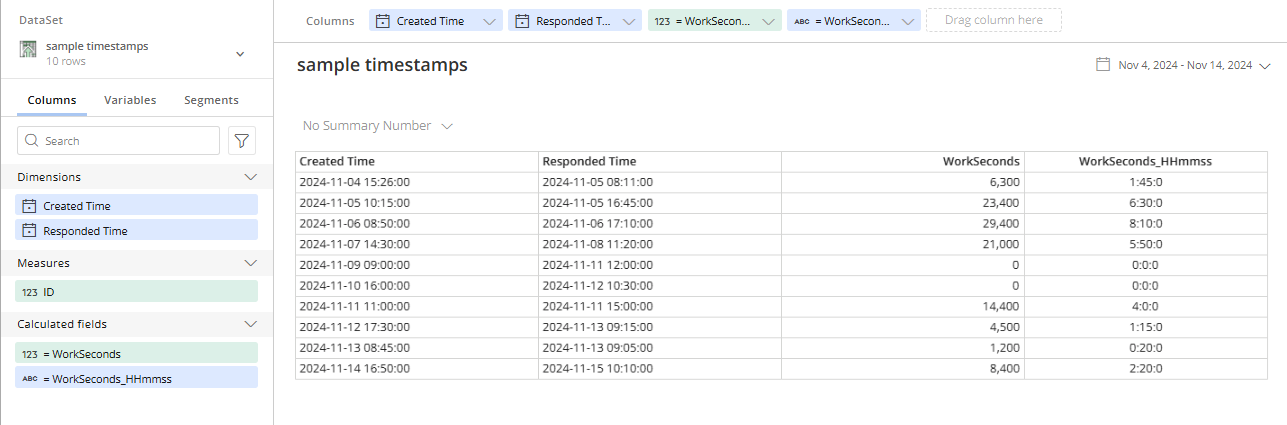
Here's what I came up with. Starting with sample data.
ID | Created Time | Responded Time |
|---|---|---|
1 | 2024-11-04 15:26:00 | 2024-11-05 08:11:00 |
2 | 2024-11-05 10:15:00 | 2024-11-05 16:45:00 |
3 | 2024-11-06 08:50:00 | 2024-11-06 17:10:00 |
4 | 2024-11-07 14:30:00 | 2024-11-08 11:20:00 |
5 | 2024-11-09 09:00:00 | 2024-11-11 12:00:00 |
6 | 2024-11-10 16:00:00 | 2024-11-12 10:30:00 |
7 | 2024-11-11 11:00:00 | 2024-11-11 15:00:00 |
8 | 2024-11-12 17:30:00 | 2024-11-13 09:15:00 |
9 | 2024-11-13 08:45:00 | 2024-11-13 09:05:00 |
10 | 2024-11-14 16:50:00 | 2024-11-15 10:10:00 |
If I interpret working hours to be hours from 8am to 5pm, then everything else is non-working hours. And I only want to calculate with working hours.
So using my sample values and the first record, ID 1:
From 3:26pm to 5:00pm would be 94 minutes. So we should have 94 minutes on Nov 4. Then another 11 minutes from 8:00am to 8:11am on Nov 5. Or 105 minutes. Subtract 60 for the hour with 45 minutes remainder the answer would be 1h:45m.
WorkSeconds :
CASE

  -- if either timestamp is on weekend (Sunday=1, Saturday=7), return 0

  WHEN DAYOFWEEK(`Created Time`) IN (1,7) OR DAYOFWEEK(`Responded Time`) IN (1,7) THEN 0


  -- same calendar day

  WHEN DATE(`Created Time`) = DATE(`Responded Time`) THEN

    CASE

      -- compute clipped start ts (8:00) or created time

      WHEN

        (CASE WHEN `Created Time` < CONCAT(DATE(`Created Time`),' 08:00:00')

              THEN UNIX_TIMESTAMP(CONCAT(DATE(`Created Time`),' 08:00:00'))

              ELSE UNIX_TIMESTAMP(`Created Time`)

         END)

        >=

        (CASE WHEN `Responded Time` > CONCAT(DATE(`Created Time`),' 17:00:00')

              THEN UNIX_TIMESTAMP(CONCAT(DATE(`Created Time`),' 17:00:00'))

              ELSE UNIX_TIMESTAMP(`Responded Time`)

         END)

      THEN 0

      ELSE

        (CASE WHEN `Responded Time` > CONCAT(DATE(`Created Time`),' 17:00:00')

              THEN UNIX_TIMESTAMP(CONCAT(DATE(`Created Time`),' 17:00:00'))

              ELSE UNIX_TIMESTAMP(`Responded Time`)

         END)

        -

        (CASE WHEN `Created Time` < CONCAT(DATE(`Created Time`),' 08:00:00')

              THEN UNIX_TIMESTAMP(CONCAT(DATE(`Created Time`),' 08:00:00'))

              ELSE UNIX_TIMESTAMP(`Created Time`)

         END)

    END


  -- different calendar days (only handles first day remainder + last day morning)

  ELSE

    -- seconds remaining on the Created date from clipped created→17:00

    (CASE

       WHEN UNIX_TIMESTAMP(CONCAT(DATE(`Created Time`),' 17:00:00'))

            <=

            (CASE WHEN `Created Time` < CONCAT(DATE(`Created Time`),' 08:00:00')

                  THEN UNIX_TIMESTAMP(CONCAT(DATE(`Created Time`),' 08:00:00'))

                  ELSE UNIX_TIMESTAMP(`Created Time`)

             END)

       THEN 0

       ELSE UNIX_TIMESTAMP(CONCAT(DATE(`Created Time`),' 17:00:00'))

            -

            (CASE WHEN `Created Time` < CONCAT(DATE(`Created Time`),' 08:00:00')

                  THEN UNIX_TIMESTAMP(CONCAT(DATE(`Created Time`),' 08:00:00'))

                  ELSE UNIX_TIMESTAMP(`Created Time`)

             END)

     END)

    +

    -- seconds on the Responded date from 08:00→clipped responded

    (CASE

       WHEN (CASE WHEN `Responded Time` > CONCAT(DATE(`Responded Time`),' 17:00:00')

                  THEN UNIX_TIMESTAMP(CONCAT(DATE(`Responded Time`),' 17:00:00'))

                  ELSE UNIX_TIMESTAMP(`Responded Time`)

             END)

            <= UNIX_TIMESTAMP(CONCAT(DATE(`Responded Time`),' 08:00:00'))

       THEN 0

       ELSE (CASE WHEN `Responded Time` > CONCAT(DATE(`Responded Time`),' 17:00:00')

                  THEN UNIX_TIMESTAMP(CONCAT(DATE(`Responded Time`),' 17:00:00'))

                  ELSE UNIX_TIMESTAMP(`Responded Time`)

             END)

            - UNIX_TIMESTAMP(CONCAT(DATE(`Responded Time`),' 08:00:00'))

     END)

END
WorkSeconds_HHmmss :
CONCAT(

  FLOOR(`WorkSeconds` / 3600), ':',

  FLOOR(MOD(`WorkSeconds`, 3600) / 60), ':',

  MOD(`WorkSeconds`, 60)

)
Re: Any way to view schedule for dataflows?
@nathankilcrease @ArborRose you guys beat me to it!!
@jetymas I love using the JSON no code connector for stuff like this. I created a short tutorial on how to get dataflow schedules with it:
 ellibot
Re: Wistia Connector
You can probably get data from that API with the existing JSON No Code connector. I've connected similar APIs that use Bearer Token authentication using it.
 rolyat
Re: 💎 Domopalooza 2026 — Registration LIVE!
Registered! ✅ Looking forward to seeing everyone from the Domo Community!

Re: Type of refreshes in Domo ETL
@rahulrampa you can use the JSON no code connector to get the specific schedule for dataflows using this endpoint: https://{instance}.domo.com/api/dataprocessing/v1/dataflows
ellibot
Re: Lock Out Dates in AppStudio Forms
Not with the Form element in App Studio. You could submit that as an idea in the
You could also accomplish this using Pro Code Editor:
Or you could just put in the description of your form to only select non-holiday weekdays. In the back end you could check that the date submitted was a valid date and then notify the form submitter via a workflow that they entered an invalid date and to resubmit the form.
How often is this happening? If it is relatively rare, you could just have an alert for yourself to notify you anytime someone submits a response that isn't a valid workday and you could ask them to resubmit. Probably lowest effort solution if this doesn't happen often.