Best Of
Re: contend couldn't be loaded
If that does not work, I suggest reporting the issue to Domo Support.
It doesn't sound like the AWS has affected this. There were Office updates in 2025 that could affect it. But that doesn't appear to be the issue if you were able to access just two days prior. Especially if you have uninstalled and reinstalled the add-in.

Re: contend couldn't be loaded
There was a massive AWS outage that affected many computer systems used by large corporations. It's possible that the outage was not on your company system, but may have affect systems along the route - including Domo. I had trouble getting into Domo's Jupyter workspace. Eventually, the issue resolved and I could access.
I suggest you clear the caches, re-authenticate, and check with your network folks to see if anything might be affecting it such as firewall, tenant restrictions, etc.
Re: No Credit Charges for DomoGov/DomoStat Datasets
Emphatically seconded. Especially considering the inability to change the frequency on some of the jobs (e.g. dataset watchdog). I have to set one of these up for every one of my subscribers since I can only scan one instance per job, and there's no option to run it other than hourly. 24x/day times all customers adds up to make it so I can't use some of the functionality I need.

Re: Donut chart total in centre
Hi Luke!
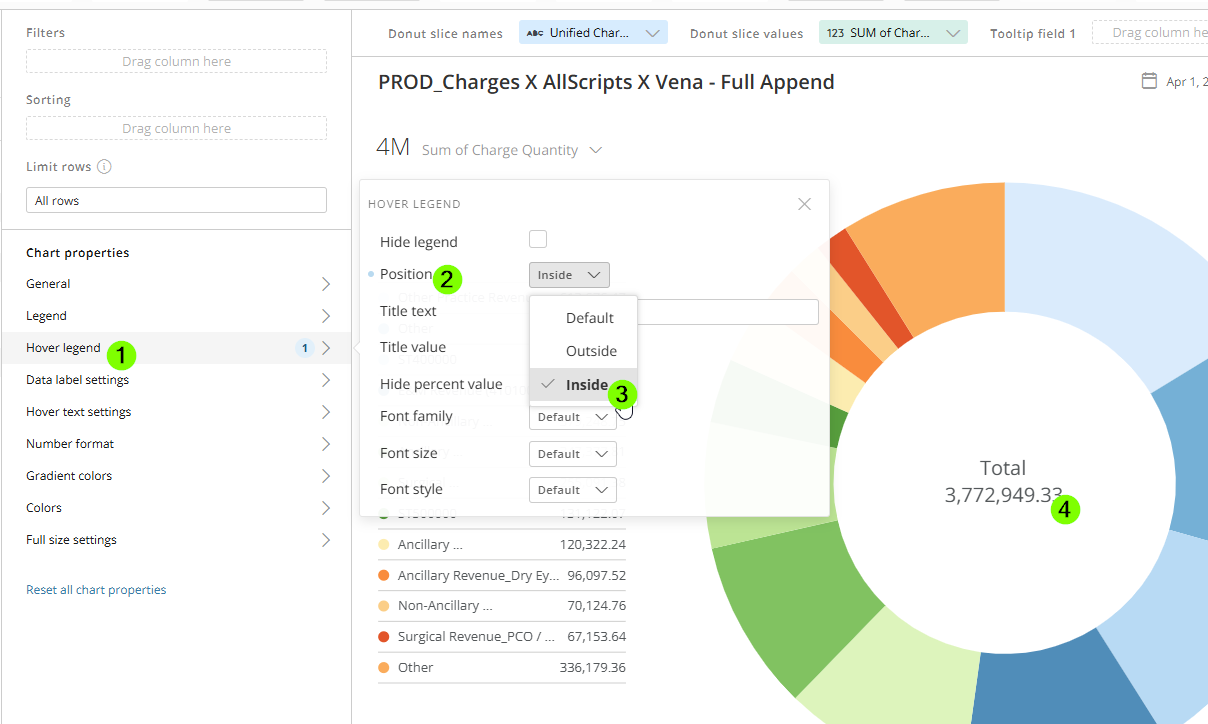
You can accomplish this through the "Hover Legend" chart properties, by changing the "Position" to "Inside", as such:
Chart Properties > Hover Legend > Position > Inside

Re: Can we create workflows via App Studio
Workflows aren't created inside of AppStudio. They are created in the Workflows interface. Workflows are very frequently executed from AppStudio, via a button on an Action (as an example).
Re: Exception error for account id and permissions
Be careful about posting too much information to us. You should redact some of those values.
I think the error is clear (at the bottom) - your account does not have the proper access to the workspace requested.
Re: Image not shown in Task Center Queue
I haven't played around with this functionality since the Fileset beta started. Let me loop in the engineering team on our end.
App Studio Bugs and Gripes
I have a few issues with creating apps in domo, some of which are bugs and some of which are general gripes with the user experience. All of these have been sent to Domo Support but they encouraged that I post it to Domo's community forums as well.
To start, the bugs:
- The first time I hit save after creating an app, after hitting save, the page saves but does not exit out like normal.
- When creating a new app, if I want to use a custom theme from another app that I’ve created, I have to reupload the theme each time from my computer. For some reason it doesn’t save to Domo.
- When I try to import a new page from a dashboard or app, it makes me save the page I’m currently on, even if no changes have been made, and then I have to hit the import button a second time rather than it opening itself the first time.
- When hitting a button that opens another page of the app in a separate tab, it works just fine on Domo, but when embedded in a website, the buttons cease to work.
Now, the gripes:
- When adding a Header to the page, I have to delete the word “Title” each time rather than it highlighting/deleting for me.
- I don’t like that I can’t double click on text boxes to edit them.
- The way the tabs of App Studio are embedded within each other isn’t always intuitive, making it difficult to find the things that I’m looking for. For example, naming my app is under the Configuration Tab of App Studio but the toggle of whether to show the name of my app is under the Pages and Navigation tab’s Configuration tab.
- The Show Domo Navigation and Show Navigation Toggles, when turned off, allow me to completely softlock me inside of my app without being able to edit it or exit back to domo (until, I found out, I can just add “/edit” to the URL). Not sure why this is an option. Maybe the edit button/home button should be separate from the navigation tab, or at least have it be an option to be.
- When scrolling on my app in Domo, the menu sticks to either the top or the side of the screen just fine. But when embedding my app in a website, however, the menu loses its “stickiness” and instead when I scroll to the bottom, I have to scroll back up to select another page of the app. Not sure if this is something domo support can help with or not. Maybe having the menu have its own scroll bar separate from the rest? Not sure.
- In Domo and when the app is embedded on a site, when I hit the “remove filters button” that I made, it doesn’t just remove filters like the ones the user added, but it also removes the filters for the entire page. So if I wanted users to be able to have a button to remove the filters they added without removing the page’s filters, I would have to embed the entire app with the same filter. Unfortunately, each page of my app cannot be filtered to the same date range, so that breaks a number of my cards. If there was a way to make a button that removes only specified filters from the page, that would be great. Or if there was a way to lock page filters so that they cannot be changed, that would help.
- I have been converting a lot of our dashboards into apps, which will continue to get more difficult to manage without some sort of filing or sorting system.
- When adding tabs to an app, tabs should have an option to be the same size regardless of the length of the tab title and should allow wrapping text.
The bugs are currently being addressed by Domo Support, but hopefully the rest of my feedback reaches the right people. I was told to post in the "Feedback" section of Domo Forums, which I can't seem to find, so if there's a better place I should post this please let me know.
Video Walkthrough - Automating the Process of Creating Standardized Categories
This video walks you through how to automate the process of categorizing thousands of different categories into a standard list of categories by leveraging AI, Domo Magic ETL and the Python tile. The result is a process that is more efficient and accurate and eliminates the need to manually maintain a list.
Hope you find it helpful!

Re: Image to Text Agent Problem
Hello @Manasi_Panov_SHA
I think you are viewing the video here: https://www.youtube.com/watch?v=eV3kQedxvGQ
Things are a little bit easier now!
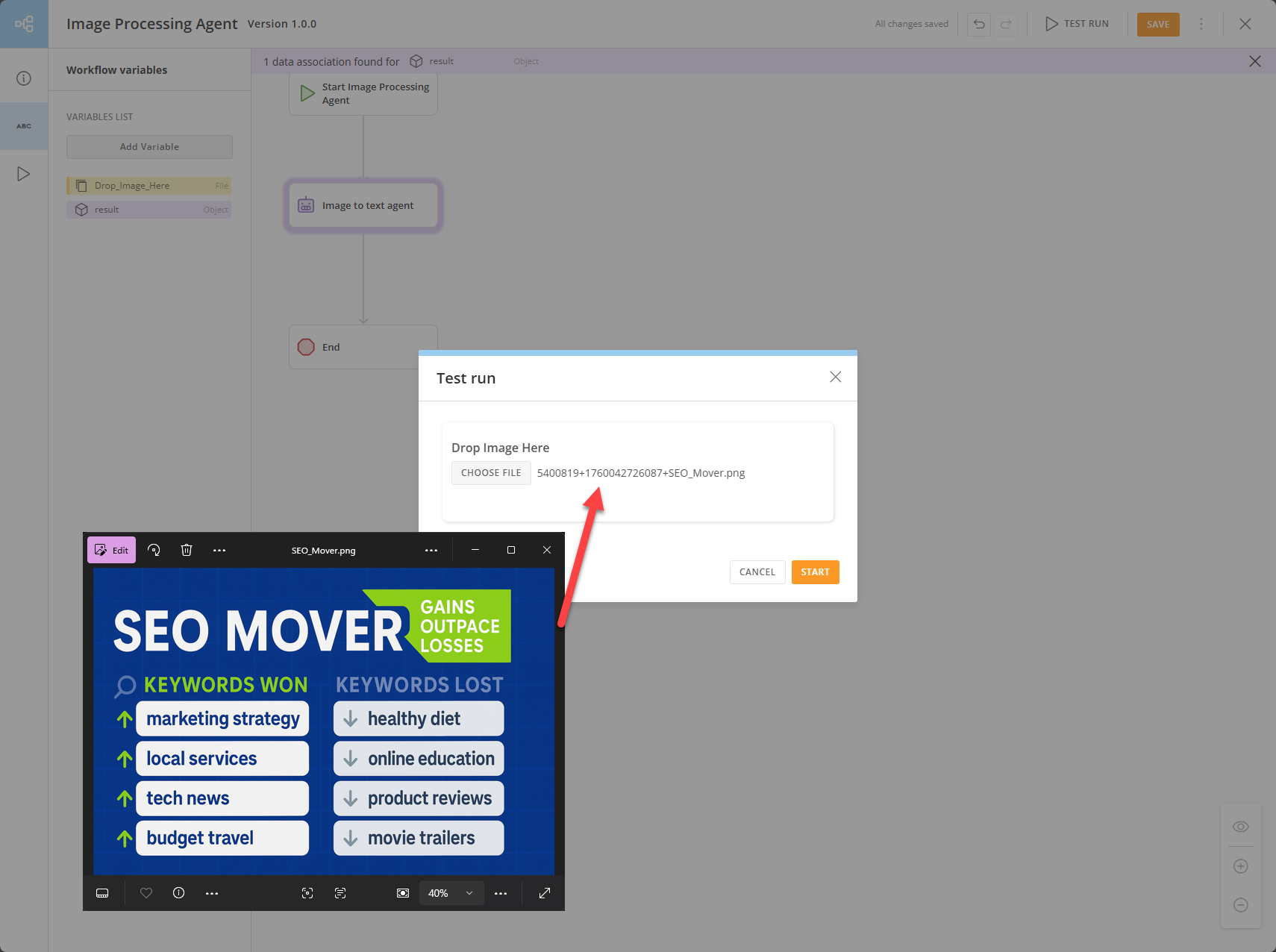
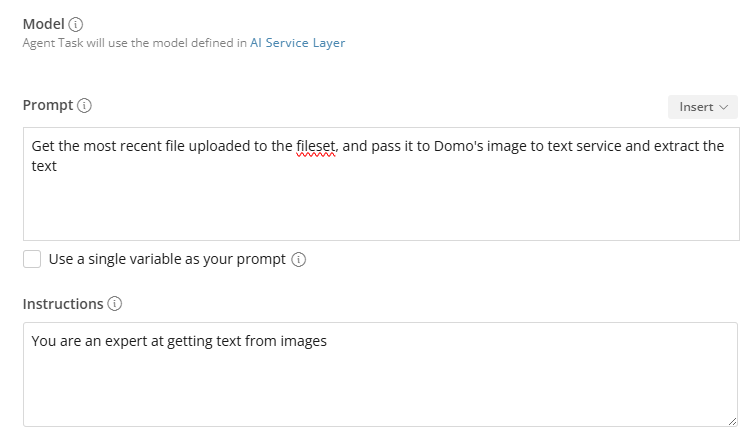
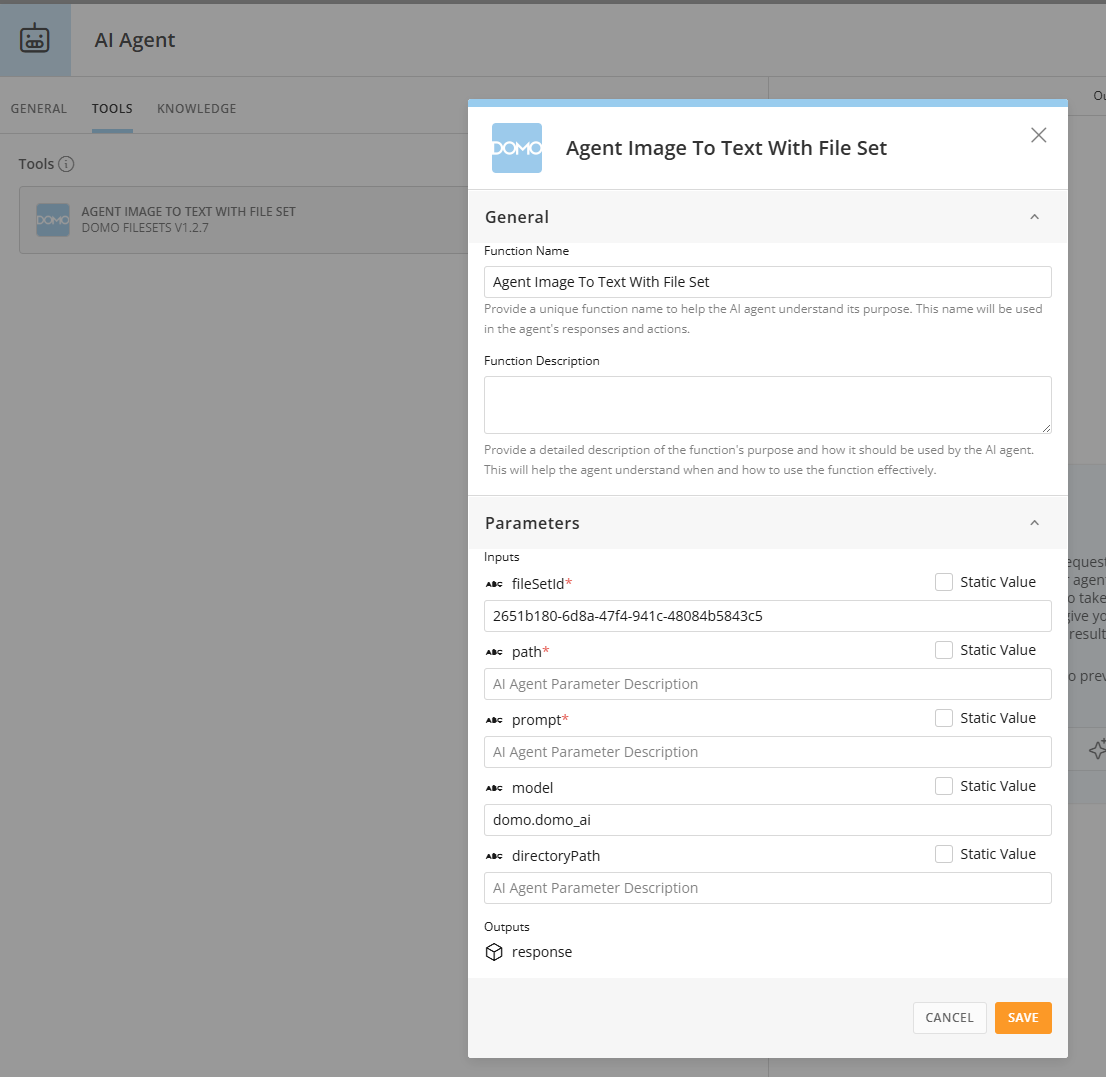
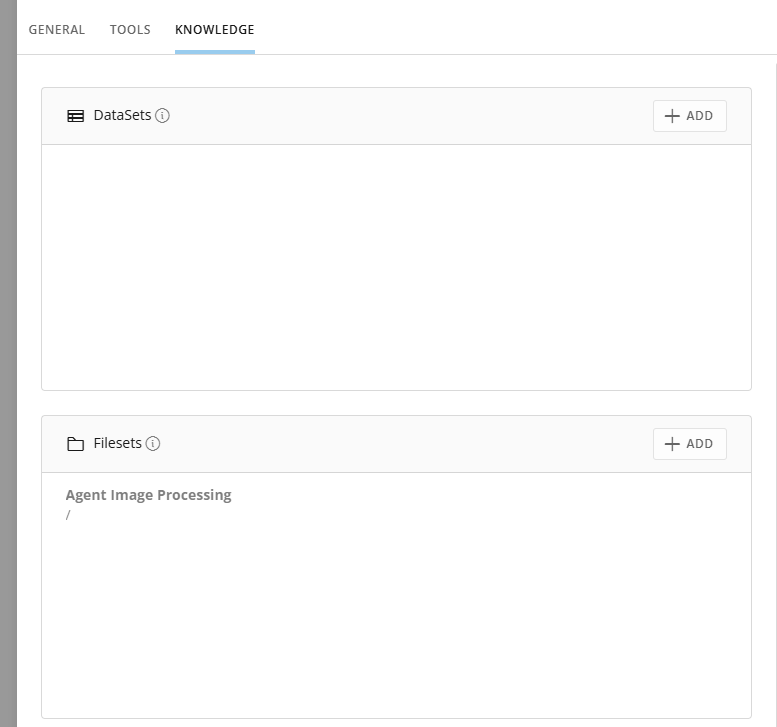
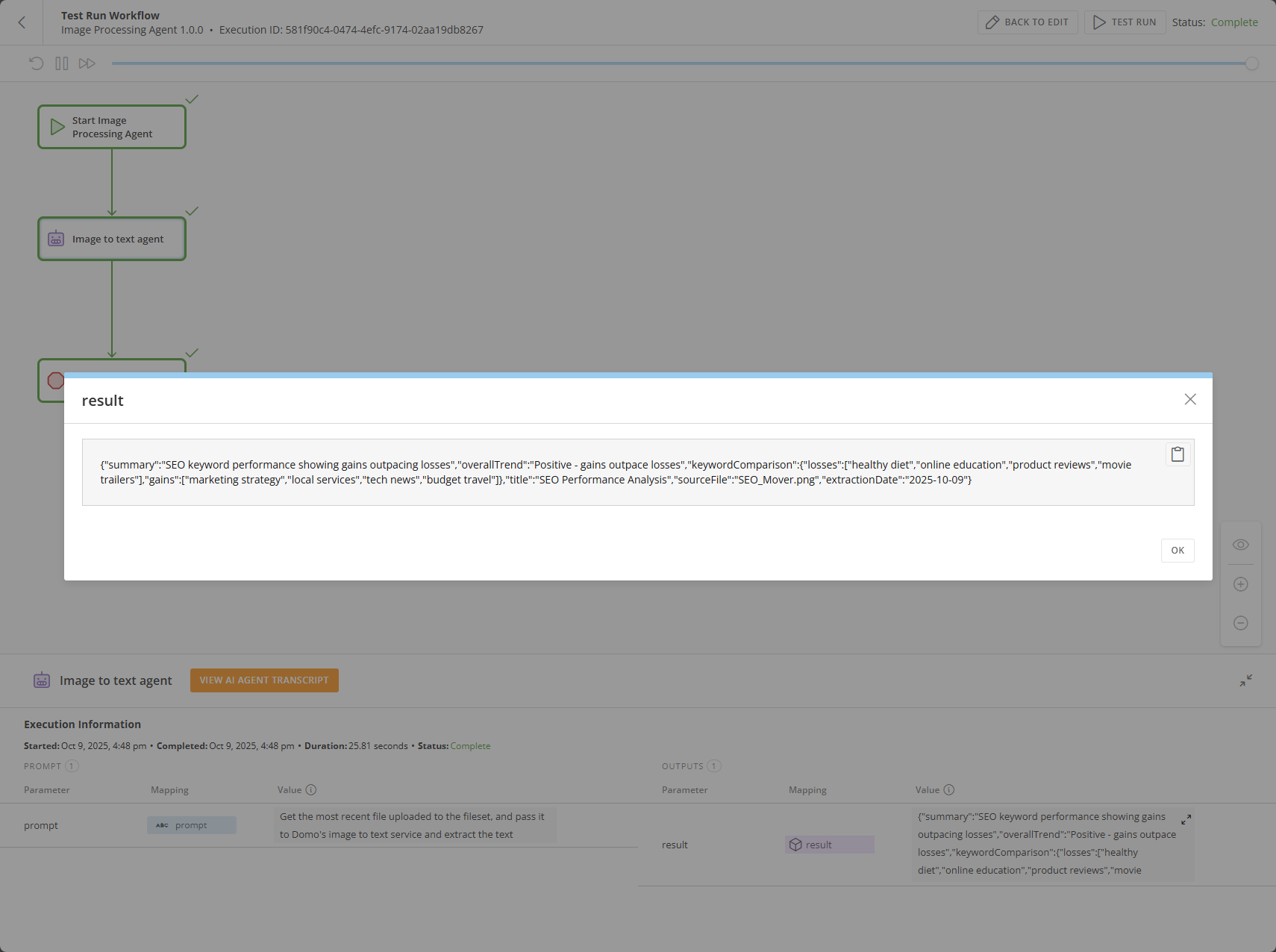
I had some success by uploading an image file as you did, but then just asking the agent to find the most recently uploaded image in the fileset, and equipping it with the "Agent Image to Text" tool.
Here was my setup, better prompting and being specific about the output in the prompt would likely help the results.
File Upload:
Prompt:
Tool setup:
Knowledge:
Test Run Result:
Hopefully this is helpful!