Best Of
Re: How can I get null/empty string fields to appear as zeros in my ETL?
I would use a "Value Mapper" tile for this, like so:
Obviously you'll have to change the 1st field to search the relevant column in your dataset.
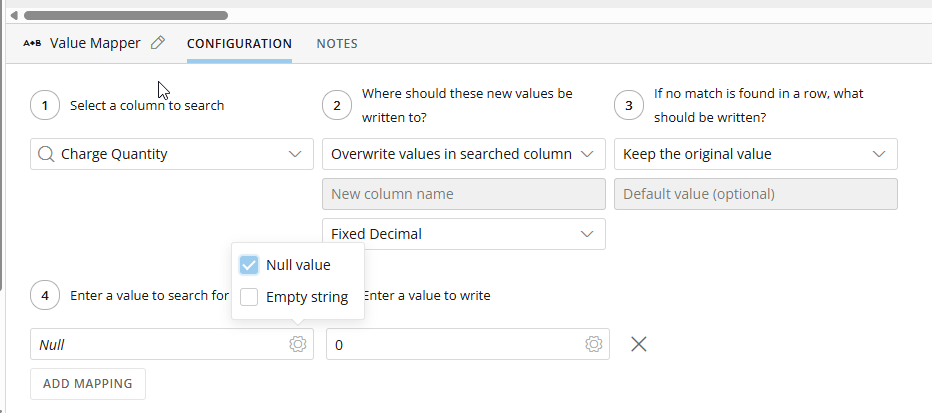
Let me know if this works :)

Re: Heatmap Tables in AppStudio
We would absolutely love to see this functionality be added! Heatmaps are growing in usage on our end, as well as App Studio, and we love them both, but this is a definite pain point.
For Funsies, here is another cutie to illustrate the conundrum, where we would prefer to be able to presist our red/green heatmapping, I give you - depressed bumblebee (which also doesn't happen to be our theme either haha!).


Re: Reduce Clicks On New Navigation
In the same vein, when I click on "Dashboards" it automatically opens to my Favorites, but I have so many dashboards that it would be more convenient to just land on the main dashboard menu and search. When I use the search bar in "Favorites", it only searches my favorites.
So I would also like the ability to customize where my Dashboards menu link goes, although I want it to default to "All" instead of "Favorites". Or have the ability to choose.
 Alex_K
Domo Everywhere: Programmatic Filtering in Salesforce
Is there anything more fun than p-filtering in Domo Everywhere??
Not that I can think of... 😅😅
As a follow-up to my previous video, I show how easy it can be to provide unique, tailored data experiences to your end-users using p-filters and embedded dashboards. Hope you find it helpful! 👇
 ellibot
Embed Dashboards into Salesforce with Domo Everywhere
Ever wanted to try Domo Everywhere but don't know how to get started?
A common use case I've seen is displaying data internally via a tool such as Salesforce. I made a quick tutorial on how easy it can be to start embedding dashboards into your Salesforce instance. Check it out! 👇
ellibot
Re: Building a “Current Month vs Previous Month vs Last Year” comparison card (or dashboard) in Domo?
You can do date comparisons on a normal table chart….or a pivot chart but its not necessary. Look back at past forum questions and you see references with formulas such as CY, PY, P2Y (current year, previous year, previous 2 years). It works for comparing years, or months depending upon the formula.
Example, if you want current year to date use something like this:
 sum(

    case when YEAR(`date`) = YEAR(CURRENT_DATE())

          and `date` <= CURRENT_DATE()

    then `amount` else 0 end

   )
Previous year to date would be something like:
SUM(CASE

    WHEN YEAR(`date`) = YEAR(CURDATE()) - 1

    AND `date` < DATE_SUB(CURDATE(), INTERVAL 1 YEAR)

    THEN `amount`

    ELSE 0

END)
and so on. For change/difference or % of change do use your CY, PY, and P2Y. If you need months versus years, do the same type formulas but instead of YEAR(date) and interval 1 year, use Month(date) and interval 1 month.
Note - in most cases for current year, you probably only have data up to current date, so you may not need that second line. But on past years you do need it.

Re: Beast Mode: build “hotel stay duration” from Timestamps
Using the UNIX_TIMESTAMP function is the way to go to get the time difference. I would start out by just doing the simple subtraction between the two dates using the UNIX_TIMESTAMP around both of them and making sure it validates. Then, start adding in your additional logic for the CASE statement and make sure it validates.
I would also refer you to this post on formatting the results.
https://community-forums.domo.com/main/discussion/52682/domo-ideas-conference-beast-modes-time-difference-formatting#latest

Adding a queue to a page in App Studio results in a white screen
I'm trying to re-create the app from this webinar
When trying to add a Queue to the app page, I can drag the Queue component from the Add actions and Elements sidebar, I select my Queue from the list, click the "Choose" button, and the page flashes and forwards to one with the Domo navbar on top (with Home, Apps, Dashboard, etc.), and the rest of the page is completely blank.
The browser dev tools console has the following error:
Uncaught Error: Minified React error #185; visit
for the full message or use the non-minified dev environment for full errors and additional helpful warnings.
I've tried adding an existing queue with tasks and a new empty one. Existing app, and a new app with nothing else in it. Both Chrome and Firefox. Happens every time.
 HalG
Re: Beast Mode: build “expiration at end of next day” from a Timestamp
Try this
CASE

  WHEN `Voucher Create Date` IS NOT NULL

  THEN DATE_SUB(DATE_ADD(DATE(`Voucher Create Date`), INTERVAL 2 DAY), INTERVAL 1 SECOND)

END
Re: Beast Mode: build “expiration at end of next day” from a Timestamp
The error appears to be in your CASE statement. This works….
DATE_SUB(

DATE_ADD(Voucher Create Date, INTERVAL 2 DAY),

INTERVAL 1 SECOND

)