Best Of
Allow Left Navigation Panel to Stay Expanded in App Studio
The left navigation panel in App Studio is collapsed by default and expands when users hover over it.
It would be helpful to have an option to keep the navigation panel permanently expanded (pinned open). For apps with multiple pages, having page names visible at all times can make navigation more intuitive and efficient
Allow Gauge Charts to Compare Against Multiple Target Values
Gauge charts support comparing a primary value against a single target value. It would be valuable to support multiple target/comparison values within the same Gauge visualization.

Example:
- Gauge Value = Income
- Target 1 = vs Last Year (LY)
- Target 2 = vs Budget
Alternatively, the comparison values could represent different periods or benchmarks, such as:
- Month-over-Month (MoM)
- Year-over-Year (YoY)
- Budget
- Forecast
This would allow users to evaluate performance against multiple key benchmarks in a single visual, reducing the need for multiple gauges and making comparisons more efficient.
Does SQL editor for Dataset views support Common Table Expression (CTE) ?
Title: CTE Support in Domo Dataset Views
Hi fellow Domo Developers,
Has anyone successfully created a Dataset View using a CTE (WITH clause)?
I’m currently trying to build a Dataset View using a CTE, but Domo throws an error and appears to interpret the CTE name as a source dataset instead of resolving it as a CTE.
I wanted to confirm whether CTEs are supported in the Dataset View SQL editor, or if this is a known limitation of Dataset Views.
If anyone has implemented CTE-based logic successfully, could you please share the approach or any workaround you used?
Thanks in advance!
"Fixed Pane" Separator
A key frustration with Domo is, when scrolling, any filters, controls etc. disappear and to make changes the user must scroll back to the top (when they are located there as is often the case). I know the filters are accessible via the button but this is not obvious to many users and often unintuitive.
With the ability to have a fixed pane option (like in Excel) elements above this separator would remain on the page and independent of any scrolling allowing to much quicker changes to filters and controls and greatly enhancing the user experience.
 TC777
Magic ETL - Selectable Preview
While you expanded the amount of rows that can run for a preview, what would be even better is being able to select data that is previewed, even if it's something like most recent 400K rows. Changes that we generally make to an ETL is due to updates in the data flowing through but it's difficult to test that logic when the ETL only tests the first set of rows or a random set of rows. I then have to create copies or Views of datasets, filtered to the rows I need to test, so I can preview that my change in logic worked before reverting back to the original datasets and rerunning the full dataflow.
 amthomas
Pivot Table Expansion
Can we have Pivot Table to expand categories in 1 column like this?

instead of the expansion is in another column?

App Studio – Require One Value to Always Be Selected in a Filter
I have several global dropdown filters in an App Studio page (Region, Country, Account Language, etc.) that apply to all visualizations on the page.
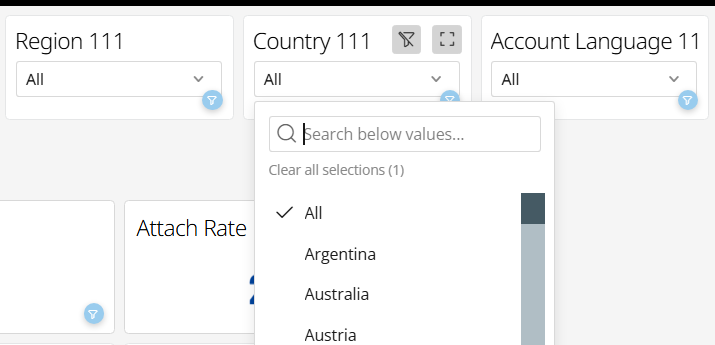
For these dimensions, the underlying dataset includes a pre-aggregated “All” value. For example, Country = All contains metrics already aggregated across all countries. Because of this, each of these filters needs to have exactly one value selected at all times.
The issue is that Domo shows the Clear Filter (strikethrough funnel) icon on each filter.
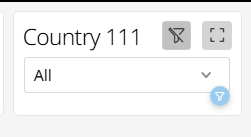
If a user clicks it, the filter becomes unselected. Domo then includes both the individual country rows and the pre-aggregated All rows, which effectively double-counts the metrics.
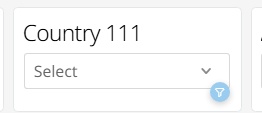
Is there a way to:
- Disable/hide the Clear Filter icon for specific filters, or
- Configure a filter so that one value must always remain selected and the user cannot clear the selection entirely?
Tableau has a straightforward option to prevent an “All”/unfiltered state for a filter. I haven't been able to find an equivalent setting in Domo App Studio, but this seems like a fairly fundamental requirement when working with pre-aggregated data.
Am I missing a setting that supports this in Domo?
vash_ps
grant for managing all support tickets for an account
Currently apparently the ability to see all support tickets associated with an account is tied to the Admin role.
Many organizations use custom roles. As such, the ability to manage all support tickets should be a grant not tied to a system role.
There are many grants associated with the Admin role that most engineers in a tier 1 support team do not need access to. Domo does provide support tickets as a dataset, but
- that dataset is limited and does not include comments / comment history
- having a dataset would not allow internal engineers to support by uploading content, or respond to existing support issues while updating the Domo support portal
Admittedly when discussing this with Jace i mentioned "this sounds like a support problem not a product problem" but if in fact the portal is tied to a role and not a (nonexistent) grant, then it is both.

Magic ETL - Selectable Preview OR EXCLUDE from Preview
The ability to select specific blocks to run as a preview.
Case: In an ETL we have several workstreams and outputs. I want to be able to select a specific area to exclude or include from a preview.
Considerations: Will always need to have the source data to preview, but select a path to only preview.
Period Over Period use as interactive filter only filter to the Date Range set in Analyzer?
I have a Period Over Period Grouped Bar with:
x = Last Day Month
y = Sales
Date Range = This Year
Graph by = Quarter
Compare to: Year Over Year, 1 year ago, 2 year ago, 3 year ago
When clicking a historical quarter such as 2024-Q2 on my Period Over Period Grouped Bar chart, the App filter is resolving to the current year equivalent (2027-Q2) rather than the selected period.
Any other options that I can show same period over the years and users can select any period shows in the card to filter/drill into that relatively easy to implement?