Best Of
Filter behavior on dashboard/app vs Details View
I wish the default behavior for filtering via-the-legend at the dashboard/app level would mimic what happens when viewing a card in full screen/via the details view.
When I click a colored block in a legend, I'm intending to remove that color from my view and allow the chart to re-scale. I think it's confusing that this behavior isn't consistent for a given piece of content when it's viewed on its own vs as part of a layout.
A few images to illustrate:
- Card Details View, you can see I have 2 colors stacked and the chart engine has scaled me to 6k

2. Card Details View - I have removed the purple color via clicking the legend, and my scale has adjusted to 2.5k

3. The same card is placed on an App dashboard, and when I click the same purple box the card maintains its scale and simply grays out the purple section.

4. The same behavior as above - but shown on a card with many more series items:

Yes, I can get the filter activity I need by using page filters or filter cards, but I think it's valid to consider that filtering via-the-legend should behave the same way no matter what kind of screen the user is looking at, especially if it's the exact came card.
If Domo wants to consider making the two behaviors toggle-able, I would love to see the behavior shown in image #2 be the DEFAULT for all.

Bug - Domo Page Level Filters being reset
Noticed that at some point yesterday our dashboards would reset page level filters after initial load. Most of our dashboards are setup with a default filter, only showing the current period, certain segment etc. but those filters are being dropped unexpectedly after initial load. Seems to be related to variables as it's only happening on our dashboards that have variables on them.
 collinT
Pretty-print Error on Android
I've created 3 different apps using App Catalyst. The apps work on desktops and the Domo mobile app when viewing on iOS. However, when trying to use Android devices, it throws a "Pretty-Print status 403" error every time. I tried using VAR at the top level and an IIFE wrapper. Neither of those is working exclusively or independently.
 Jessary
Workflow Notifications
I have just finished creating and deploying my first workflow. It's doing what I need it to do. I'm struggling to figure out how to consistently get workflow completion notifications to who I need to get them.
I am one of several admins. We are all in the "Domo Admin" group. I have given the group Admin access to the workflow. The only notification settings I can find for workflows are personal settings (annoying but I can tell others to set them up). But none of the settings will work. It is being started by and alert so the "you started" options won't work. And the "you own" options don't seem to work because there is no "owner". Only creator and contributor set as me and unchangeable.
So next path, setting up and email task in the workflow. Well after digging through a bunch of functions I landed on the Workflow Executions function. Technically I could get everything I needed, but if the workflow fails the Email task would never get triggered. Meaning I would only get the emails on success, not failure.
Pivot again. Found the DomoStats: Workflows dataset. Ok cool. I can just setup and alert for when a new row is added. I can even split things. Completion/Success just to me. Failures to the entire group. Cool. Except I only can run once a day (this is fine for normal days). I need it to update anytime the workflow runs. So add a task to run the dataset. Cool, except once again, if the workflow fails, it just stops. Meaning no trigger for failed workflow except to me.
If this workflow fails I need to know asap so the tasks can be manually triggered. I'm about to leave the country for 11 days. I need other people to be able to get alerts. Is my only option to set up a rule in Outlook to forward any failures?
ARosser
Ability to Cancel or Stop Publication Refresh Jobs
Currently, when triggering a publication refresh in Domo, the process must run to completion once started. There is no option to pause, cancel, or abort an in-progress refresh job.
According to Domo documentation, users can initiate and monitor publication refreshes, but there is no control to stop a job once it has started.
This creates challenges in real-world scenarios where:
- Refresh jobs can take a long time depending on the number of datasets, dashboards, and subscribers.
- A refresh may be triggered accidentally or at an inconvenient time.
- Issues are identified mid-refresh (e.g., incorrect content, missing datasets, or configuration errors).
- Users want to avoid unnecessary processing or system load.
Proposed Enhancement
Introduce the ability to:
- Cancel or abort an ongoing publication refresh
- Optionally pause and resume refresh jobs
- Provide clear status feedback when a job is stopped
Business Impact
This enhancement would:
- Improve operational control and flexibility
- Reduce unnecessary compute/resource usage
- Prevent propagation of incorrect or incomplete content to subscriber instances
- Enhance user experience when managing large or complex publications
Oleksii
Tag dataflows automatically based on tags of output dataset?
Is it possibly to tag the dataflows automatically with the tags added to the output dataset? So basically whenever adding tags to a dataset, the dataflow that spits out that output you are tagging should be default also get the tags.
Currently when creating a new dataflow, I navigate to the output dataset to tag it with a business unit or source type, etc. But then afterwards always have to remind myself to navigate back to the dataflow to tag it manually again.
Stefano
Custom Icons for Navigation
It would be great if we could create custom icons for the various new navigation menus in Domo and Domo Apps. Now that the menu bar is allowing us to reclaim more space, being able to differentiate between icons becomes more important - if the navigation bar is just full of identical icons then is there really any point to having them there? We need more variety for similar things.
For example, there's a lot of icons in there but many of them aren't useful for associating with common business reporting, and a lot of them are variations of arrows (or arrows+symbol) in different directions...having more candidates for things like a summary/overview page would be nice, more candidates for websites/html/browser icons, more candidates for various types of marketing channels, etc...For example, there's an icon for Google+, but no icon for Google Adwords
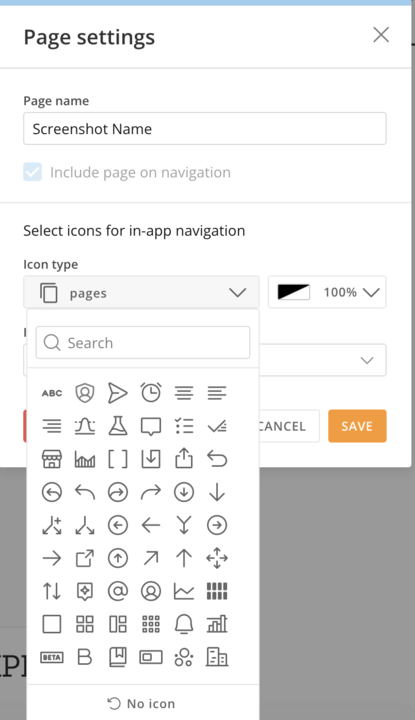
There's an existing thread on the Domo Community slack here that proposes some libraries that could be used as inspiration for additional icons:
https://domousergroup.slack.com/archives/C012FURNAS1/p1753116397157299
Option to Delete Cards When Deleting an App
Currently, when deleting an app in Domo, there is no option to choose whether the associated cards should also be deleted. The cards remain in the instance even after the app is removed.
We would like to request an enhancement where, during the app deletion process, users are provided with an option (for example, a checkbox) to indicate whether the related cards should also be deleted along with the app.
This feature would help users better manage and clean up cards that are no longer needed once an app is removed, reducing manual effort and preventing unused cards from remaining in the environment.
Expected Behavior / Enhancement Request:
Add an option (such as a checkbox) during app deletion to allow users to also delete the cards associated with that app.
Column descriptions Datasets & Dataflows
Column Descriptions do not Flow into the View created from a dataset.
Column descriptions on a dataset should persist through a dataflow. This includes if the column name changes as well.
This would save us a boat load of time.
Thanks,
Larry
ruchl
Mimic a User's Access to New User
It would be nice to be able to go to a user, look at the pages and cards they have access to, select all, and share with a new user that's being set up. I know groups is a good way to manage access easily and efficiently, but sometimes it's nice to be able to mass mimic access at the dashboard and card level, especially when Groups isn't the best way to do this. It would also be nice to be able to view what datasets the person has access to on the People tab, and do the same thing there. It would be an easy functionality to add that would help save a lot of time.