Best Of
Re: Any way to view schedule for dataflows?
Thanks Abby!
I've uploaded some of the scripts that I use to my github at the link below. They're mostly written by ArborRose.
 jetymas
Re: Slider Filter Card - Min & Max beast mode
You shouldn't need to pre-aggregate, but I did a quick test and see what you likely need to do to make the card work for you. Using this sample data:
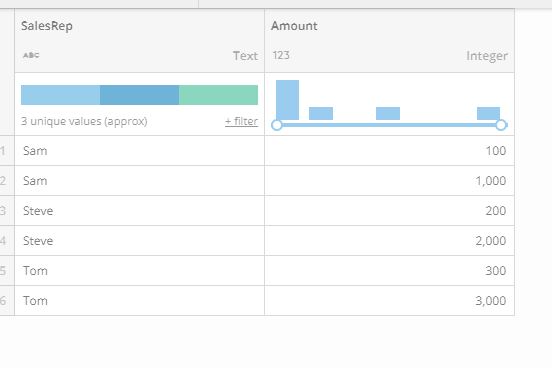
Grouping by Sales Rep, we would want a minimum of 1,100 and a maximum of 3,300 to show in the range selector. To do that, we drop in the Amount field into the minimum and maximum value and choose the aggregation type of Sum. Additionally, you need to drag the SalesRep into the Sorting section and choose No Aggregation.
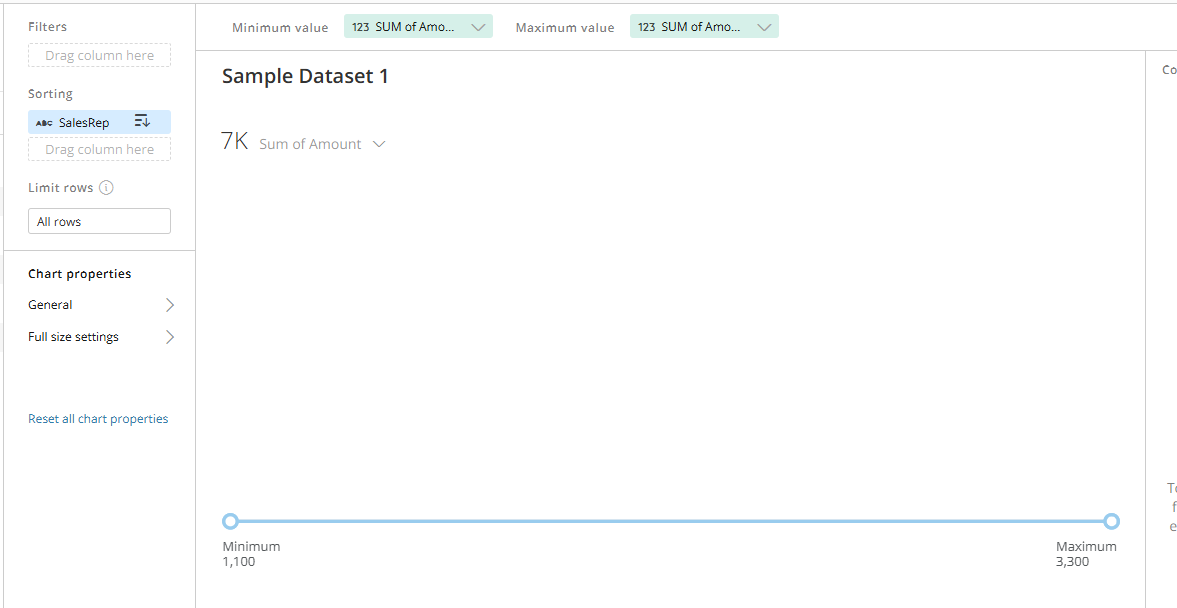
Without the SalesRep in the sorting section, it will just sum up all the values and display 6,600 for the min and max in my example.
Hope this helps you.

May 2026 Domo Feature Release
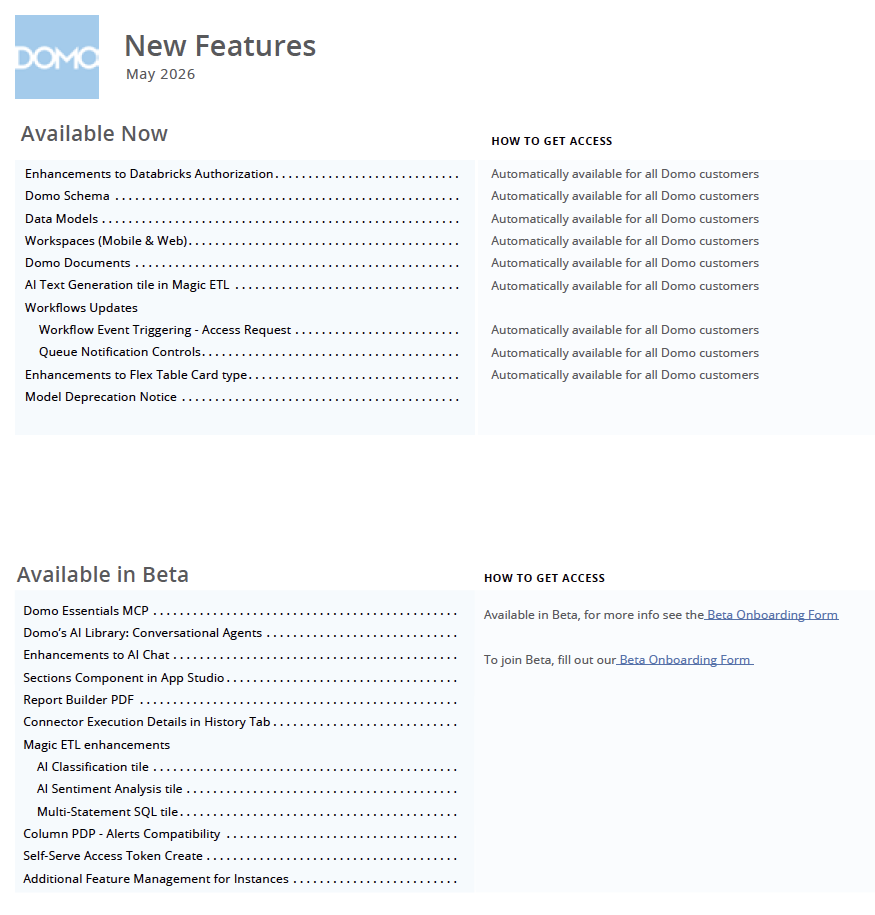
You should see the pop up announcements in your Domo instance today for a feature release which will be turned on next Tuesday (after the long weekend).
As always, there could be last minute adjustments and when the features are turned on next week there will be additional in product messaging as well as updates to the Domo website and Knowledge Base.
There are a ton of amazing features in this release and I cannot wait for all of you to take them for a ride!

Reece from Dodgeball Australia
I wanted to say a quick hello to everyone here!
I've been using Domo for a number of years for Dodgeball Australia, a small but growing not for profit that champions the governance and success of dodgeball nationally.
As a Director I've (slowly but surely) but out high-level dashboards for our core departments inclusive of Marketing, Human Resources, Strategy, Talent Identification, and even started leveraging App Catalyst to quickly realise solutions for my volunteers on the fly (like a training session app!).
I'm keen to connect with anyone and share my experience, and leverage any wisdom from other not for profits, sporting organisations, or anyone else who is open to connecting!
Thanks everyone!


Re: How to change date format on comparison dates?
I think you are running into a limitation with the Period over Period chart types. They are notoriously light on flexibility. I'm guessing you have a beast mode for your X-axis as that chart type doesn't allow for any date formatting on that field like other chart types do.
You can often accomplish the same visualization using a line + bar chart and then have better display formatting control. Here's are a couple videos that I did that shows some ways:
Re: Date Selector Upgrade / Layout Options
Yes! The "Range Selector" is also super finicky when working with dates, so having a purpose built date range filter with a modern UI would be great.

Re: Mimic a User's Access to New User
I would like the same thing for creating Groups. It's a pain to share dozens of dashboards and apps with a newly created group. It would be nice to save-as an existing group that has 90% of what the new one needs, and then remove/add the handful of adjustments.
ccccc4
April Community Forum Recap
Hello Domo Community!
April has wrapped and so many great projects, questions, and solutions have been shared in the forum and ideas exchange this month! Thank you for watching out for each other and helping everyone along their own paths to Domo Success! On a personal note, I’m energized by meeting so many of you as I’m getting immersed in the group as the new Community Manager. You all have excellent questions and enlightening answers. Thank you!
Announcements
- Upcoming ACE Webinars- Two sessions of “AI Academy” are scheduled: AI Academy: Readiness Automation and AI Academy: Workflow Inception – Leveraging Workflows Within Workflows
- Domopalooza Breakout Session Recordings- If you haven’t watched everything yet you wanted to visit Domopalooza 26 Product Deep-dive Recording
- Watch for: New User Onboarding Webinars – beginning later in May to help your colleagues who may be new in the community get ramped up on all things Domo.
Most Active Discussions in April
These conversations sparked the most engagement—be sure to check them out and chime in with a reaction or comment:
- Domo MCP Server
- Mimic a User’s Access to New User
- How to change the background on an expanded card in AppStudio?
Thank you @mckennapayne, @Abby Brinks, and @DWill978 for making thought provoking posts. Shout out to @ellibot, @DavidChurchman for contributing ideas toward answering their questions, and to @Dhuddleston for getting the discussion going on McKenna’s post on MCP server.
Leaderboard Top 3
Looks like there’s been a little shake up among the Top Answerers in the Community with MarkSnodgrass taking the spot from long-time leader ArborRose. Coming in at second we have long-time community coach, GrantSmith, and in an unusual tie for third place, we have two seasoned experts, DavidChurchman and Ellibot. Great to see such active engagement by the Community members!
- @MarkSnodgrass : 214 points
- @GrantSmith : 141 points
- @DavidChurchman : 135 points
- @ellibot : 135 points
Top 4 Ideas
These four ideas got the most upvotes. Give them an upvote or comment if you'd like to see them in the product, too.
- Ability to Cancel or Stop Publication Refresh Jobs
- Filter Section
- Mimic a User’s Access to a New User
- Additional Filtering in Admin Cards View
- Thank you for helping shape the future, @Oleksii, @verytiredgirl, and @Abby Brinks.
Community Member of the Month
Our CMM for April is @ggenovese, Giacomo Genovese, who recently celebrated completion of four years as a community member. You may have read one of his over 150 comments and benefited from his insights. He’s a Community Coach and has made over 1,000 visits to the community and earned 19 badges. Thank you, Giacomo, for sharing your Domo insights and ideas with the community. Here’s to four more years!

Help me congratulate Giacomo in the comments below!

Announcing the Datasource Swapper: Move your existing Cards, Views, and ETLs to new datasets in bulk
Hi everyone,
I am excited to announce the release of the Datasource Swapper! Whether you are building new datasets because you are moving to a new data provider, transitioning away from materialized datasets in favor of Cloud Amplifier, or dealing with forced changes caused by vendor API deprecations, this tool was created to help save you hours of tedious manual updates to move your existing content to your shiny new datasets.
You can read more about this custom tool and get a step-by-step guide to create and run this in your instance here:
The Datasource Swapper is designed to accelerate large-scale migrations by allowing you to re-map content in bulk. Instead of opening every dataset yourself and updating each piece of content, you can provide a simple mapping dataset to this tool and let it handle the heavy lifting.
Key Functionality & Features:
- Bulk Dataset Swapping: Automatically update the input datasource for Cards, Dataset Views, and Magic ETL Dataflows across your Domo instance.
- Mapping-Driven Automation: Uses DomoStats and a simple "Old ID to New ID" mapping to identify and update all dependent assets for any given dataset in one go.
- Proactive Schema Validation: Before committing changes, the tool checks for missing columns or data type mismatches in the target dataset, allowing you to skip problematic pairs or proceed with full visibility.
- Flexible Deployment: Choose the environment that fits your workflow — deploy it as an integrated Pro-Code App using CodeEngine or utilize the standalone JavaScript-based CLI tool for a local experience.
This tool is perfect for Domo Instance Administrators who are tasked with maintaining instance health during structural data changes. Because it requires the ability to deploy CodeEngine packages, create custom Pro-Code apps, and modify instance-wide content, it is most effective when run by an Administrator or a user with elevated permissions and widespread access to update content.
You can dive into the step-by-step implementation guide and access the code here:
Happy migrating!