Best Of
Re: How can we apply drill down functionality between two dashboards in domo?
@Jaymin You can do this by configuring the interaction for each card on the first dashboard to redirect to the second dashboard, like below:



Re: Month over Month Comparison on mega table/pivot table
Hi @Jackie96 ,
I got this question earlier today so I guess it was you! Here's a video for everyone else to see how I approached this problem:
John Le
You're only one dashboard away.
More video solutions at: https://www.dashboarddudes.com/pantry

Re: Why are my days of the week out of order when there is a 4-day work week?
@jperrenoud They appear to be sorting alphabetically. If you want to sort in chronological order, you can create a beast mode using the DAYOFWEEK() function and add that as your sort field instead.
Re: Can you paint with all the colors of the web?
I love this writeup! I was nodding in agreement and smiling with amusement the whole time.
I love the color ruleset idea, that would save so much time being able to import from a library of rules stored on the same dataset. Brilliant!
 creed
Re: How should can i remove Dot "." from a column?
You can also use a formula tile and a regex to do this as well:
REGEXP_REPLACE(`Field`, '.', '')

Re: What would be the downside of using Appended Data to capture M/M snapshots?
I'm a big fan of if it works and gets results fast without being a huge resource sink then don't over think it.
When it comes to comparing periods in my shop I like the ability to use any chart I want rather than being restricted to period over period charts. So what I tend to do is append one dataset to itself, increment the dates by one year (or whatever you need to do to properly compare dates), then rename the appended value columns 'LY <<Column Name>>'.
Here's a simple example

Doing it this way allows you to create charts like this that can compare periods, quarters, years, days... can even be forward looking.
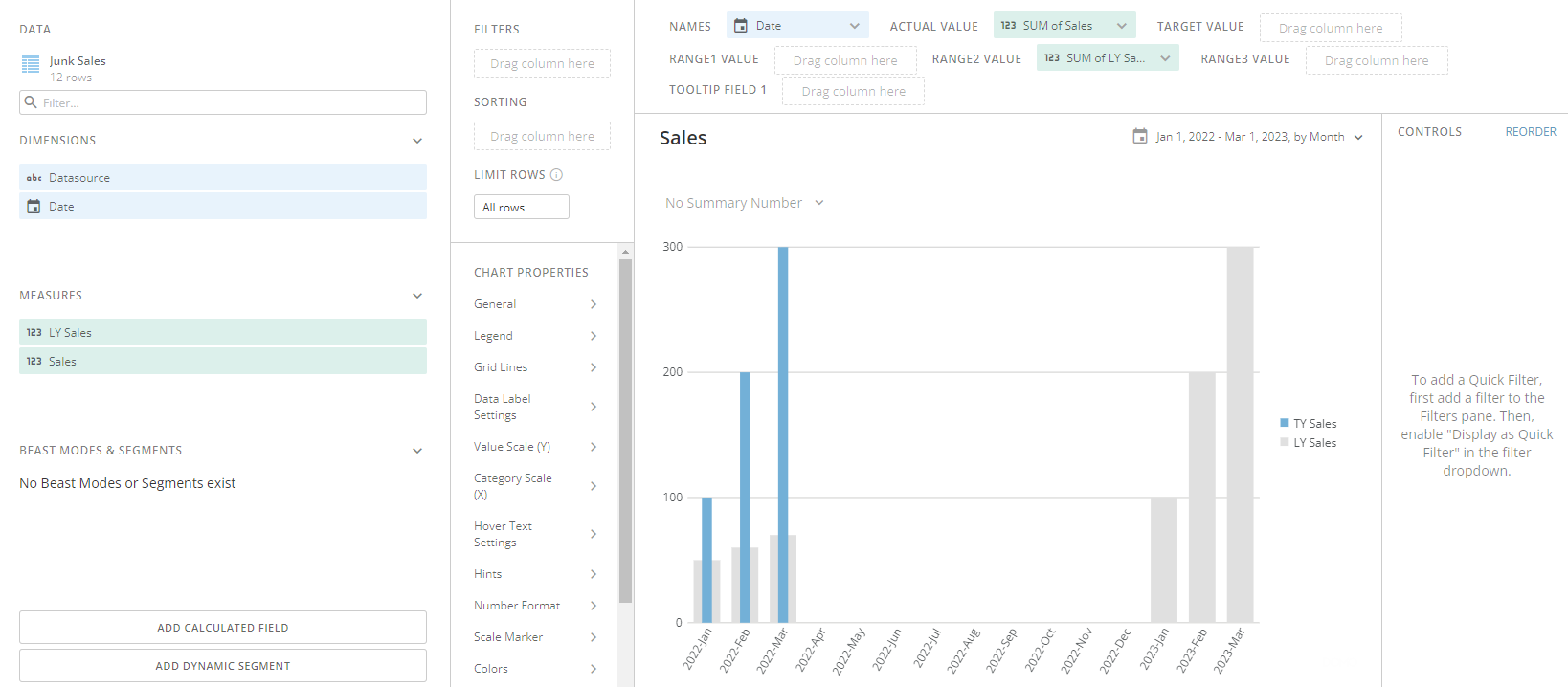
If you want to make sure it's apples to apples and not forward looking, (in this case, Jan, Feb, March of 2022 vs the prior year and nothing else), simply create a column or a beastmode that says if the LY Sales date is more than the max of the original tbl date, exclude it.
Hope this helps.
 G_Grey
Re: How should can i remove Dot "." from a column?
You should be able to resolve this by using replace text in Magic ETL.
Here's a screenshot of where to find it:

In this example I have this highly complex table, behold my unstoppable data prowess:

Then by adding replace text and replacing "." with an empty string the output table returns this:

Hope this helps!
G_Grey
Re: New Year Filtering Issues by Week / Month
Try something like this:
CASE WHEN (`Week Date` + INTERVAL (7-DAYOFWEEK(`Week Date`)) DAY) = (CURDATE() - INTERVAL (DAYOFWEEK(CURDATE)) DAY) THEN 'Last Week' ELSE 'NOT' END
The first part is is adding days to the week to get the last day in the week. The second half is calculating the end of the week based on the current date (for example Monday = 2 so it's subtracting 2 days to get to Saturday of last week)
Re: Beastmode for multiple row comparisons to one source row?
If those are your only records in your dataset you can utilize a Magic ETL to add a constant to your dataset (Join Column, value 1), then filter your data for just 'Current Week'. Take that filter and join it back to your original dataset with the constant and join both on the constant. This will join each row to the current week record for you to compare the two values together.