Best Of
Re: How to Share Pages without Sharing Data Set?
PDP is the way to go when limiting access to the different records in your dataset however PDP can’t hide a specific column. I’d recommend a dataset view to not select the columns with PDP to restrict access to solve your issues

Re: Get a Dojo badge for leaving a Gartner Peer Insights Review
Done! More people really should be on Domo
 amehdad
Re: In Workbench what does "DataSet Type" change?
Thanks. That makes sense. However, it's a little concerning that Workbench doesn't let you change the dataset type on existing jobs.
Perhaps I'll just use SQL Server type going forward, and leave the existing ones as is.
 JunkDoom
Re: Can we create a beast mode calculation with case statement for a value field?
Hi @Salmas, what's the scenario/question you are trying to solve for here?
If you want to know the number of instances where values fall in the '0-1' range for example, what you can do is have a table chart with two columns:
1) 'Beast mode' where you have define your range conditions
2) Count of 'Beast mode', where you click on the 2nd column field and change the 'Aggregation' to 'Count'
amehdad
Re: Convert Timestamp to CST, UST, MST, EST Python
If your start time is coming in as UTC then you want to have +00:00 in parameter 2. In parameter 3, is how many hours you want to adjust it.
To say it another way, parameter 2 is to specify how many hours offset from UTC is the datetime in parameter 1. Parameter 3 is how many hours from UTC it should be offset.

Re: Improved Error Handling in Analyzer
I’d like to see more detailed errors all throughout the Domo product so I can try and diagnose problems easier instead of having to submit support tickets. You could even make it a flag each instance could enable if they wish.

Re: PDP tied to user?
@Jessica PDP policies are additive, meaning that since your user is in both the limited and unlimited group, whenever they are viewing that dataset, they will see any data in the Limited group AND any in the unlimited group (this is outlined in the "Adding Users to Multiple PDP Policies" section of the kb document https://domohelp.domo.com/hc/en-us/articles/360042934614-Creating-and-Deleting-PDP-Policies). It doesn't matter what group you shared the page with, that just gives access to the page/cards/datasets. Since your user is in both groups, both PDP policies are applied anytime they access a card built on that dataset.
Also to your initial question - PDP can be tied to either people or groups, depending on how you define them. You can either add a person to a PDP policy or a group to a PDP policy - when you add a group, anyone in that group then has that PDP policy applied.
If you want your user to see a limited view on page 1 and an unlimited view on page 2, you will have to rework your datasets/PDP/filters (my first thought is you probably have to have different datasets for page 1 than page 2, but somebody else may have a more creative solution).
 mhouston
Re: How to calculate Percentage in each Series - Bar graph
Hi @Dharshini, in 'Chart Properties' -> 'Data Label Settings' -> 'Text' -> '%_PERCENT_OF_CATEGORY', you can show the data in each stacked bar as a % against the total along each for your ACT Lower values, showing the bars data exactly as your first image.
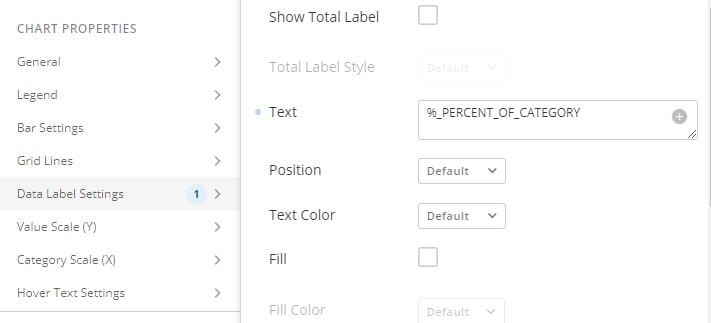
Hope that helps.
amehdad
Re: How to indicate story pages and regular pages on page list
You may be able to utilize the API to determine which type of page it is but it wouldn’t be a supported API and is a very technical solution. It would be nice if the governance or domostats datasets contained the page type