Best Of
Re: Is there a way to check if a field has more characters than a specific amount?
Hi @JoeR_PSIT
You can use the LENGTH function to get the number of characters in a string
CASE WHEN `Serial Number` IS NULL OR LENGTH(`Serial Number`) > 7 THEN 'Error' ELSE 'OK' END

Re: Is it possible to formatting the style of a report that is sent via email?
Hi @lvtrujillot
Currently this isn't something you can change. I'd recommend logging an idea in the idea exchange as a potential enhancement.
Re: AND function is not working in the case statement for a single column values
Hi @Salmas
Your beast mode isn't working because you're attempting to compare a single value to 4 multiple values at the same time. If Name is A it will never be B, C or D so your result will always be 'Pending'
If you're doing this across your entire dataset you could do something like this to check them all individually and aggregate the data and compare them together (pseudo-code, I haven't exactly tested this):
CASE WHEN (MAX(CASE WHEN `Name` = 'A' AND date(last updated time) = Date(Curdate()) and Last Execution state = 'Success' THEN 1000 ELSE 0 END) +
MAX(CASE WHEN `Name` = 'B' AND date(last updated time) = Date(Curdate()) and Last Execution state = 'Success' THEN 100 ELSE 0 END) +
MAX(CASE WHEN `Name` = 'C' AND date(last updated time) = Date(Curdate()) and Last Execution state = 'Success' THEN 10 ELSE 0 END) +
MAX(CASE WHEN `Name` = 'D' AND date(last updated time) = Date(Curdate()) and Last Execution state = 'Success' THEN 1 ELSE 0 END)) = 1111 THEN 'Success' ELSE 'Pending' END
I'm simply doing "binary" addition such that I know A was successful if the thousands is 1, B is successful if the hundreds is 1, C = tens is 1 and D = ones is 1. You could also just do 1 for all the values and compare to 4. I'm also taking the MAX to avoid duplicate entries.
Again this is also assuming you're not trying to do this on a row level basis but aggregating across the entire dataset to get a single textual representation of your status.
Re: AND function is not working in the case statement for a single column values
Your beast mode will never return Success as currently constructed because it evaluates the data one row at a time. Therefore, Name will never equal 4 different things in one row.
Depending on what card type you want to use, you might try doing the following:
Add Name to your filters and select your 4 dataflows
Add Last Execution State to your filter and choose Success
Set the date range filter to today and make sure it is using Last Updated Time as the date field
Create a beast mode with the following:
CASE WHEN COUNT(Last Execution State) = 4 THEN 'Success' ELSE 'Pending' END
Drag this beast mode into your card
The count will only equal 4 when all 4 of those dataflows have a success state for the current date. This should accomplish what you were trying to do.

Re: How to reactivate a dataflow disabled from inactivity?
Hi @user048760, there's more information around this here [https://domohelp.domo.com/hc/en-us/articles/4404652354583-DataFlows-Disabled-Due-to-Extended-Inactivity] but what could be happening is that the update is taking longer than expected, due to the size of data and/or joins, leading to a 'Failed while execution' message and then the dataset auto-disables.
 amehdad
Re: How to reactivate a dataflow disabled from inactivity?
Have you tried manually running it? I believe that forces it to re-activate. I have some disabled datasets and the instructions say to manually run it to re-activate it.

Re: Question related to case when formula in beast mode
Hi @ndldty
You can do something like this with a case statement (assuming superb and outstanding are separate value columns):
CASE
WHEN `Superb` < 0.10 AND `Outstanding` < 0.10 THEN 'Below'
WHEN `Superb` > 0.35 AND `Outstanding > 0.35 THEN 'Above'
ELSE 'OTHER'
END
As for the Superb can't be more than 5% that doesn't really fit with your other logic - Meaning it can never be above. Can you clarify the Superb can't be more than 5% statement?
Re: Beast Mode Calculation in Summary Number
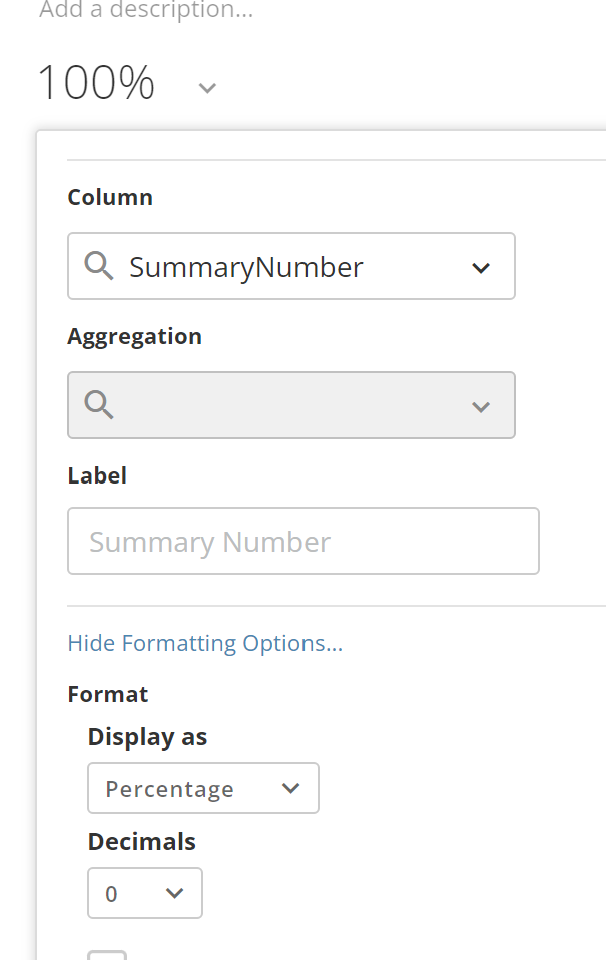
@Saketh since you are already aggregating it, you just need to ignore the aggregation field and click on Show Formatting Options and then choose percentage for the Display As format. You will then see your summary number as a percentage.
Re: Beast Mode Calculation in Summary Number
Hi @Saketh
You're attempting to aggregate an aggregate which isn't possible within the beast mode and summary number. If you want the average of the percentage you'd need to pre-aggregate your data with a dataflow to then be able to take the average of the percentage.
Re: Domo- Tableau conection.
And regarding Domo to Tableau, the idea was raised a few years ago [https://community.tableau.com/s/idea/0874T000000HAmTQAW/detail] but it appears no action has been taken since.
amehdad