Best Of
Re: Eliminating Null Values in Slicer Card Type
@mschallman First I recommend you fix your nulls rather than just filtering them out. Anytime I have nulls in a filter I always either go to the dataflow and add a formula tile for ifnull(column, 'Blank'. This will allow you to check out what those nulls are and make sure they should not be tagged as USD or CAD. From there you can default 'Blank' out of your filter.
Second, for a slicer, you can choose the single select option under the general settings. This will force your users to only have one option selected.
For the predefined selection, I recommend you use Filter Views. This will allow you to select an option, say USD, save that as a Filter View and mark that as the fault for every user. Then if they need to switch to a different currency they can.
 Ashleigh
Re: Assistance With Creating a Bar Line Graph
Hi @SLam
I'd recommend reformatting your data with a date offset dimension dataset and using a beast mode to calculate the different between last year and this year. I've written about this before here: https://dojo.domo.com/main/discussion/53481/a-more-flexible-way-to-do-period-over-period-comparisons#latest
You can then use a Line + Bar chart to define the YoY % values.

Re: Return most recent row/date
@AdamC You can use a Rank & Window tile:
https://domohelp.domo.com/hc/en-us/articles/360042922814-Old-Magic-ETL-Tiles-Rank-and-Window
Using Row Number as the function, then ordering by EVENTTIME descending, and partitioning by EQUIPMENT_NUMBER. This new column that's created will assign the most recent date for each equipment number a value of 1 and you can just filter to only allow where the row number is 1.

Re: Return most recent row/date
@AdamC You should be able to accomplish this with the Rank & Window tile using a Rank function, ordered by EVENTTIME (descending), and partitioned by EQUIPMENT_NUMBER. This will return the most recent event for each piece of equipment with a rank of 1.
https://domohelp.domo.com/hc/en-us/articles/360044876094-Magic-ETL-Tiles-Aggregate#4.1.

Re: Domo isn't loading my excel files
Are you using Workbench or uploading directly into Domo.com? For me, I usually need to refresh my browser before any datasets or cards reflect the new data.
If you're uploading directly to your Domo.com instance, have you considered Workbench or a different connector? It may work better.

Re: lag function
I would suggest doing this in Magic ETL. You can do this with just a few tiles, the formula tile and the join tile.
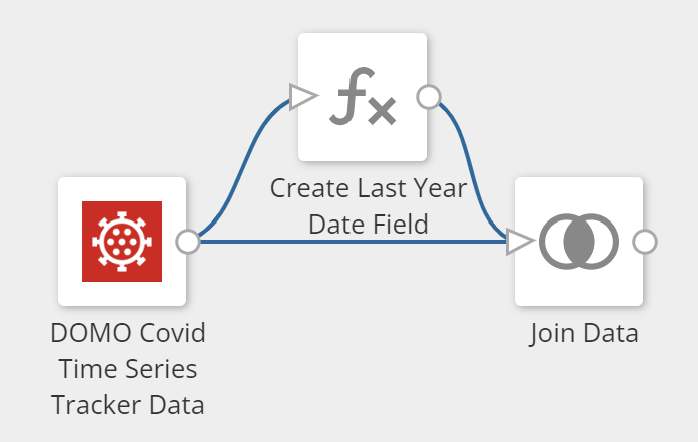
In the formula tile, create a field called LastYearDate and use the date_sub function to subtract one year from the date field in your datasest.

You can then use the join tile to join the data back to itself by joining on the last year date field you just created and the date field from the original dataset.

You may need to add additional columns to your join criteria depending on your data.
On the right table, you would rename your metric column to Last Year Value (or whatever makes sense to you)
This will put last year's data next to the current year data as an additional column.
Hope this helps.

Re: How to append Doc cards with XLS data?
@nathankilcrease If you are using a Doc card, then you will need to manually append the new data to the original Excel file before uploading a new version. However, I would recommend using a table KPI card powered by an appending File Upload dataset instead.
Re: How do I remove the "Warning: Not All the Data is Shown" from a filter?
Moneyshot, not being able to delete your thread isn't a bummer at all. I had the same issue and found the solution thanks to you!
Re: Pivot Table Subtotal Control
Agreed! I'd also add a couple requests to your idea, specifically for Pivot Table cards:
- Option to disable subtotals for individual value fields, similar to how it works for fields in Mega Tables
- Option to disable subtotals for individual row/column fields. Currently subtotals are available for all rows or all columns, but cards can become very messy for when they have many row fields that each have their own subtotals.
Shopify Connector - Partial Refunds not showed in refunds report
I am trying to get the refund amount from orders with the financial status "partially_refunded" and therefore I am pulling the "Refunds" report from the connector. However, it seems like only fully refunded orders are listed here. Is there a way to get "partially_refunded" orders in this report as well (or is there a workaround)?
Thanks"
