Best Of
Re: Beast Mode Case Excluding Certain Strings
@Domomon the syntax is NOT LIKE when you want to be sure it's not anywhere in the string.
So:
CASE
WHEN `campaign` LIKE '%online%' THEN 'Online'
WHEN `campaign` LIKE '%residential%' AND `ga_campaign` NOT LIKE '%semi%' THEN 'Residential'
ELSE 'Other'
END
 mhouston
Re: How can I make the legend of my bar chart display the value?
@AAofOO I don't believe that's an option in the bar chart, but I know it is possible in a Pie/Donut chart type.

Re: How can I make the legend of my bar chart display the value?
@AAofOO Are you looking for the total number "Yes" and "No" responses or the number per month?
For totals, I recommend using a customer summary number (https://domo-support.domo.com/s/article/360043429993?language=en_US)
For the number per month, you can display the value using the Data Label Settings.
Re: Can't Graph by Month
@SaloniShah A couple things to point out here:
Your x-axis is not being recognized as a date field. When it isn't a date field, Domo will not let you use the "graph by" option in the date range filter.
I see your x-axis field is "created date", but your formula in your ETL screenshot is creating a field called "AggregateDate". Have you tried putting the "AggregateDate" field in your x-axis?
A quick way I often convert a field to a date data type in the formula editor is to wrap the DATE() function around it. Such as, DATE(`AggregateDate`) . This will convert it to a date field, assuming the field has all valid dates.
Hope this helps.

Fill the NO data on heat Map with a different color
Hi!
Just wondering if we can alter or change the color for NO data on heat map to any other color other than grey?
Re: First Non-Null Value from Column in Formula Tile
@willrnt Try adding a constant value in the before your Group By tile and use that as your only group by column. Since the entire field is a constant, then it will return a single value as the first non-null value in your dataset.
Re: How do I convert a string to a date within Magic ETL?
@bkdadomo Yes, depending on the format of the dates you can either use the Alter Columns tile to change the datatype of the field or use the STR_TO_DATE function in a formula tile.
Re: Is there a way to filter out integers that are longer than 7 digits?
@damen If an integer has less than 7 digits, then you could filter to numbers less than 1,000,000 rather than by length (assuming the data type is numerical). So for example:
when `loan number` like '5%' and `loan number` < 1000000
Re: First Non-Null Value from Column in Formula Tile
@willrnt To find the first non-null value, you will need to use a Group By tile instead of the formula tile since you want to look across multiple rows. You should be able to select first non-null value in the aggregation type drop down. Coalesce looks across multiple columns within the same row.
Re: Filter for Top 10 Values in Hor Grouped Bar (Similar to Top 10 Excel Pivot Table Function)
@kcoughlan65 Hi,
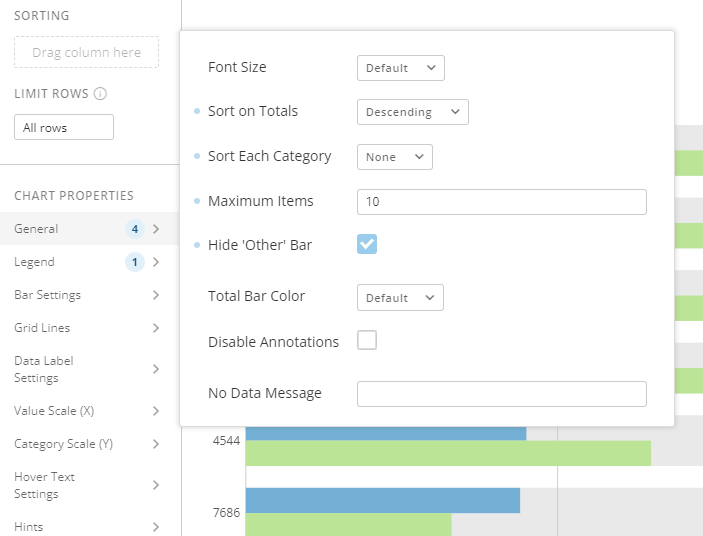
I've mocked up some data and produced this using a nested bar chart.
Within the general tab I selected these options which in mind sorts based on the totals of each code and then limits the chart to 10 items. Does this help resolve your issue?

 Jones01