Best Of
Re: How do I bucket (group) different Levels in Beast Mode?
Create a beastmode. Replace 'FIELD' with the column that contains the values you're looking at.
CASE
WHEN 'FIELD' IN ('Level 02','Level 03','Level 04','Level 05','Level 06','Level 07') THEN 'Level 02 - Level 07'
WHEN 'FIELD' IN ('Level 08','Level 09','Level 10','Level 11') THEN 'Level 08 - Level 11'
WHEN 'FIELD' IN ('Level 12','Level 13','Level 14','Level 15','Level 16') THEN 'Level 12 - Level 16'
END
Re: Caculate percentage in same month when using two date columns in same data table
You should restructure your data so that it's stacked so you have one row per observation (sales or service)
Unit ID | Date | Date Type
1 | 1-Jan | Sales
2 | 2-Jan | Sales
2 | 2-Feb | Service
Then use some beast modes to count your sales and service units:
COUNT(CASE WHEN `Date Type` = 'Sales' THEN `Unit ID` ID END)
COUNT(CASE WHEN `Date Type` = 'Service' THEN `Unit ID` ID END)
COUNT(CASE WHEN `Date Type` = 'Service' THEN `Unit ID` ID END)
/

COUNT(CASE WHEN `Date Type` = 'Sales' THEN `Unit ID` ID END)
This way everything is on the same date field.

Re: Description for Calculated Fields
So much cleaner! And it could just be right there in the tile under the beast mode name and pop up when you hover, just like any dataset field. YES PLEASE!!!

Re: Partition By not working to show correct SM% when I change parameters view options
Your case statements don't have any clause for when Geography/Product View = 'P&L'
Either add an else 1 at then end of each case statement, or call out a specific value for each option that the user can select.

Re: Magic ETL Organization Tiles
This is another idea that has been requested time and again. I think @Ashleigh has requested it a lot previously. (If it was someone else, oops!)
I find myself wanting it SO OFTEN!
Addendum to the screenshot above - I would like to see it not necessarily fully detach the sections, but to simply be able to identify sections and note what is happening in that section. It would also be cool if those sections could then be moved around together, but not a deal breaker.
Re: replace a Dataset within SQL workflow and within transforms
it is possible. you'll notice that in your screenshot the name of the dataset is aliasedfrom EmploymentCycleUpgraded to employmentcycleupgraded.
if you wanted to swap in a new dataset to your ETL, just add it in and then change the alias.

Re: Managing Data Retention Policy
You could utilize Magic ETL dataflows to check the date on the data and either split it out and archive it or remove it from the dataset depending on your company's data retention policy.
Re: Domo IDEAs Conference - Beast Modes - Number Formatting
Is there any hope of Domo implementing the SQL FORMAT() AS function?
This kind of workaround should not be necessary.
 DHo
DHo
Re: Count Attribute Instances instead of Projects
I might be wrong, so right now your Dataset would be pivoted, so in a single Row per project you have up to 9 possible Go-Live Dates (with Initial and Actual) for each. Something like:

There are 2 approaches I can think of for this:
Beast Mode approach:
One that will return the number of times it was completed within the given window, which would look something like this but with 6 more lines for the other possible dates:
CASE WHEN YEAR(Actual Date1)=2023 AND Actual Date1 <= DATE_ADD(Initial Date1,INTERVAL 25 DAY) THEN 1 ELSE 0 END
+ CASE WHEN YEAR(`Actual Date2`)=2023 AND `Actual Date2` <= DATE_ADD(`Initial Date2`,INTERVAL 25 DAY) THEN 1 ELSE 0 END
+ CASE WHEN YEAR(`Actual Date3`)=2023 AND `Actual Date3` <= DATE_ADD(`Initial Date3`,INTERVAL 25 DAY) THEN 1 ELSE 0 END
Then a best mode to tell you the number of the dates that fall in the period, regardless of whether or not they were completed in the 25 days period:
CASE WHEN YEAR(Actual Date1)=2023 THEN 1 ELSE 0 END

+ CASE WHEN YEAR(Actual Date2)=2023 THEN 1 ELSE 0 END

+ CASE WHEN YEAR(Actual Date3)=2023 THEN 1 ELSE 0 END
And in your graphs you can do a SUM of these fields to get the total you'd expect. You can make this more versatile by having the Year and the Interval be Variables rather than hardcoded, so you don't have to redo if someone later ask, what about things that we achieve in a 7 day window rather than 25, or what if I want to know for 2022 instead of 2023. This with the table explained above will yield the following results:

ETL approach to unpivot (overkill for this request IMHO)
Then your ETL would look something like this (I know there might be more efficient ways out there, but this should do the trick):

The Make Date Pairsjust concatenates the actual and initial date for each of your possible options.

In the Select Columns, we choose only the key project information we want to keep available for charts plus the Pairs we created earlier. In the Dynamic Unpivot you select all the columns except the pairs as values that will not be pivoted.
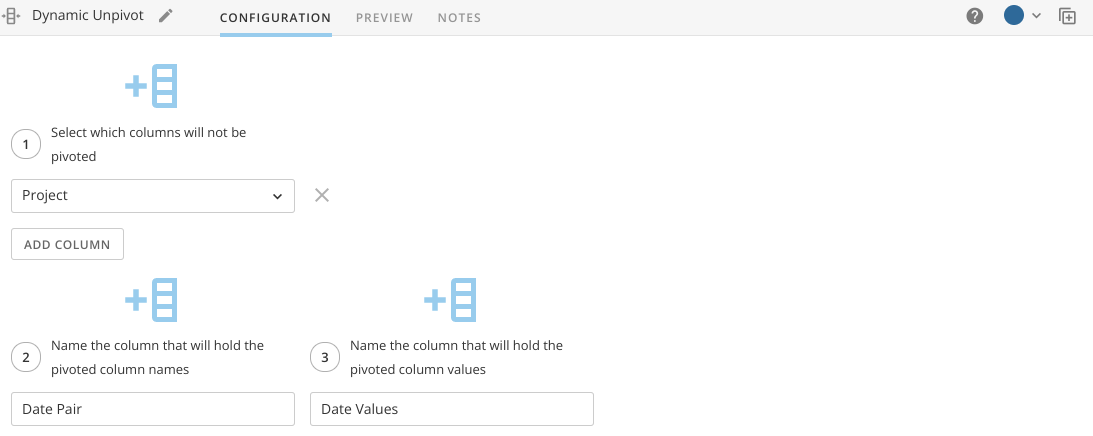
Then we split the columns again with the Split Columns to get separate value and we force them to be treated as Dates by setting up their type with Alter Columns


Optional: This approach will create one row for each date, so 9 rows per Project. You can apply a filter rows first to only keep the dates for which you have value pairs.
You'd build your card from this new dataset instead, and you'll only compare the number of times Actual Date is less than Initial Date.
Hope this helps,
Marcel Lüthi
