Best Of
Re: Count Attribute Instances instead of Projects
I might be wrong, so right now your Dataset would be pivoted, so in a single Row per project you have up to 9 possible Go-Live Dates (with Initial and Actual) for each. Something like:

There are 2 approaches I can think of for this:
Beast Mode approach:
One that will return the number of times it was completed within the given window, which would look something like this but with 6 more lines for the other possible dates:
CASE WHEN YEAR(Actual Date1)=2023 AND Actual Date1 <= DATE_ADD(Initial Date1,INTERVAL 25 DAY) THEN 1 ELSE 0 END
+ CASE WHEN YEAR(`Actual Date2`)=2023 AND `Actual Date2` <= DATE_ADD(`Initial Date2`,INTERVAL 25 DAY) THEN 1 ELSE 0 END
+ CASE WHEN YEAR(`Actual Date3`)=2023 AND `Actual Date3` <= DATE_ADD(`Initial Date3`,INTERVAL 25 DAY) THEN 1 ELSE 0 END
Then a best mode to tell you the number of the dates that fall in the period, regardless of whether or not they were completed in the 25 days period:
CASE WHEN YEAR(Actual Date1)=2023 THEN 1 ELSE 0 END

+ CASE WHEN YEAR(Actual Date2)=2023 THEN 1 ELSE 0 END

+ CASE WHEN YEAR(Actual Date3)=2023 THEN 1 ELSE 0 END
And in your graphs you can do a SUM of these fields to get the total you'd expect. You can make this more versatile by having the Year and the Interval be Variables rather than hardcoded, so you don't have to redo if someone later ask, what about things that we achieve in a 7 day window rather than 25, or what if I want to know for 2022 instead of 2023. This with the table explained above will yield the following results:

ETL approach to unpivot (overkill for this request IMHO)
Then your ETL would look something like this (I know there might be more efficient ways out there, but this should do the trick):

The Make Date Pairsjust concatenates the actual and initial date for each of your possible options.

In the Select Columns, we choose only the key project information we want to keep available for charts plus the Pairs we created earlier. In the Dynamic Unpivot you select all the columns except the pairs as values that will not be pivoted.
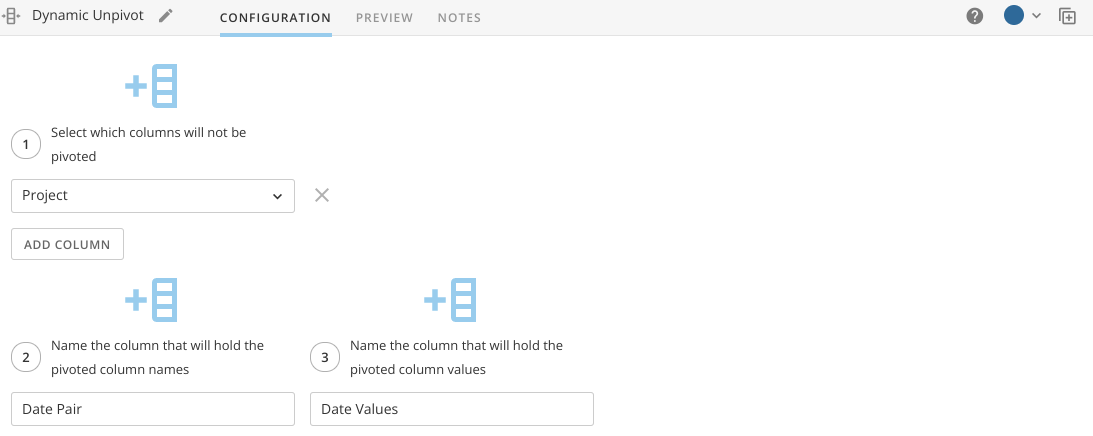
Then we split the columns again with the Split Columns to get separate value and we force them to be treated as Dates by setting up their type with Alter Columns


Optional: This approach will create one row for each date, so 9 rows per Project. You can apply a filter rows first to only keep the dates for which you have value pairs.
You'd build your card from this new dataset instead, and you'll only compare the number of times Actual Date is less than Initial Date.
Hope this helps,
Marcel Lüthi

Re: I want to add the Min, Max and average lines to a stacked graph ...how do I do that?
@caiopimenta Can you share a little more about your data and what your expectation of the min/max/avg values you want displayed would look like?

Re: Filtering 2 different data sets with one filter on a dashboard
Are the columns the same data type? Do you have extra / trailing whitespace in the column names? Domo should recognize them as one column if they're named exactly the same.

Re: Filtering 2 different data sets with one filter on a dashboard
Hi,
Could you confirm that there is no trailing or extra white space in the naming of the columns.
I have seen this cause this problem before, often there is a 'space' character at the end of the column name causing them to be registered as two unique column names.
You should see the option like the image below when named the same, where you can select which dataset drives the list of filter values / options.

 Jamie
Jamie
Re: Warning: Not all the data is shown
I agree that, ideally, the purpose of domo (and the BI group in our organization) is to do the heavily lifting of the data analysis/aggreation/etc. in Domo and present easier to digest results to the user. The vast majority of the time, that is exactly what we do.
However, for us (sales organization with a heavily segmented sales group), there is no way we will be able to create clean reporting for all their needs/wants, and they are always going to want to do their own analysis that is specific to their "area". So, we have two options:
1. Give them editor access to domo to create their own reporting
2. Use domo as a mechanism to deliver to them varying degrees of "raw" data so that they can perform additional analyis locally in excel or other similar tools.
We tried #1 and ruled it out pretty quickly because they simply don't have the knowhow when it comes to understanding how data works... especially when it involves joining multiple datasets. Our sales people are good at selling, they are not good at the fundementals of business intelligence/data mining/etc. They were creating reports that just didn't make any sense and were passing them along to internal groups... causing problems.
So for now (until BI can grow enough to have discipline specific BI analysts sitting with each group... sales, HR, marketing, etc.) we are forced to control domo development ourselves... and provide them the raw data as they ask for it.
And while it is true that exporting the data from a table card returns all the relevant data... limiting the displayed records on the card is pretty confusing for the folks using it. So while this isn't a complete show stopper for us... it is still a pretty significant pain point.
Jeff

Re: Warning: Not all the data is shown
One of Domo's strength is data integration from different platforms (google analytics, MOAT, Emails), and that too in an automated way. When you integrate all of this data, you might want to see it together by making pivots. Other BI platforms can do that easily, and display it in the form of tables in pivots. There is absolutely a need for this in Domo, and simply highlighting Domo's other functions does not mean that this issue should be sidelined.
Re: Add Date shorthand + time options to Analyzer Date Format drop-down
I would also love MMM dd, yyyy !!!!
