Best Of
Color rules for gauges
Is there a way to change the color rules of the filled gauges so when one calculated value it is greater than the target calculated value then its green and red if less? the color rules only allow me to put a static number like greater than '10' but i want the target calculated value from beast mode
Thanks alot
Re: handling multiple attachments
I've resolved this myself by utilising a Json function:
function addToNumberList(inputList,item){
inputList.push(item)
return inputList
}
The input parameters are number(list) and a number, the output is the number(list).
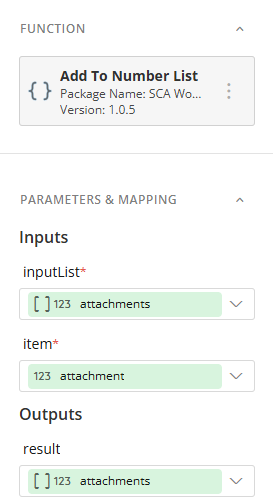
The function is called to for each attachment variable set in the form. The number(list) variable is then used in the Send Email function.
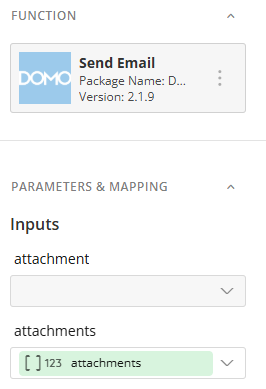
Not exactly the most efficient process.
It's disappointing that the inbuilt attachment function in the form can handle only one document. Multiple attachments is an atypical function of any form, so the Domo form should be able to cater for this.
Re: Can we create a custom thank you message for forms in app studio?
@JasonAltenburg I would need the code too.
Re: Magic ETL Join visual feedback (summary of join results)
THIS IS A SICK IDEA! LOVE IT WOOOOO
Re: Workflows Form Error: Assignee does not have update content access to queue
Update here: When I change the variable to a list using the above method. It now disapears in the orginal variable output space:

 NateBI
APP STUDIO Q&A from Domopalooza
The product team enjoyed answering questions from the audience during the final session at Domopalooza. Below you will find the answers to all questions related to App Studio (including those that weren't mentioned on stage).
Q: Back in the day, form builder and inline dataset editor were some of the coolest apps for collecting or modifying data, are there any plans to productize those types of capabilities officially?
A: Yes, there are plans to continue adding more functionality to the Forms that are available for Workflows and App Studio. We'll continue to bring more of the advanced capabilities that Form Builder offers into the native Domo forms.
Q: During the AppStudio demo they showed the Thayne app as if it were a native iPhone app, will we be able to publish AppStudio apps to the iOS/Google stores, how will this work?
A: Yes, there are plans in the future in the coming months to be able to publish an App Studio App into the Apple Store and Google store. Very cool!
Q: Will DDX Bricks work in App Studio apps? and also when embedded via Domo Everywhere?
A: Yes! Bricks are fully compatible with AppStudio.
Q: Please tell me how much App Studio costs? I need this now!?
A: No cost, this feature was released yesterday to all customers.
Q: Is there functionally a difference between using the app studio and a dashboard?
A: Both can display cards in a layout. App Studio adds custom navigation, packaging multiple pages under one destination, forms widget, and themes (greater control of looks of components). Dashboards are still good for more static reports and emailing out reports.
Q: Is App Studio (Pro-Code) going to replace Domo Bricks?
A: App Studio Pro is meant to replace the Domo Bricks Editor. It will provide all the same benefits as Domo Bricks but remove a lot of the limitations. There will be an upgrade path to allow users to move existing Bricks to App Studio Pro and the Bricks Editor will eventually be deprecated.
Q: Are there any examples of companies using app studio to transition from observing domo data & working in another platform, to working IN domo? Could working IN Domo (with buttons/writebacks) be the future of Domo?
A: YES!!! This is the vision of AppStudio. Companies do this with Pro Code Apps, AppStudio brings this to the no code world.
Q: When should I use the Domo Brick editor vs. App Studio Pro?
A: App Studio Pro is meant to replace the Domo Bricks Editor. It will provide all the same benefits as Domo Bricks but remove a lot of the limitations. There will be an upgrade path to allow users to move existing Bricks to App Studio Pro and the Bricks Editor will eventually be deprecated.
Q: When should I use App Studio vs. App Studio Pro?
A: App Studio is a low-code drag and drop interface that can provide a lot of great functionality for less technical users. However, there will be times when there are limitation to App Studio that may require a full code experience to get around. This is when you can create an app in App Studio Pro. Pro apps can be added to App Studio apps so they can work together.
Q: When will “schedule reports” be available for app studio?
A: We are still exploring a few options and the best way to go about supporting Scheduled reports in App studio. Currently, it is not have a date on our roadmap.
Q: Can you remove the filter icons from app studio dashboards like you can now on standard dashboards?
A: Yes, the option exists under Page settings(shows up when you click on the page layout) > Filter options
Q: Will we get an undo button on app studio?
A: Have talked about supporting an undo button in the future, not on our short term roadmap as of now.
Q: Do app studio apps have version control or ability to revert changes?
A: No version control as of now. You can revert changes by editing the app but it will not show up as a new version of the app. (It works similar to a dashboard in that manner).
Have any follow-up questions? Post them in the comments below. A product team owner is closely moderating this post and will respond promptly to your questions.

Re: Dynamic user selected date comparison variance calculations
If you want to use variables, you could create variables for comparing date range A with date range B. You will need a start and end for A range, and a start and end for B range. Then use a beast most to identify what belongs to range A and what belongs to range B. Filter out the other.
CASE

  WHEN `Date` BETWEEN `Start Date Range A` AND `End Date Range A` THEN 'A'

  WHEN `Date` BETWEEN `Start Date Range B` AND `End Date Range B` THEN 'B'

  ELSE 'Other'

END
Find totals and variance and from that variance %. Account for dividing by zero in %.
SUM(CASE WHEN `Group` = 'A' THEN `Amount` ELSE 0 END)


SUM(CASE WHEN `Group` = 'B' THEN `Amount` ELSE 0 END)


SUM(CASE WHEN `Group` = 'B' THEN `Amount` ELSE 0 END)

- SUM(CASE WHEN `Group` = 'A' THEN `Amount` ELSE 0 END)


CASE

  WHEN SUM(CASE WHEN `Group` = 'A' THEN `Amount` ELSE 0 END) = 0 THEN NULL

  ELSE

    (SUM(CASE WHEN `Group` = 'B' THEN `Amount` ELSE 0 END)

    - SUM(CASE WHEN `Group` = 'A' THEN `Amount` ELSE 0 END))

    / SUM(CASE WHEN `Group` = 'A' THEN `Amount` ELSE 0 END)

END

Re: Dynamic user selected date comparison variance calculations
You can track the calendar differences by using your primary date field and creating fields for year({datefield}, month({datefield}, monthname({datefield}) and the use aggregates in Magic ETL to calculate current year, previous year, previous 2 years, etc. How deep you decide you need is based on whether you need it down to week, day, hour, etc.
If you are comparing, then you want to do CYTD versus the PYTD.
So a current year aggregate would be something like:
SUM(CASE WHEN YEAR(`date`) = YEAR(CURDATE())

    THEN `amount`

    ELSE 0

    END)
A previous year to date aggregate would be:
SUM(CASE

    WHEN YEAR(`date`) = YEAR(CURDATE()) - 1

    AND `date` < DATE_SUB(CURDATE(), INTERVAL 1 YEAR)

    THEN `amount`

    ELSE 0

END)
So if you are in June, previous year only calculates up through June of the previous year. And so on. From there you can find the deltas / differences and percentage differences.
And you can get further using variables but it gets more complex.