Best Of
Re: Smart text
I'm limiting my dataset to a single date by an ETL formula / flag. In the card, I filter for the flag = 1 (which flags the most recent period). So, the card's date range is a single dynamic value which I would like to include in the title using Smart Text.
 BlakeP_0
Solution Share: Using Python to Bulk Rename Columns and Convert Timestamps
Hey Domo Fam! Wanted to share a success story using Magic ETL + Python scripting to solve a problem. My first use of a python tile!
Challenge
I'm building a Company Dimension table using Hubspot company data...all connector reports have technical column names (over 450 columns) and all date fields (50+ columns) are a mix of unixtimestamps, some with milliseconds, some without, some already as dates and yet others as timestamps. There are too many columns for a MySQL flow input (it has a limit), and managing hundreds of columns in a formula tile or select columns is unmanageable and too manual.
The objective is to rename all connector report columns to the proper UI label and convert all date or time related fields that are UNIXTIMESTAMPs over to a DATE type.
Here is the source Hubspot All Companies Dataset Preview from the connector for a few columns:

My first step was to find the Hubspot API endpoint that provided the mapping of the technical name to the UI label, which exists at this endpoint - https://api.hubapi.com/properties/v2/companies/properties.
I setup a basic JSON No Code Connector parse that data and it's looking good and provides the mapping, which doesn't always match up exactly by simply converting to Title Case or removing underscores, for example: hs_is_enriched on backend displays in Hubspot property as "Has been enriched"

Python Scripting Tile
Magic ETL was a great solution and python allowed me to make this mapping and the date conversions in bulk for hundreds of columns

Here is the first tile handling the column rename - a few lines of code with a mapping dictionary to rename 450 columns
from domomagic import *

# Read data from inputs into data frames
input1 = read_dataframe('Hubspot | All - Companies')
input2 = read_dataframe('Hubspot API | Company Properties')

# Create name to label mapping dictionary
mapping_dict = dict(zip(input2['name'], input2['label']))

# Rename columns where they exist in the mapping
existing_cols = [col for col in input1.columns if col in mapping_dict]
rename_dict = {col: mapping_dict[col] for col in existing_cols}

# Apply the renaming
result = input1.rename(columns=rename_dict)

# Write the transformed dataframe to output
write_dataframe(result)
And here is the second handling the date conversions. A bit more complex given the variety of inputs and column names, but nothing a little AI couldn't help me figure out.
from domomagic import *
import pandas as pd

# Read the input dataframe
df = read_dataframe('Python Script - Bulk Column Rename')

# Find date columns
timestamp_cols = [col for col in df.columns if 'date' in col.lower() or 'time' in col.lower()]

print("Processing timestamp columns:", timestamp_cols)

for col in timestamp_cols:
    try:
        # Skip empty or all-zero columns
        if df[col].isna().all() or (df[col] == 0).all():
            continue

        # If already in datetime string format
        if pd.api.types.is_string_dtype(df[col]):
            df[col] = pd.to_datetime(df[col], errors='coerce')
            continue

        # For numeric timestamps
        if pd.api.types.is_numeric_dtype(df[col]):
            # Get non-zero max value to determine timestamp type
            max_val = df[col][df[col] != 0].max()

            # 10-digit timestamp (seconds)
            if max_val < 10000000000:
                df[col] = pd.to_datetime(df[col], unit='s')
            # 13-digit timestamp (milliseconds)
            elif max_val < 10000000000000:
                df[col] = pd.to_datetime(df[col], unit='ms')
            # Larger timestamps (microseconds)
            else:
                df[col] = pd.to_datetime(df[col] / 1000, unit='ms')

        print(f"Converted {col}. Sample values:", df[col].head())

    except Exception as e:
        print(f"Error converting column {col}: {str(e)}")
        continue

# Write the final result
write_dataframe(df)
Re: Ability to share filter view with a specific person and not to everyone
Yes, this would be great! It would also be nice to share filter views to specific groups as well, and to allow individuals to set their own default filter views, since right now, the only way to set a default is to set it for everyone.

JULYghtful content you won’t want to miss!
July–– ICYMI!🔥🔥
Hello Domo Community! It's time to spotlight the most viewed and commented discussions from July, plus a celebration of our standout contributors, ideas, and the competitive leaderboard.
Most Active Discussions in July
These conversations sparked the most engagement—be sure to check them out and chime in with a reaction or comment:
- Description field in activity log
- Month formula for month to month change
- Beast Mode Calculation
- Incline table card
@ColemenWilson and @ArborRose answered all of these questions! Thank you for your contributions as well, @DavidChurchman. @kim_barragan0126, @Utz, and @art_in_sky, your questions seem to have resonated with the rest of the community too. 50+ views on all of these posts.
Leaderboard Top 3
@ArborRose @MarkSnodgrass @DavidChurchman on the top of the leaderboard yet again. Thank you for being stellar Coaches. Watch your inboxes for a gift card from Domo!
- @ArborRose , 379 points
- @MarkSnodgrass , 165 points
- @DavidChurchman , 110 points
Top Posts
Here the most viewed and engaged posts from July. Follow the links and leave a reaction if you found them helpful too!
- How can I add week ending dates when I have only days of the week?
- Getting error "domo.OnDataUpdate is not a function"
- Multiple progress tracking bars
- Recursive calculation in etl
Shoutout to the following community members for asking and answering our top discussions this month: @kim_barragan0126 @ArborRose @ColemenWilson @sourabh05 @GrantSmith @verytiredgirl @DavidChurchman @MayaU_01
Top Ideas
These three ideas got the most upvotes. Give them an upvote or comment if you'd like to see them in the product too.
Thank you for helping shape the future of Domo @Dhuddleston and @shaqlee.
Soon to be Coaches 👀
Once you get 1000 points, you reach COACH status and join an elite group of individuals. Hey, @pauljames, @jessdoe, @Sean_Tully we see you!! Keep going.
Community Member of the Month,
@DavidChurchman consistently shows up for the Community. In July specifically, @DavidChurchman answered a significant 15% of all questions that came in July. All-time, he's earned a rightful spot on the top 10. Thank you David for being one of Domo's best Coaches!

If David has helped you find an answer to your question, help me thank and congratulate @DavidChurchman in the comments below!

Re: Larger Grid Recommended pop-up
We have conceived of this as a user-level setting, as each user may have different preferences. In the future, once you set that setting for yourself, it will appear as on for you on every existing and new DataFlow.

Re: Creating new users without enabling email invites/notifications from Domo
Awesome! I'm glad it worked for you!

Re: Can I block a card user from the option to Go To Dataset?
Hi Roman K!
Yes, you can do exactly this using the drill path settings from a card options menu. Click the Wrench > Edit Drill Path > and click "Prevent Drilling to final data…."
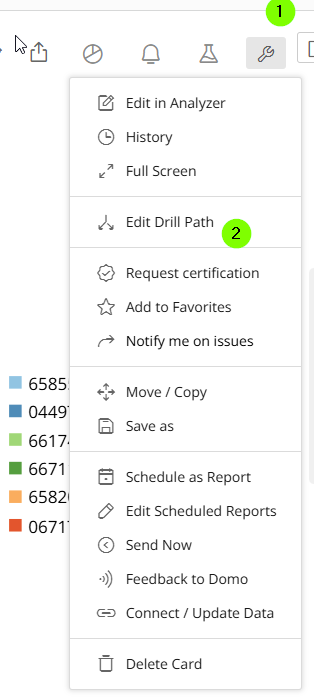
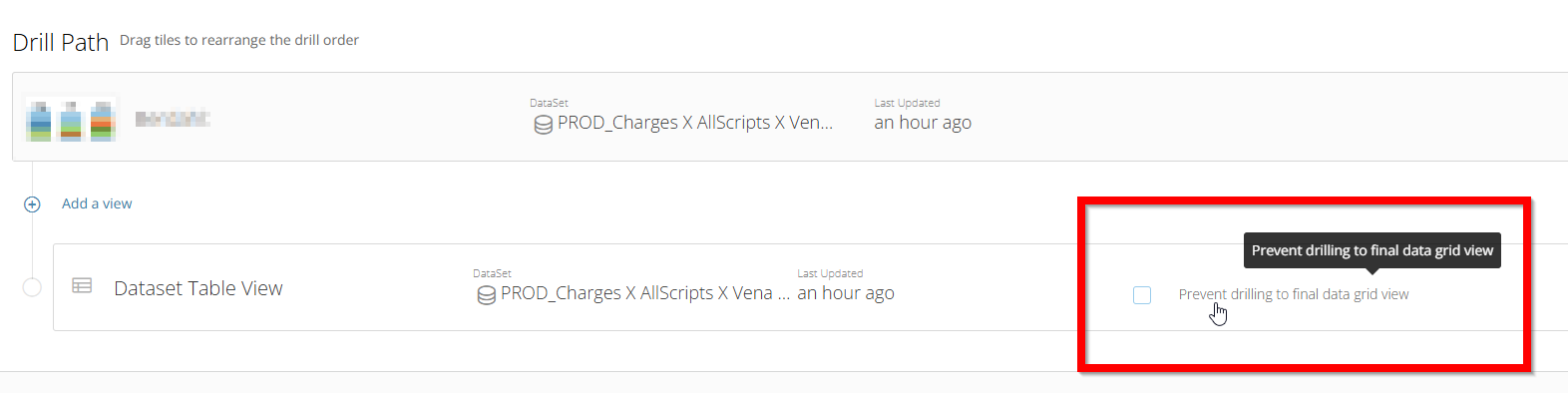
If this becomes cumbersome, then I'd recommend digging into PDP or custom roles as you mentioned. But for single cards, this is the way 🌠

Re: domo.onDataUpdate() Bug
It sounds like the behavior of domo.onDataUpdate() may have changed. Since this change affects your existing applications, I recommend reporting this issue directly to Domo Support. They can confirm whether this is a known change or a bug and provide guidance or a fix.
If your handler is asynchronous, that might have issues in how it refreshs.

Re: No Data Message is not being shown in Flex Table Card.
Looks like a bug in flex table. I suggest contacting Domo Support.