Best Of
Re: Beastmode: Previous 7 Day Avg Comparison
@DashboardDude I appreciate the time and effort you put in here to try to help with my issue, unfortunately, I need the 7 day average to be the 7 days prior to each date, not just the last 7 days. I was able to grab this information using that Lag function in the Rank and Window tile in an ETL which works great for me on my group by functions that are sums of a column, the issue I run into is that some of the beast mode formulas when used in the Group By tile in an ETL are are not effective unless looking at specifically the data that I'm grouping by: Sales Channel, Deal and Date.
The workaround I came to was by duplicating the dataset in the ETL and creating Group By tiles with specific granularity for specific cards: Summary card with all sales channels and deals (Group by Date only), Summary card partitioned by Sales Channel (Group by Date and Sales Channel), Summary Card partitioned by Sales Channel & Deal (Group by Date, Sales Channel and Deal).
I then created a constant called "Granularity" that can be used to filter on each card to select the specific granularity that I wish to view the summary numbers at and then I appended these together:

The avg calculation is then done on a beast mode in the card as the number of days that I'm averaging is based on a variable that's adjusted on the dashboard:
While I wish that I could do this on a Mega Table with the Transpose feature rather than having to create this whole dataflow to achieve the results I need, I just can't figure out how that would be possible.
This is my final result using the ETL:

 lbg123
Re: Pivot Table Issues - Needs Work
Hi, I haven't tried yet, but this seems to be something you could workaround by creating a beast mode using the fixed function, that will return you the true total by brand, something like:
SUM(SUM(`Retail`) FIXED (BY `Brand`))
And then using this beast mode for both the sorting and filter criteria. Might be worth giving it a shot.

Re: Need to create a ticket card which shows all raised, closed and backlog tickets
You'll want to use the Line + Grouped Bar chart type and then go to chart properties > General > Number of Running Total Lines. See below:

Configure the chart so that Backlog is a running total

Re: Alerts for when Data Sets Fail
Hi,
You can set the alerts by following the steps as mentioned below,
- Go to your dataset overview in Domo Data Center
- Click on the wrench icon on the top right corner of the screen, and click on the notification option
- In the popup that appears, select the option 'Send email only when this dataset fails to update'
Hope this helps
Regards
Aditya Jain

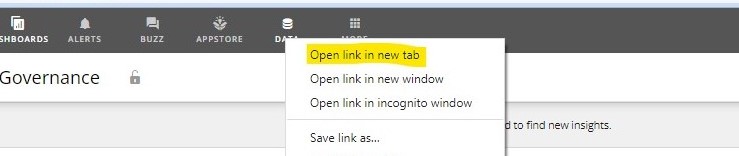
Re: Rick Click To Open New Tab
Agreed. Also, if you notice, one can right click on the Data tab when we are in any of the dashboards but not when we are in the Data tab itself.
Re: Does the API's dataset/export method work?
Are you passing in the Accept header to tell it what type of content you're willing to accept? I'm assuming you're wanting CSV so passing in "text/csv" as your Accept value would be what you want.

Re: How do I access the subfolders using SharePoint Online Rest Connector?
You'd need to specify the subfolder in the relative path parameter when configuring your connector.
Re: comapare current-3 days in period over period chart
@chetan_cricut make sure you are choosing an aggregation of SUM on both the gauge value and comparison value

Re: June Domo Community Forum Spotlight
Congrats @colemenwilson!
Also shout out to @GrantSmith for reaching 10,000 points on the Community Forum!