Best Of
Re: 🍀March Community Forum Recap
Congratulations John Le, @DashboardDude!
Domopalooza 2026 was a great pleasure. Terrific job on Boujee Bingo, @GrantStowell. "Chase ArborRose" is fun but let's leave that twelve month record to the true legend, @GrantSmith. I'd like to sit back and see some new faces involved in the discussions too.

Pro Code in Apps Mobile Rendering Tips?
Looking for any tips on best functionality for rendering a AppDB Brick via Apps and specifically have it behave smoothly from an iPad via the mobile app. Curently what I'm noticing is when I rotate the screen it "resets". Note: I'm not super fluent in Pro Code writing, however Claude has helped greatly! Any tips would be greatly appreciated!

Re: Editable Dataset use as an input dataset in Magic ETL error
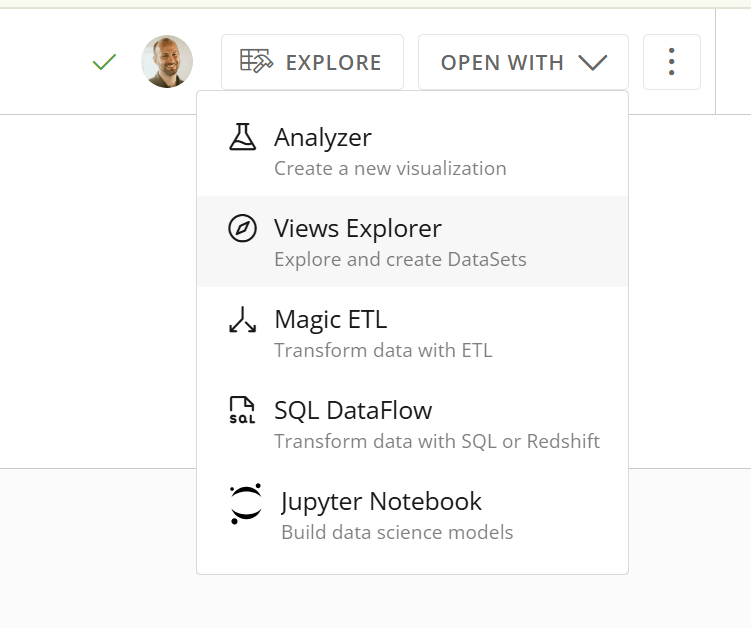
I ran into this, too. You can create a "view" of the dataset and use that view in your ETL.
Open with > views explorer > save as

Re: Editable Dataset use as an input dataset in Magic ETL error
As Editable tables are currently in beta, I'd recommend bringing this up with the beta team.

Re: Domo Governance or Stats datasets - Tag column
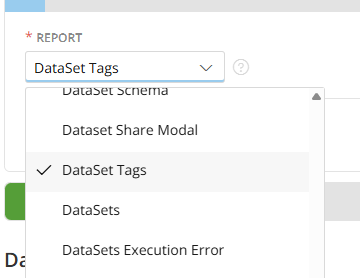
Yes, there is a DomoStats dataset called Dataset Tags. This will give you a list of all dataset Ids and the tag(s) name.

Re: Can we use an Excel file as the Source for Domo?
Yes, you can use the office add-in to update data in Domo from your Excel sheet. Here is the KB article that walks you through it:
https://domo-support.domo.com/s/article/000005143?language=en_US#update_datasets_in_excel
Other options would be the Microsoft SharePoint Online Rest Connector. You can have the connector point at that Excel file/worksheet tab and bring that data into Domo.
Hello Everyone from your new Community Manager
Domo Community: I'm thrilled to be moving into the role of Community Manager! I've been inside Domo for over a decade and have watched from a distance as our first community efforts began. My strategy from the beginning at Domo has been to help customers move along the path toward high value results from Domo. Where better can people uncover ideas to move ahead, and share approaches that remove roadblocks than THIS GROUP!
Please reach out to me in the community anytime with your thoughts and ideas. I'm here to nurture a mix of what's great and inject new innovations that can help this group grow and everyone be more and more successful with Domo!


Re: Reflections from Domopalooza 2026 and my Case for Cards
Terrific post @DavidChurchman.
Domo’s competitive advantage is making the data-to-dashboard workflow simple and accessible. Strategies that reinforce that strength will continue to add value; those that pull focus away from it risk diluting what makes Domo effective.
I agree that continued investment in the foundational layer—cards, data modeling, and overall usability—is critical. Personally, I’m not looking to use Domo for building workflows or writing code. If I need that, I can use tools like Claude or Cursor directly. It’s also worth considering the added cost implications when similar capabilities exist outside the platform.
It feels like some of the current direction is being influenced by executive demand to highlight how AI is being used, rather than how data is being effectively leveraged. In practice, I still see challenges with AI reliably handling even relatively simple data relationships, like joins across a few tables. That can lead to impressive demos, but inconsistent results in real-world use.
With that in mind—and acknowledging that some of these may already be in development or beta—here are a few suggestions focused on strengthening the core experience:
Cohort / Retention Card (simplified)
• A card that shows how groups of users behave over time after they start
Example:
Group users by when they signed up (e.g., January, February, March), then track what percentage of each group returns in later weeks or months
Signup Month | Week 1 | Week 2 | Week 3 |
|---|---|---|---|
Jan | 100% | 60% | 45% |
Feb | 100% | 55% | 40% |
Funnel / Conversion Card (simplified)
• A card that shows how people move through steps in a process—and where they drop off
Example (website flow):
Visited site → Signed up → Made a purchase
What you’d see:
Step 1: 10,000 users
Step 2: 4,000 users (40% conversion)
Step 3: 1,000 users (25% conversion from step 2)
Time Comparison Card (Smart)
• Automatically compares WoW, MoM, and YoY performance
• Includes % change and clear visual indicators
Variance / Waterfall Enhancements
• More robust variance analysis (plan vs. actual with contributing drivers)
• Moves beyond basic waterfall charts into clearer financial storytelling
Text / Narrative Card (non-AI)
• Rule-based summaries (not generative AI)
Example:
“Revenue increased 12% vs last month, driven by X”
Parameterized Cards
• A single card that can dynamically switch metrics or dimensions
• Reduces the need to duplicate multiple versions of the same card
Card-Level Versioning
• Track changes over time
• Ability to roll back when needed
Cross-Dataset Cards
• Blend data directly at the card level without requiring heavy ETL processes
Improved Debugging Tools
• Step-by-step data inspection
• Clearer error tracing and troubleshooting
Re: In iPads, Domo app kicks out users
Have you checked the mobile idle timeout settings in Domo? Have they changed?
Admin » Authentication » Session Settings