Best Of
How to change date format on comparison dates?
I have a chart that shows the last 30 days by week, comparing to the previous 4 weeks of data. The x-axis is labelled correctly, using MMM-dd format, but when I hover, the comparison date shows the week number and I'm trying to change this to be consistent with MMM-dd.
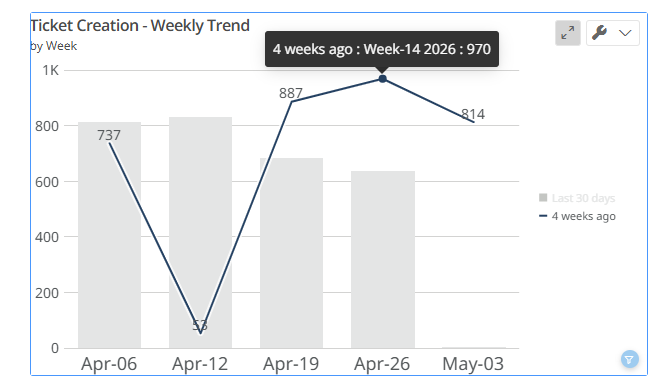
I updated the Date Format in the hover text options but it doesn't appear to have done anything. I did confirm it appears the Category Name is the wrong format but I don't know how to change it.
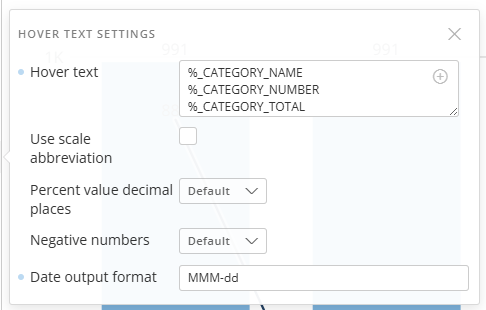
What am I missing? Thank you!

Announcing the Datasource Swapper: Move your existing Cards, Views, and ETLs to new datasets in bulk
Hi everyone,
I am excited to announce the release of the Datasource Swapper! Whether you are building new datasets because you are moving to a new data provider, transitioning away from materialized datasets in favor of Cloud Amplifier, or dealing with forced changes caused by vendor API deprecations, this tool was created to help save you hours of tedious manual updates to move your existing content to your shiny new datasets.
You can read more about this custom tool and get a step-by-step guide to create and run this in your instance here:
The Datasource Swapper is designed to accelerate large-scale migrations by allowing you to re-map content in bulk. Instead of opening every dataset yourself and updating each piece of content, you can provide a simple mapping dataset to this tool and let it handle the heavy lifting.
Key Functionality & Features:
- Bulk Dataset Swapping: Automatically update the input datasource for Cards, Dataset Views, and Magic ETL Dataflows across your Domo instance.
- Mapping-Driven Automation: Uses DomoStats and a simple "Old ID to New ID" mapping to identify and update all dependent assets for any given dataset in one go.
- Proactive Schema Validation: Before committing changes, the tool checks for missing columns or data type mismatches in the target dataset, allowing you to skip problematic pairs or proceed with full visibility.
- Flexible Deployment: Choose the environment that fits your workflow — deploy it as an integrated Pro-Code App using CodeEngine or utilize the standalone JavaScript-based CLI tool for a local experience.
This tool is perfect for Domo Instance Administrators who are tasked with maintaining instance health during structural data changes. Because it requires the ability to deploy CodeEngine packages, create custom Pro-Code apps, and modify instance-wide content, it is most effective when run by an Administrator or a user with elevated permissions and widespread access to update content.
You can dive into the step-by-step implementation guide and access the code here:
Happy migrating!

Re: Bug - Domo Page Level Filters being reset
We do have an open ticket with Domo and they are actively working on it for us.
 collinT
Re: Month End Snapshot & Current as of today on the same dataset, is it possible?
Yes, I'd recommend using the Dataset Copy with Append update method. This will update the dataset every month and automatically give you a timestamp (BATCH_LAST_RUN).
You could use an ETL to union these two datasets together and have a column to state "Current" or "Historical" and trigger it to run on your historical dataset update then just filter out the latest record (highest batch_id) from historical in your ETL.

Re: Pro Code in Apps Mobile Rendering Tips?
Hi @Sean _moore21, this is expected one. iPad rotation triggers a re-render, so your AppDB Brick reloads and loses in-session state.
Try keeping state tied to controls or datasets instead of temporary variables.
Avoid triggering queries on every render, cache or pre-load where possible.
Simplify layouts and reduce conditional rendering tied to screen size.
And since Claude’s already been your coding partner, might as well put it back to work on these tweaks 🙂
Re: Data Table
@verytiredgirl
Is this the correct image?
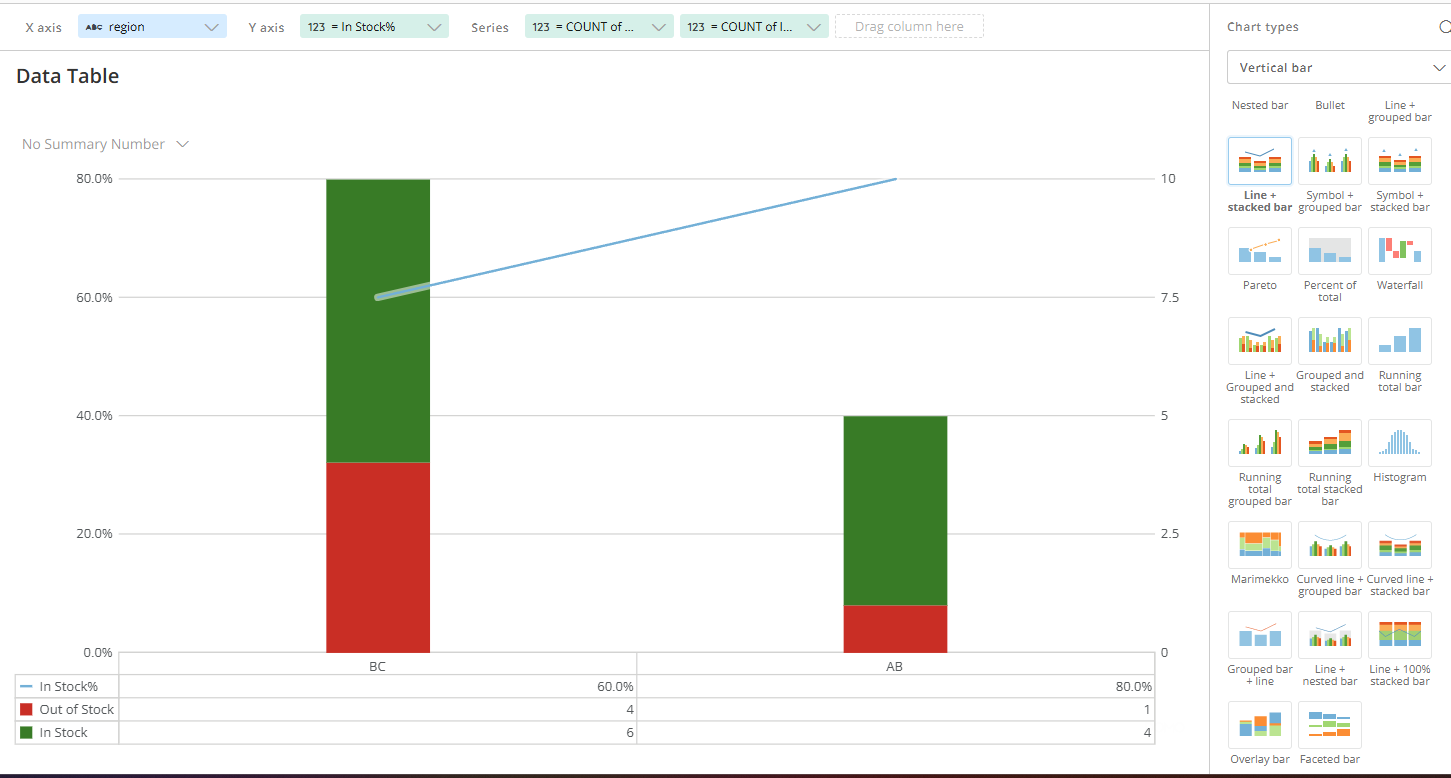
For each region (branch), the number of items in stock and the number of items out of stock are accumulated.
 NRT
NRT
Re: Rows Masking, is it possible?
I'm not aware of a way to do this. The approach I would take is to create an aggregate dataset at the region level, so that the Region Manager can see the totals for their region and then apply pdp to the granular dataset so that the RM can only see the details of the sales reps that are their direct reports

Re: Rows Masking, is it possible?
To add to ggenovese, you could use MagicETL group-by to sum by region, and then join the totals back onto the dataset.
The result could look something like this:
Order | Sales$ | SalesRep | Region | TotalbyRegion |
|---|---|---|---|---|
A | 100 | 1 | CA | 400 |
B | * | * | CA | 400 |
C | 100 | 3 | CA | 400 |
D | * | * | CA | 400 |

Re: Magic ETL: AI Text Generation Tile
@RobbieJannoh Sorry to hear that you're having this issue! How frustrating. The AI Text Generation tile takes advantage of Anthropic's batching services, which offers a significant discount on input/output tokens, however it comes along with varied run times as it runs on idle compute. We understand that these varied runs may not work for every use case, and we're working on adding functionality to the tile that will support non-batch executions as well (which should provide for less variability if you opt in to use non-batch in that DataFlow).

