Best Of
Dynamic Pivot
I have a table with a combination of fields and a target value. I want to concat all the fields (Retailer, Field, Target, Strategic Priority) and pivot the table so they are all columns with their respective Target Value underneath.
I know how to do this with the Pivot option in which I manually create a new column for each combination. However, is there a way to have this automatically create new columns? My concern (beyond a whole bunch of manual input - I currently have 67 rows) is there will be rows (with new field combinations) added to this dataset and they'll be excluded unless I recognize and manually add them in.
Below is a screenshot of the data I'm working with for context.

Re: How to delete a copy of a card
"Copies" are actually just the same card. You can see this if you edit the card on both dashboards the ID in the URL for the card will be the same so there isn't really an original and a copy. If you want to "delete" a "copied" card from a dashboard all you need to do is select Move/Copy and remove the dashboard from the list of dashboards displayed.

Re: Same period last year measure
Hi @Ab_Israni
When I'm doing comparisons for year over year for custom ranges what I do is restructure my data so that I have several different periods for each record based on the date. For example if you're looking at January 1st it'll have a current value of Jan 1 2026 and a Last Year period value of 2025. I've done a write up on this in the past where you can find here:
If you're concerned with rows you can pivot the resulting data so that you have a column for the current value and one for the last year value instead of having multiple rows.
Re: Any way to view schedule for dataflows?
And here's a tutorial on how to set up your own custom domostats dataset that returns the schedule. To set up the JSON account, use the JSON no code connector, select API key as the type, select "Pass as a header" for the API key type, then put x-domo-developer-token as the Header name, then put in your API key.
https://www.youtube.com/watch?v=6fUYd1gIUnQ

Re: Editable Tables in Snowflake Cloud Amplifier, Magic ETL, Workflows
When I first got on the Editable Tables Beta, I could not bring their associated datasets into Magic ETL. The workaround was to create a view of the dataset, and that view did work with Magic ETL. I recently tried again, and it does appear that I am able to use the Editable Table in MagicETL now, but I haven't tested it much. All that is to say, try creating a view of the editable table for those use cases you listed.

Re: May 2026 Domo Feature Release
Everyone's invited to the related webinar from the product management team. Register here:


Re: Internal Audit - needs access to EVERYTHING
I would start by assigning them to the participant role and then creating a group named audit and adding the people to it. You can then go to Admin - Dashboards and choose Select All and choose Edit and select Add Users & Groups and select your group. Once they have access to a dashboard, they will have access to all the datasets used on those dashboards. You can also go to the Data Center and select multiple datasets and then add that group to give them specific access to those datasets.

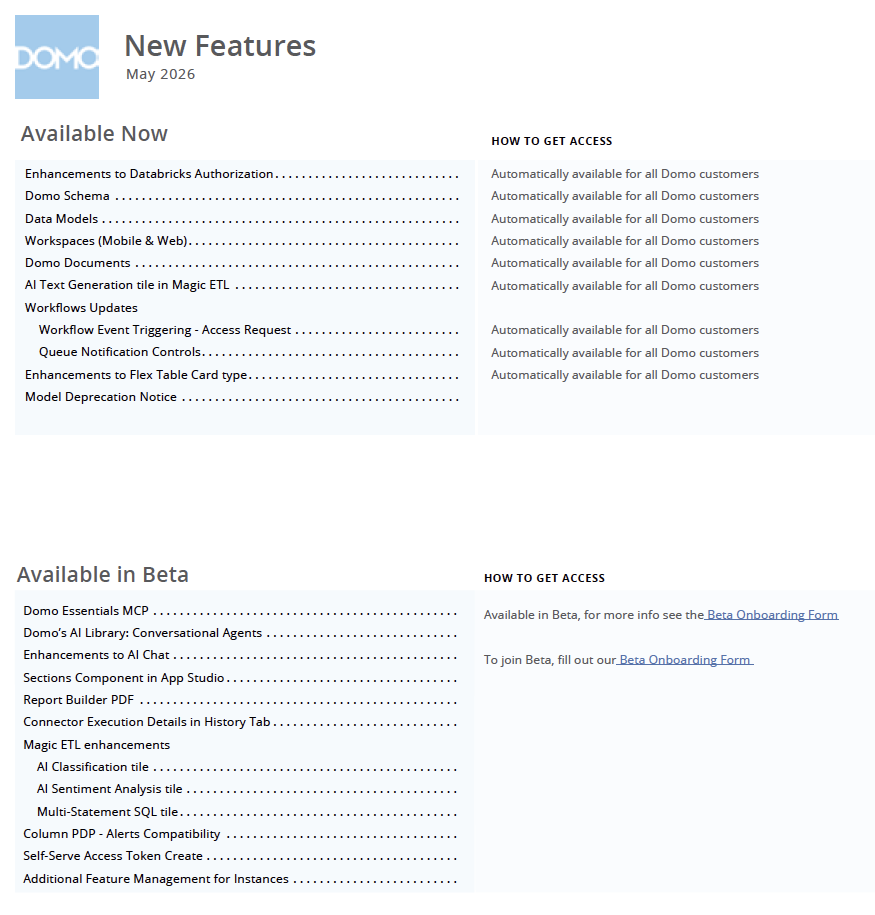
May 2026 Domo Feature Release
You should see the pop up announcements in your Domo instance today for a feature release which will be turned on next Tuesday (after the long weekend).
As always, there could be last minute adjustments and when the features are turned on next week there will be additional in product messaging as well as updates to the Domo website and Knowledge Base.
There are a ton of amazing features in this release and I cannot wait for all of you to take them for a ride!

Re: beastmode versus ETL formula - same formula, different result
This worked perfectly, I just had to modify the parenthesis a little. Thanks
 Jbrorby
Re: PDF Report Builder Beta: Pass a user-controlled filter to the report?
I agree, the filters should pass through to the report export. There is similar functionality with Dashboards so it makes sense. We have users filtering one app page down to a specific client so they can provide them a report so i think this functionality would be ideal.
