Best Of
Re: Border when hovering over a DDX Brick
Can you share a screenshot of what you are seeing for a border on your DDX bricks? Mine don't have a border other than the same hover border you see on any other card in Domo. Those hover borders can be disabled in the following way: Edit Dashboard > Edit Content > Change Interaction > Disable Card Interactions. This will remove the hover border, but also prevent any interaction with the card.

Re: How to calculate Percentage in each Series - Bar graph
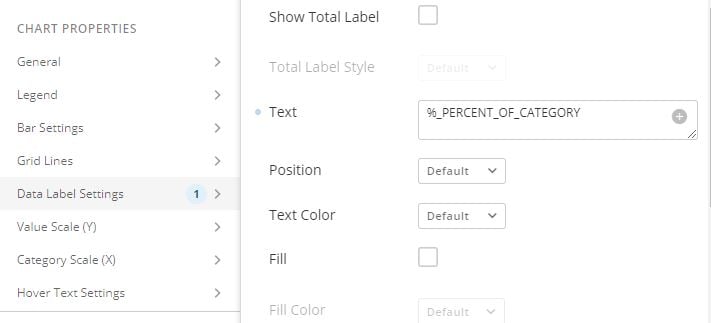
Hi @Dharshini, in 'Chart Properties' -> 'Data Label Settings' -> 'Text' -> '%_PERCENT_OF_CATEGORY', you can show the data in each stacked bar as a % against the total along each for your ACT Lower values, showing the bars data exactly as your first image.
Hope that helps.
 amehdad
Re: How to exclude/filter out based on 2 dates
In Magic ETL JOIN tile can't join using a between clause however you can add a single column to each dataset, give it a name of "Join Column" with a value of 1, then join both datasets together based on this field and then use a filter tile to filter our records were it's not between the two dates.

Re: How to exclude/filter out based on 2 dates
Drop this formula into your filter tile, be sure to select "Add formula rule" as the filter type:
`date` <= `wipe_date` AND `date` >= `forecast_due_date`
Re: How to edit DATEDIFF to calculate beyond calendar year
@Aaron_w_SMG Is the Year filter based on the IncidentDateTime or is it derived from a different date field? Is it possible that there are conflicting date filters in your cards that result in all the data being filtered out?

Re: Paritoning beta. Where to start?
@dkonig It depends on the connector. The ones that support partitioning will have a "merge" method which uses partitions. If the connector you have been using does not have the merge method, there may be another version of the connector that does. When paired with MagicETL subset processing (which I assume is the beta you are referring to), Domo detects which rows in the input datasets have been added/updated and only processes those rows. In many cases this results in a much faster data pipeline.
Here are a couple other articles that talk about partitioning theory:
Re: Paritoning beta. Where to start?
Maybe I'm just not understanding how/why to use partitioning. With a connector that only has append and replace options can you even use partitioning to pull in new data and replace(update), let's say, the last 30 days?
 dkonig
Re: Paritoning beta. Where to start?
This video is from back in January. It definitely mentions the use cases I am interested in but I am still not sure exactly how to configure things. I'm still unclear on what to partition on especially when a dataset that are created with connectors without partitioning are used in the dataflow
dkonig