Best Of
Documentation to sync writeback tiles
During my Domo trial, myself and the sales team helping me, had trouble getting data to writeback to both Google Sheets and Google Big Query. After a lot of experimentation and clicking around, we discovered the issue was that the write back tile in the workflow needed the same schedule settings as the workflow. It would be great for this to be included on documentation!
 Xan
Function for renaming cards
A common Workflows use is governance related tasks, and a common governance related task is cleaning up old cards. I created a workflow that goes through, identifies cards that haven't been viewed in XX days, and then changes the title to indicate it's flagged for deletion.
This is a common pattern of looping through things that need action taken, and required me to author a new function which I'll share with you here. I wanted to walk through the concept required to accomplish this.
I'm going to walk through all the steps I took to create this workflow. It's worth noting that my process is to not create a bunch of variables in advance, but rather let the service tasks create the variables. This ensures the variables are always the appropriate type, but it does require you to rename every variable, as the system will create them all with the name "result". So just know a step that I don't mention in every one of the service tasks is choosing "create variable and map" and then renaming the variable to something useful.
The first step in this workflow is to identify the cards that need to be flagged for deletion. To do this, I used the "queryDatasetAndConvert" function that is found in the Domo Datasets package. The dataset that I'm querying, is the activity log. Let me share the query here and break it down:
SELECT `Object_ID` , MAX(al.`Event_Time`) as Latest_Event, `Object_Name` as Card_Title FROM `activity_log` al WHERE DATE(al.`Event_Time`) < DATE_SUB(CURRENT_DATE, interval 30 day) AND `Object_Type` = 'CARD' AND `Action` = 'VIEWED' GROUP BY al.`Object_ID`,`Object_Name`
Looking at the query, we're grabbing the Object ID, which is the card ID. We're grabbed the max event time (the most recent event) and we're grabbing the object name (which is the card title). You can see in our where clause we're limiting it to Object Type of "card" and Action of "Viewed". We also are using a date sub to only grab records where the date of this activity is more than 30 days from the current date and we're grouping by the object ID and object name. What this query does exactly is gives us a list of every card that hasn't been viewed in more than 30 days, and the list includes the card id and card title. This function returns a list of objects.
Now that I have a variable which is a list of objects, I need to understand how many objects I have so I know how many times I need to loop through. To do that, I next have a service task which is "getListOfObjectLength". This will tell you the number of objects in the list of objects, so you'll map the output variable from the previous service task to the input of this one. Store the result as "listLength" so you can reference it later.
Next step is to initialize an iterator so you can track how many times you've looped through the list of cards and changed the title. To do this, I just used the "AdditionNumber" function, adding 0 to 0 and storing the output variable as "iterator".
This is where the magic starts to happen. We need to now loop through each card and perform a series of tasks to store the card ID, store the card title and then change the card title. There are 4 service tasks required to make this happen.
First we Grab a card to modify, meaning we want to grab 1 of the objects from our list of objects. We want to loop through every single one, but we'll do it in order and start with the first one. Since these lists use zero based numbering, the first record is at position 0. Our iterator variable is set to 0. So we use the "indexIntoObjectList" function, with our index position being mapped to our iterator variable (currently at 0, which will return the 1st item in the list) and the list being the query result from our dataset query. I'm storing the output of this as the "currentCard" variable.
Now that we have the current card, we need to get the card ID and the card title. The card ID is used to tell the ChangeCardTitle function which card to update, and the card title is needed because we're changing the card title to the same title, just adding a prefix. So for each of these service tasks I'm using the "pickTextPropertyFromObject" function. The object I'm passing in is the "currentCard" object variable and the property I'm passing is the Object_ID - storing the output as a variable called "cardID". Same step for the card title, but the property I'm grabbing is "Card_Title" and I'm storing it in a variable named "cardTitle". Those two variables are what are needed for the function that actually changes the card title.
Now, when I got to this step I couldn't find a function that would change the cards title. I won't get in to the details on how I found the API end point, other than saying I watched the network traffic while I changed a cards title. A few minutes later I had a working function created using the code attached. You can copy and paste this in a new code engine package, deploy the package and use it in your workflow.
So now I run that service task, and I pass in the cardID and cardTitle variables, and for the prefix I put a custom value of "TO BE DELETED - ". What this function will do is take the card ID and add "TO BE DELETED - " at the beginning of the title. So a card titled "Dans Card" would become "TO BE DELETED - Dans Card".
The next step is a conditional gateway to determine if there are more cards that need to be modified. Out of the conditional gateway the first path I set is a service task that increments my iterator. That's the "Yes" path, meaning yes, there are more cards to modify. The service task I used here is AdditionNumber, and I'm passing the iterator variable as number1 and a custom value of 1 for number2. What this does is takes my iterator and adds 1 to it. At this point the iterator is 0, so now it will move to 1. In the "Yes" evaluation, I'm evaluating if the iterator is less than or equal to the ListLength. If you remember, the listlength variable is the number of cards we have to modify, and the iterator is now both a count of how many times we've gone through this process as well as a value we can use to index in to our list of cards.
From this service task that increments my iterator by 1, I go back to the service task where I index in to the object list and grab the details of the next card. You've already configured this function so nothign further needs to be done here but it's worth noting that the iterator is the index parameter, so now with the iterator being 1, it's going to grab the cards details at position 1, which is the 2nd one in the list. You've just built a loop that will loop through this process, grabbing the next card in the list, one after another until that iterator is equal in length to the list of cards.
Now you'll go back to the conditional gateway and create the path out for when the incrementor is equal in length to the list. You can choose what you want to do from here…in my workflow I created an email that sends to me and let's me know the number of cards that were flagged for deletion, waits 30 days, and then starts the next workflow that will go through and delete those cards.
Hopefully his is helpful! I'm planning to make a video walking through this and when I do I will share it here.
Re: Please help me write this filter formula:
While you can write formulas in the filter tile, for this type of logic, I would suggest adding a formula tile before your filter tile where you determine which rows to include or exclude and then you can just filter to include in your filter tile.
In your first scenario, your formula tile logic would look like this:
case when CustomerType = 'INTERCOMPANY' AND Company <> ='X' THEN 'Exclude'

ELSE 'Include' END
In the second scenario, it would look like this:
case when CustomerType = 'ENDUSER' AND Company NOT IN ('A','B','C') THEN 'Exclude'

ELSE 'Include' END

Re: Beast Mode for Count Distinct with Condition
Hi, user03295,
You very nearly had it right. Try wrapping your entire case statement in the count distinct function:
count(distinct
  CASE
    WHEN `visitor_called` = 'Y' then `visitor_id`
    -- note I'm NOT using the "else" portion of the case statement. That's because, if `visitor_called` is not 'Y', then I want the case statement to return NULL. NULL is not included in aggregate functions like count()
    END
)
Unknown
Active Directory / SSO / User Provisioning and Deprovisioning
Hello Domo Product Team!
One of our top ELA accounts has been struggling with the following for some time. We are hoping to gain enough attention (and enough upvotes) to have this considered for inclusion in the Domo platform.
The general request is for automating user provisioning and deprovisioning via Active Directory sync with SSO. There is an old post in this Community Forum from 2019 that articulates what is being sought (however, we are unsure if this is still active and able to be upvoted - in addition it references Azure, whereas we are on AWS):
Essentially, allowing an active directory sync of some kind would appear to solve these recurring issues:
Bypass Required Login at User Creation
: Having new users login before their new Domo user account is active/ready can be a source of confusion and frustration, especially when it comes to high level execs who we are trying to share reports with. We can create their user account, but the requirement to have them login before they can view Domo content is a major impediment to their seamless adoption.
We are recommending a toggle to allow Admins to turn on/off the requirement for newly created users to have to login before they can be shared Domo content. We need to be able to establish users without requiring a direct login.
Automated Session Kill for Disabled/Deleted Users
: We currently take advantage of the Domo functionality for Domo session timeouts after a set period (in our case, 24 hrs), essentially requiring all users to login and reauthenticate each day for security purposes. Without increasing the timeout frequency (which would make all users' lives very difficult), we need a way to also auto-kill Domo sessions if a user has been terminated and their User license disabled/removed. It poses a great security threat when users who are no longer employed still have access to sensitive company data before the next 24hr timeout occurs. Please strongly consider adding functionality to allow this auto-session end for disabled and/or deleted users.
We are currently investigating automation via Governance Toolkit, and possibly even Workflows, but again, we wanted to make sure this issue is successfully reported to the Domo Product team for acknowledgement and consideration for a more seamless experience.
Thank you!
Casey

Workbench - Allow Live Updates for all logged in users
We have multiple users who are working on our workbench server however it only gives live updates to the first person who has logged into the server. It'd be nice to have the live updates for all users who are logged in instead of having to either kick all the other users off the server or closing workbench and reopening it whenever we need updates.

Trusted Attribute PDP Filters That Allow "Contains" Logic
It is a manual and time consuming process to manage personalized data permissions (PDPs) today, especially if you have multiple data sets and a large organization.
That doesn't have to be the case.
The end-to-end process of adding data permissions could be almost 100% automated with one small change to the current setup of PDPs.
Process:
1) Build an entitlements table leveraging your employee hierarchy or something like your territory hierarchy from Salesforce. This table would have some ID that connects into your data with all people allowed to see a row of data. You could then join this table with every table that requires PDPs to be applied
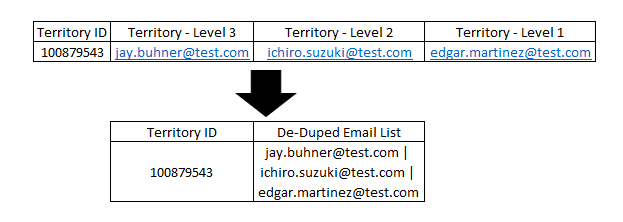
2) On the data set, filter by Trusted Attribute and select the De-Duped column and the Email attribute
**THIS IS WHAT NEEDS TO BE UPDATED**
Unfortunately, the filter is set to EQUAL TO instead of CONTAINS, meaning you can't do this
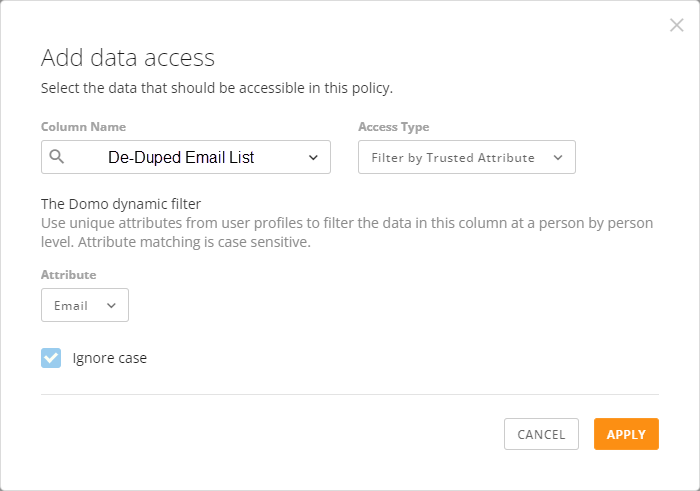
3) Add a dynamic group to the policy row containing all Domo users. Only those who are listed in the De-Duped Email List column will have the ability to see data
Ask:
Update the filter logic for Trusted Attributes on PDPs to CONTAINS instead of EQUAL TO (or, make it an option to toggle between).
Additional Options for Multi-Factor Authentication
It would be a good enhancement if the multi-factor authentication option could allow the option to use something other than SMS, such as Microsoft Authenticator or Google Authenticator. This would allow the Domo MFA option to be in line with the latest security best practices.