Best Of
Re: Closed Group Owner - grant to add/remove members?
Hi @Jessica, what role is your user currently? I know that being 'Admin' means you can add and remove users from closed groups even if you don't own the groups.
Also, even though that user has been added as a group owner, s/he can't see that they are owner of that group but in your Domo view, you can see that person is owner?
 amehdad
Re: Slider Cards not showing all data/options
Hi @D-Rab, the warning message indicates that all of the data is present, but on the card level, the visualization has been truncated. What you should do is reduce the amount of data coming into the dataset you use, or perhaps adding a Search bar on the slider card would enable the other people to come up.
amehdad
Re: Programmatically run a dataflow/dataset
Okay, here we are with the solution to this problem! Special thanks to @jaeW_at_Onyx for all the steps.
I've published https://gist.github.com/giuseppellrusso/03daabba54424ceac83309921121320c#file-domo_utils-py with my module developed to programmatically run a dataset or a dataflow.
As you can see from the code, running a dataset is as easy as running the associated stream and thus we can use the PyDomo library (that is, we are using the official and supported API).
Running the dataflow is a bit trickier, because we have to authenticate to our private instance and use the session token to access an undocumented API. However right now this is working great ?
I also post here the code:
from pydomo import Domo
import logging
import json
import requests
""" Connect to Domo using the Pydomo library and the client id and secret
Documentation:
https://developer.domo.com/docs/authentication/quickstart-5
Args:
client_id (str): client_id to connect with
client_secret (str): client secret to connect with
api_host (str): host of the Domo api
domo_log_level (logging): level of Domo logger. Default set to DEBUG
Returns:
an istance of the Domo object from Pydomo library
"""
def get_domo_connection(client_id, client_secret, api_host, domo_log_level = logging.DEBUG) :
try :
domo = Domo(client_id, client_secret, log_level=domo_log_level, api_host=api_host)
return domo
except Exception as e :
logging.error(e)
raise Exception(e)
""" Gets the stream associated with a Domo dataset
Args:
streams (pydomo object): pydomo object containing the list of streams of a domo instance
dataset_id (str): alphanumeric id of a domo dataset
stream_list_limit (int): limit of streams to retrieve from the pydomo streams object
Returns:
the pydomo stream object of the stream associated with the given dataset
"""
def get_stream_by_dataset_id(streams, dataset_id, stream_list_limit = 2000) :
stream_list = streams.list(stream_list_limit,0)
dataset_streams = [stream for stream in stream_list if stream['dataSet']['id'] == dataset_id]
if(len(dataset_streams)==1):
return dataset_streams[0]
else:
no_stream_found_string = 'No stream found for dataset {}'.format(dataset_id)
logging.error(no_stream_found_string)
raise Exception(no_stream_found_string)
""" Runs a Domo dataset
The method is actually creating a new execution for the stream associated to the dataset
Args:
domo_connection (pydomo object): instance of the pydomo Domo object
dataset_id (str): alphanumeric id of a domo dataset
"""
def run_dataset(domo_connection, dataset_id):
try :
streams = domo_connection.streams
dataset_stream = get_stream_by_dataset_id(streams, dataset_id)
dataset_stream_id = dataset_stream['id']
streams.create_execution(dataset_stream_id)
logging.info('Successfully run dataset id {}'.format(dataset_id))
except Exception as e:
logging.error(e)
raise Exception(e)
""" Gets a session token to be used for undocumented private api
Args:
domo_instance (str): name of the domo instance
email (str): email used to login to the domo instance
password (str): password used to login to the domo instance
Returns:
the session token
"""
def get_session_token(domo_instance, email, password):
auth_api = 'https://{}.domo.com/api/content/v2/authentication'.format(domo_instance)
auth_body = json.dumps({
"method": "password",
"emailAddress": email,
"password": password
})
auth_headers = {'Content-Type' : 'application/json'}
auth_response = requests.post(auth_api, data = auth_body, headers = auth_headers)
auth_status = auth_response.status_code
if auth_status == 200 :
logging.info('Session token acquired.')
return auth_response.json()['sessionToken']
else :
token_error_string = 'Token request ended up with status code {}'.format(auth_status)
logging.error(token_error_string)
logging.error(auth_response.text)
raise Exception(token_error_string)
""" Runs a Domo dataflow
Args:
domo_instance (str): name of the domo instance
domo_token (str): session token used to authenticate to the private apis
dataflow_id (str): id of the dataflow to be run
Returns:
the status of the post request used for running the dataflow
"""
def run_dataflow(domo_instance, domo_token, dataflow_id):
dataflow_api = 'https://{}.domo.com/api/dataprocessing/v1/dataflows/{}/executions'.format(domo_instance, dataflow_id)
dataflow_headers = {'Content-Type' : 'application/json',
'x-domo-authentication' : domo_token}
dataflow_response = requests.post(url = dataflow_api, headers = dataflow_headers)
dataflow_status = dataflow_response.status_code
if dataflow_status == 200 :
logging.info('Successfully run dataflow id {}'.format(dataflow_id))
return dataflow_status
else :
dataflow_error_string = 'Dataflow run request ended up with status code {}'.format(dataflow_status)
logging.error(dataflow_error_string)
logging.error(dataflow_response.text)
raise Exception(dataflow_error_string) gllrusso
Programmatically run a dataflow/dataset
Hello,
I would like your help in order to understand how to run a dataset (or a dataflow) based on a trigger outside Domo.
Let's say, for instance, I have a python script that check a condition on my database and if the condition is met, it should trigger the execution of two mySql Connector in Domo.
Would this be possible somehow?
The closest thing I am able to do is to run manually a dataset or a dataflow with the Java CLI, but I was wondering if there is any API that can accomplish my request so that i can call this API whenever I need it.
I saw in another question an user talking about undocumented API, but I cannot find anything more about it.
It would be enough to understand how the two DOMO CLI commands
| dataflow-run-now |
and
| dataset-run-now |
work in order maybe to emulate the same interaction with my Domo instance programmatically.
gllrusso
Re: Does anyone know how to convert Google Analytics "Date Hour and Minute"?
You can use a formula tile to splice out the different parts and assemble it as a timestamp:
TIMESTAMP(CONCAT (
  LEFT(`Date Hour and Minute`, 4), '-',
  SUBSTRING(`Date Hour and Minute`, 5, 2), '-',
  SUBSTRING(`Date Hour and Minute`, 7, 2), ' ',
  SUBSTRING(`Date Hour and Minute`, 9, 2), ':',
  SUBSTRING(`Date Hour and Minute`, 1, 2)))

Re: Creating an "unassigned" row for gantt chart visualization
@MarkSnodgrass thank you!! This was really helpful (and much simpler than what I was thinking) - I was able to take this and run with this to get what I need.
Writing up the full solution for anyone who runs into something similar:
I anonymized a subset of the data and ended up finding some edge cases I hadn't considered - 1) resources with no assignment and 2) unassigned days before the first assignment for the resource and after the last assignment for a resource and 3) overlapping resource assignments i.e. Assignment A and B have the same start date but different end dates:

I applied the logic you gave me (and added a sort on end date in the rank and window to handle overlapping assignments like curly's that both start 10/13) which filled in all the gaps:

I was then able to extend the logic to handle these red bars:
The case where nobody is assigned is a simple formula for start date is null and end date is null.
For the days before the first start date:
- Rank and window tile - create a column last_start_date that is the lag of start date, ordered on start and end date
- Formula tile:

For the days after the last end date:
- Rank and window tile - create a column next_end_date that is the lead of start date, ordered on start and end date
- Formula tile:

Then append all of these to the original dataset and boom, magic.
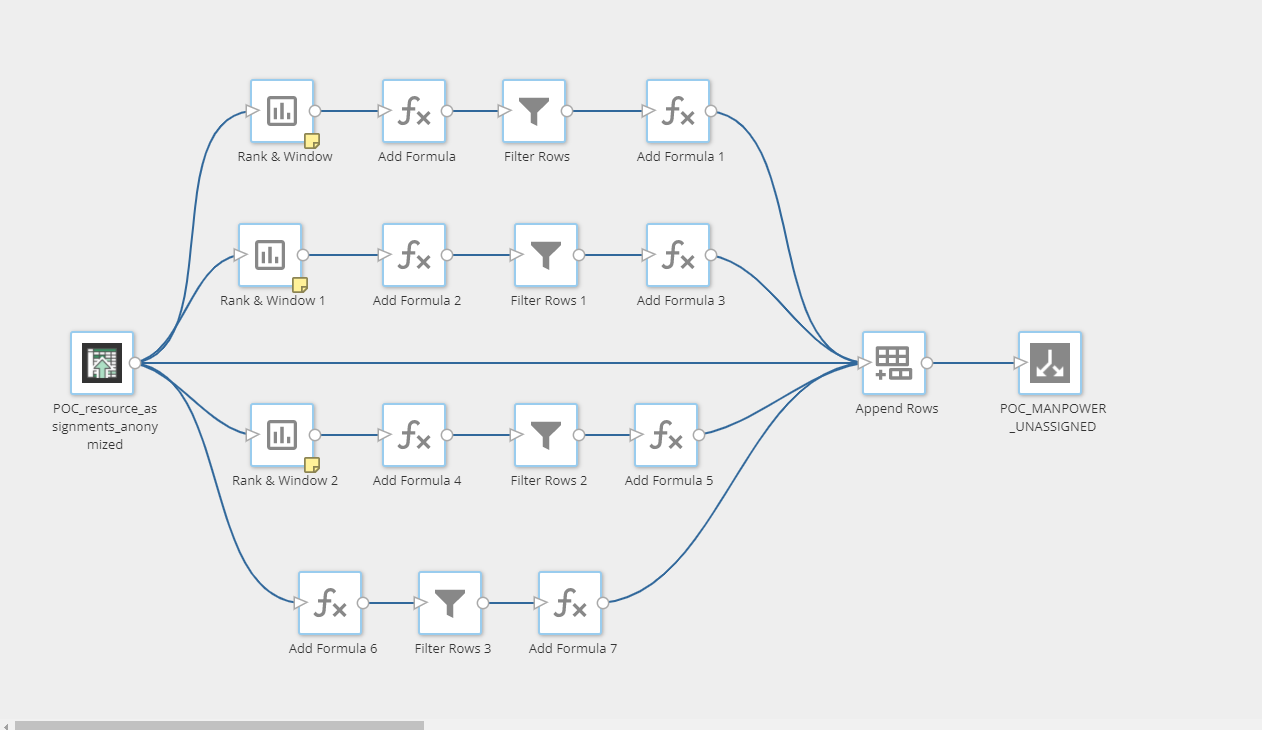

Now I just have to switch in the real dataset to this logic :)
 mhouston
Re: Creating an "unassigned" row for gantt chart visualization
I would suggest keeping your data in your original format and then building out your unassigned dates by using the rank and window tile and a formula tile. I did it by doing the following:
- Connect your original dataset to a rank and window tile and then create a column called Last End Date and choose the Lag function using the End Date column with an offset of 1. Order by the start ascending and partition on the resource name
- Add a formula tile next and create 3 columns that look like this

This will result in an output like this:

You can then filter to unassigned equal 1 and overwrite your assignment name column to unassigned and then append to your original dataset using the unassigned start and end dates as your start and end dates.
Hope that makes sense.

Re: Framed Sum in Rank & Window Magic ETL not treating zeroes properly
Using your screen shots I built a webform and tested this out and I got the same results. I added in an "Alter Columns" tile and CAST the "Total Revenue" column to be a Fixed Decimal and after that the Rank & Window returned 0.0 on the rows I expected to be 0.
I can't remember exactly why this happens but it is something to do with binary and scientific notation not playing well together.

Re: Framed Sum in Rank & Window Magic ETL not treating zeroes properly
@TheLookout Tried it out and it worked perfectly! Thanks so much for your help :)
Magic ETL - copy/paste JSON definition to clipboard
During the Technical User Group kickoff call, @john_stevens dropped some knowledge on us that just blew my mind. As seen in the gif below, you can copy Magic ETL tiles to the clipboard, and then paste into a text editor and it will give you the JSON definition of those tiles. That definition file can then be edited and repasted into the Magic canvas to produce new tiles. This can be incredibly helpful if you're wanting to edit Magic in bulk and don't want to use the Java CLI. I'm really excited to try this out more!

-Elliott 😁