Best Of
Re: Using ETL formula for finding between dates
You can do some simple date manipulation to get the Monday of the current week with a Formula Tile
`Date` - INTERVAL (CASE WHEN DAYOFWEEK(`Date`) = 1 THEN 6 ELSE (DAYOFWEEK(`Date`) - 2) END) DAY
DAYOFWEEK returns a number between 1 (Sunday) and 7 (Saturday).
The CASE statement is checking if it's a Sunday to subtract 6 days instead of 1.
-2 is to reduce the days to subtract to get to Monday. For example Tuesday (3) we need to subtract only 1 day instead of 3 days.
You can then tie it all together with a CONCAT function and a DATE_FORMAT:
CONCAT('Week of ', DATE_FORMAT(`Date` - INTERVAL (CASE WHEN DAYOFWEEK(`Date`) = 1 THEN 6 ELSE (DAYOFWEEK(`Date`) - 2) END) DAY, '%m/%d'))

Re: coalescing data in a table
You need to put your condition inside your aggregation.
SUM(CASE WHEN `Order Src` LIKE 'CSR' THEN `order_line_total_price`) END)
Also - as a side note your LIKE 'CSR' isn't matching on any wild cards so it's expecting Order Src to be equal to exactly CSR. if you're wanting to see if CSR is anywhere inside the Order Src value then you'd need to put in the wildcards
LIKE '%CSR%'
You'll also need to make sure you aggregate the other columns you wish to summarize for each account
Re: Beast Mode for Sum Function
@ozarkram You cannot have multiple fields inside the same SUM() function. Try changing to this:
CASE WHEN YEAR(`DATE`) = year(CURRENT_DATE())
THEN `CURRENT_INVENTORY` + `NONCURRENT_INVENTORY` + `OLD_INVENTORY`
END

Re: Beast Mode for Sum Function
SUM only takes a single argument. You'll need to add them together. Note that I'm adding 3 sums together as it will handle nulls otherwise if I add CURRENT_INVENTORY + NONCURRENT_INVENTORY + OLD_INVENTORY and if any one of those values is null then the entire value will be null causing incorrect summations.
SUM(CASE WHEN YEAR(`DATE`) = year(CURRENT_DATE()) THEN `CURRENT_INVENTORY` ELSE 0 END)
+
SUM(CASE WHEN YEAR(`DATE`) = year(CURRENT_DATE()) THEN `NONCURRENT_INVENTORY` ELSE 0 END)
+
SUM(CASE WHEN YEAR(`DATE`) = year(CURRENT_DATE()) THEN `OLD_INVENTORY` ELSE 0 END)
Re: How do beastmodes handle filter context?
@MichelleH Ok this is helpful, so it applies the filter first (even within a card) then calculates the BM. @RobSomers , sure the one I have to hand is this SUM(Implementing) BM:

The dataset has Distinct IDs . 'Implementing' is a Measure field showing the hours each ID has spent against the Implementing status. The 'Status Name' column is the current Status of the ID which has been filtered to Status = Implementing. (Context: IDs can have values in the 'Implementing' Measure but have Staus Name <> Implementing)
My expectation here would be that SUM(Implementing) would show the same values as the Implementing Measure. This is the case when I add the ID into the table (far right) it displays as expected:
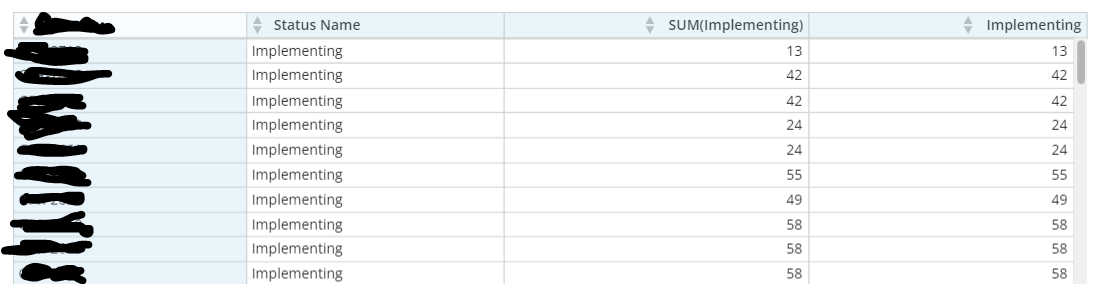
If I remove the Status = Implementing filter from the card - and remove the ID from the table - it will show as the first picture.
 NateBI
Re: Beast Mode to remove text after space
@ozarkram you can do this using the instr() and left() functions. You use instr() to find the first space, and then use left to take everything to the left of that index.
The formula looks like this:
left(fieldname,INSTR(fieldname,' ')-1)
 mhouston
Re: Beast Mode to compare the record from the recent Monday to the last Monday
Thank you so much @mhouston !..really appreciate your help!
ozarkram
Re: Beast Mode to compare the record from the recent Monday to the last Monday
You can utilize a formula to calculate the most recent Monday for the week:
`Date` - INTERVAL (CASE WHEN DAYOFWEEK(`Date`) = 1 THEN 6 ELSE (DAYOFWEEK(`Date`) - 2) END) DAY
A week prior:
`Date` - INTERVAL (CASE WHEN DAYOFWEEK(`Date`) = 1 THEN 6 ELSE (DAYOFWEEK(`Date`) - 2) END) DAY - INTERVAL 7 DAY
DAYOFWEEK returns a number between 1 (Sunday) and 7 (Saturday).
The CASE statement is checking if it's a Sunday to subtract 6 days instead of 1.
-2 is to reduce the days to subtract to get to Monday. For example Tuesday (3) we need to subtract only 1 day instead of 3 days.
You can then filter your data where the date and the Monday date match. Twice - once for this week, once for last week.
To populate the New vs Old use a Formula tile as @mhouston recommended:
CASE WHEN `Left PO Column` IS NULL THEN 'New' ELSE 'Old' END
Re: How do I get the date to show up even when there are no results?
Start with the calendar dataset from the Domo date dimension connector and left join your dataset to it on the date using a dataset view or ETL. Then use the calendars date field instead of your own. Left join will cause your missing data to be null but still have the dates from the calendar
Re: Card Data
@Fadem your data is there it just can't show it all. Try doing an aggregation or providing filters for people when using the card and you will see all the data. You can also change what card type you are using. Are you using a Mega or Pivot table? I recommend using those and not the HTML table.
 Ashleigh