Best Of
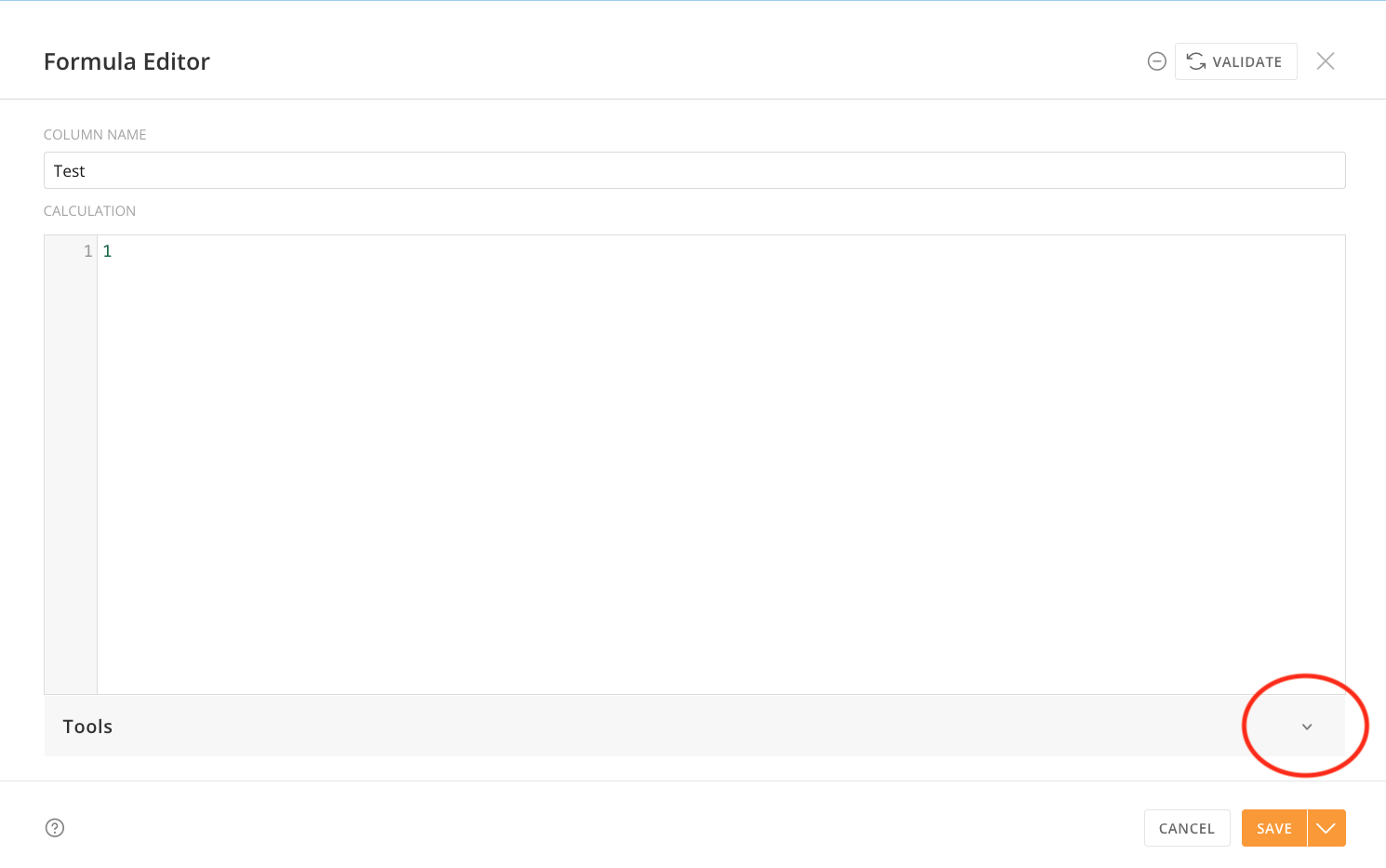
Ever wished you had more space in the formula editor?
The days of trying to construct a long and complicated formula in an itty bitty little formula editor are over - you asked and we heard you: we've now added the ability to collapse the Tools section of the expanded formula editor in Magic ETL. This went live in your Domo instance yesterday. Just open the expanded formula editor in one of the tiles where you write formulas (Add Formula, Join Data, Filter Rows, or Group By) and click the caret on the Tools bar to collapse all of that documentation and noise. Click the caret again to bring it back when you need it for reference.
My team and I love being able to slip in these little quality of life updates, amid our bigger feature efforts. We hope this makes the process of writing that formula more pleasant and improves your life just a little bit.
(…although I hate to tell you this, but that massive CASE statement should probably really be a join to a lookup table. #justsaying)
— Your Friendly Neighborhood Magic ETL Product Manager 🙌

Re: HTML Formatting - Vertical Align
There are a few limitations to running html inside of Domo. But I've found there's almost always a way to work around the differences. I'll try a mock-up when I have some extra time.

Re: Rotate Text in Textbox on Dashboard
@Jemiller Thanks for this feedback, could you provide a few more details on what you want to accomplish with rotating text? Vertical and horizontal? Are you looking to do more grouping within the dashboard?
 ckwright
Re: Rotate Text in Textbox on Dashboard
I can't speak for the original poster, but just being able to have text boxes that rotate would be great. Attached is a screen grab from the options in powerpoint: i'd love to see these options in a text card
 kreid
CUSTOMER FEATURE RELEASE IS COMING- August 7th 2025
So excited for our customer feature release on Thursday… keep an eye out for web content, videos from my PM and other release materials. Some of the big things that are coming:
Cloud Integration Improvements| Big improvements coming to Domo’s cloud integrations. Specifically, how we connect with Databricks, Snowflake, Oracle NetSuite, and BigQuery. Better integrations mean less time wrestling with your data and more time actually using it to make decisions. They mean your cloud data is easier to access, easier to manage, and easier to share across teams.
Magic ETL Updates (beta) | The new window functions in the SQL tile make it easy to handle complex calculations like running totals, rankings, moving averages, and cumulative counts directly in your ETL workflows. We've also added an AI SQL assistant! Ask questions in plain language to generate formulas without breaking a sweat.
Filter & Variable Enhancements | We’ve updated filters and variables within Domo’s apps and dashboards based on your feedback! Date variables now support 'today' and other relative dates. Also, you can exclude the current period from your data and apply 'contains' filters on app pages for more precise control.
Workflow AI Agent Task 2.0 | Intelligent workflows just got even easier. Users can experiment with simple prompt engineering via configuration fields, connect DataSets with a new Knowledge tab, and use enhanced testing to fine-tune automation. Smarter workflows, less complexity!
New Navigation | Navigate smarter, not harder. With a new nav, you can organize, prioritize, and personalize your workspace.
Clone DataSet | The new Clone DataSet functionality makes it faster and easier to duplicate datasets—ideal for backups, testing, or building new workflows.
Governance Enhancements | We’re excited to share 3 new updates to Domo governance. Each makes managing your data safer, simpler, and more efficient. Look for simpler API client setup, delegation of role assignment and refresh permissions.

Re: Customized Pivot Table Card
Updated Javascript:
var domo = window.domo;

var datasets = window.datasets;


domo.get(`/data/v1/${datasets[0]}`).then(function(data) {

  // Group by Country and Date

  const byCountry = {};

  const allDates = new Set();


  data.forEach(row => {

    const date = row.Date.trim();

    const country = row.Country.trim();

    const headcount = Number(row.Headcount);


    if (!byCountry[country]) byCountry[country] = {};

    byCountry[country][date] = headcount;

    allDates.add(date);

  });


  // Sort dates descending (latest first)

  const sortedDates = Array.from(allDates).sort((a, b) => new Date(b) - new Date(a));


  // Get latest 7 unique month-end dates

  const targetDates = sortedDates.slice(0, 7).reverse(); // oldest to newest

  const latestDate = targetDates[targetDates.length - 1]; // current/latest


  // Build table

  let html = "<table>";


  // Headers

  html += `

    <tr>

      <th rowspan="2">Country</th>

      <th colspan="7">Headcount</th>

      <th colspan="6">Headcount Difference</th>

    </tr>

    <tr>

      ${targetDates.map(d => `<th>${d}</th>`).join("")}

      ${targetDates.slice(0, 6).map(d => `<th>${d} vs. ${latestDate}</th>`).join("")}

    </tr>

  `;


  // Body

  Object.keys(byCountry).forEach(country => {

    let row = `<tr><td>${country}</td>`;


    const hc = targetDates.map(d => byCountry[country][d] ?? 0);

    hc.forEach(val => row += `<td>${val}</td>`);


    const current = hc[6]; // latest headcount

    for (let i = 0; i < 6; i++) {

      const diff = current - hc[i];

      const cls = diff > 0 ? "diff-positive" : diff < 0 ? "diff-negative" : "";

      row += `<td class="${cls}">${diff}</td>`;

    }


    row += "</tr>";

    html += row;

  });


  html += "</table>";

  document.getElementById("result").innerHTML = html;

});

Re: Customized Pivot Table Card
Okay, add a Formula tile in the Magic ETL to calculate Diff before the dynamic Unpivot.
Granularity of the data won't change the process. You'll determine the granularity based on the combination of your rows/columns.

JULYghtful content you won’t want to miss!
July–– ICYMI!🔥🔥
Hello Domo Community! It's time to spotlight the most viewed and commented discussions from July, plus a celebration of our standout contributors, ideas, and the competitive leaderboard.
Most Active Discussions in July
These conversations sparked the most engagement—be sure to check them out and chime in with a reaction or comment:
- Description field in activity log
- Month formula for month to month change
- Beast Mode Calculation
- Incline table card
@ColemenWilson and @ArborRose answered all of these questions! Thank you for your contributions as well, @DavidChurchman. @kim_barragan0126, @Utz, and @art_in_sky, your questions seem to have resonated with the rest of the community too. 50+ views on all of these posts.
Leaderboard Top 3
@ArborRose @MarkSnodgrass @DavidChurchman on the top of the leaderboard yet again. Thank you for being stellar Coaches. Watch your inboxes for a gift card from Domo!
- @ArborRose , 379 points
- @MarkSnodgrass , 165 points
- @DavidChurchman , 110 points
Top Posts
Here the most viewed and engaged posts from July. Follow the links and leave a reaction if you found them helpful too!
- How can I add week ending dates when I have only days of the week?
- Getting error "domo.OnDataUpdate is not a function"
- Multiple progress tracking bars
- Recursive calculation in etl
Shoutout to the following community members for asking and answering our top discussions this month: @kim_barragan0126 @ArborRose @ColemenWilson @sourabh05 @GrantSmith @verytiredgirl @DavidChurchman @MayaU_01
Top Ideas
These three ideas got the most upvotes. Give them an upvote or comment if you'd like to see them in the product too.
Thank you for helping shape the future of Domo @Dhuddleston and @shaqlee.
Soon to be Coaches 👀
Once you get 1000 points, you reach COACH status and join an elite group of individuals. Hey, @pauljames, @jessdoe, @Sean_Tully we see you!! Keep going.
Community Member of the Month,
@DavidChurchman consistently shows up for the Community. In July specifically, @DavidChurchman answered a significant 15% of all questions that came in July. All-time, he's earned a rightful spot on the top 10. Thank you David for being one of Domo's best Coaches!

If David has helped you find an answer to your question, help me thank and congratulate @DavidChurchman in the comments below!