Best Of
Re: Any way to view schedule for dataflows?
@nathankilcrease @ArborRose you guys beat me to it!!
@jetymas I love using the JSON no code connector for stuff like this. I created a short tutorial on how to get dataflow schedules with it:
 ellibot
Re: Any way to view schedule for dataflows?
Very nice. Give the man a point.
Here's python code to hit that endpoint. Note - a single data flow as described in that curl. Domo instance value would be the company name that appears before ".domo.com". In my example output I am calling dataflow id 564.
# Domo Dataflow schedule fetcher for Domo Jupyter Workspaces

# Anonymized instance: replace YOUR_INSTANCE with your Domo instance host prefix (no .domo.com)

# e.g. if your instance is henryscheinone.domo.com -> use "henryscheinone"


import os

import json

import time

import requests

from getpass import getpass

from typing import Optional


# -----------------------------

# Configuration - fill these

# -----------------------------
DOMO_INSTANCE = os.getenv("DOMO_INSTANCE", "YOUR_INSTANCE")   # <-- set this or export DOMO_INSTANCE

DATAFLOW_ID = "PUT_YOUR_DATAFLOW_ID_HERE"                    # <-- Replace with a real dataflow id (uuid-ish string)

# Token: either set DOMO_DEV_TOKEN env var or leave empty to be prompted securely at runtime

DOMO_DEV_TOKEN = os.getenv("DOMO_DEV_TOKEN", None)


# -----------------------------

# Helper: get token securely

# -----------------------------

def get_token() -> str:

    token = DOMO_DEV_TOKEN

    if token:

        return token.strip()

    token = os.getenv("DOMO_DEV_TOKEN")  # re-check

    if token:

        return token.strip()

    # If not set, prompt securely (works in Jupyter)

    return getpass("Enter Domo developer token (x-domo-developer-token): ").strip()


# -----------------------------

# Main function

# -----------------------------

def fetch_dataflow_preview(instance: str, dataflow_id: str, dev_token: str,

                           timeout: int = 20, retries: int = 3, backoff: float = 1.0) -> Optional[dict]:

    """

    Fetches the dataflow preview JSON from the undocumented endpoint:

    GET https://{instance}.domo.com/api/dataprocessing/v2/dataflows/{dataflow_id}?validationType=PREVIEW

    Returns parsed JSON dict on success, or None on failure.

    """

    base_url = f"https://{instance}.domo.com"

    endpoint = f"/api/dataprocessing/v2/dataflows/{dataflow_id}"

    params = {"validationType": "PREVIEW"}

    headers = {

        "x-domo-developer-token": dev_token,

        "Accept": "application/json",

        "User-Agent": "domo-jupyter-fetcher/1.0"

    }


    url = base_url + endpoint


    for attempt in range(1, retries + 1):

        try:

            resp = requests.get(url, headers=headers, params=params, timeout=timeout)

        except requests.RequestException as e:

            # network-level error

            print(f"[attempt {attempt}] Request error: {e}")

            if attempt < retries:

                time.sleep(backoff * attempt)

                continue

            return None


        if resp.status_code == 200:

            try:

                return resp.json()

            except ValueError:

                print("Received non-JSON response.")

                return None

        elif resp.status_code == 401:

            print("Unauthorized (401). Check your developer token.")

            return None

        elif resp.status_code == 404:

            print("Not found (404). Check instance and dataflow ID.")

            return None

        else:

            print(f"[attempt {attempt}] HTTP {resp.status_code}: {resp.text[:400]}")

            if attempt < retries:

                time.sleep(backoff * attempt)

                continue

            return None


# -----------------------------

# Utility: pretty-print triggerSettings

# -----------------------------

def show_trigger_settings(dataflow_json: dict):

    """

    Extracts and prints triggerSettings (schedule info). If not present, prints available top-level keys.

    """

    if not isinstance(dataflow_json, dict):

        print("No JSON data to inspect.")

        return


    # triggerSettings is expected somewhere near root (per user's cURL)

    ts = dataflow_json.get("triggerSettings") or dataflow_json.get("triggerSettings", None)

    if ts:

        print("triggerSettings (schedule information):\n")

        print(json.dumps(ts, indent=2))

        return


    # fallback: search nested keys that look like triggerSettings

    def find_key(d, keyname="triggerSettings"):

        if isinstance(d, dict):

            for k, v in d.items():

                if k == keyname:

                    return v

                res = find_key(v, keyname)

                if res is not None:

                    return res

        elif isinstance(d, list):

            for item in d:

                res = find_key(item, keyname)

                if res is not None:

                    return res

        return None


    found = find_key(dataflow_json, "triggerSettings")

    if found:

        print("Found nested triggerSettings:\n")

        print(json.dumps(found, indent=2))

        return


    print("No 'triggerSettings' key found in response. Top-level keys:\n")

    print(", ".join(dataflow_json.keys()))


# -----------------------------

# Usage

# -----------------------------

if __name__ == "__main__":

    token = get_token()

    if not token:

        raise SystemExit("No developer token provided.")


    print(f"Requesting dataflow preview for dataflow id: {DATAFLOW_ID} on instance: {DOMO_INSTANCE}.domo.com")

    resp_json = fetch_dataflow_preview(DOMO_INSTANCE, DATAFLOW_ID, token)

    if resp_json is None:

        print("Failed to fetch dataflow preview.")

    else:

        # show top-level name/id and triggerSettings if available

        name = resp_json.get("displayName") or resp_json.get("name") or resp_json.get("id", "<unknown>")

        print(f"\nDataflow: {name}\n")

        show_trigger_settings(resp_json)
Output from the above code:
Requesting dataflow preview for dataflow id: 564 on instance: YOURINSTANCE.domo.com


Dataflow: Queue_Performance.ipynb


triggerSettings (schedule information):


{

  "triggers": [

    {

      "title": "Trigger Title 1",

      "triggerEvents": [

        {

          "id": "XXXXXXXXXXXXXXXXXXXXXXXXXXXXXXXXXXX",

          "schedule": {

            "second": "0",

            "minute": "0",

            "hour": "9",

            "dayOfMonth": "?",

            "month": "*",

            "dayOfWeek": "MON",

            "year": "*"

          },

          "type": "SCHEDULE"

        }

      ],

      "triggerConditions": [],

      "triggerId": 1

    }

  ],

  "zoneId": "Africa/Bamako",

  "locale": "en_US"

}
Note - my instance is set as Africa/Bamako so it centers Domo on UTC time. ;)

Re: Any way to view schedule for dataflows?
Just in case you ever want to try it out - a brick is just an html page with a stylesheet and JavaScript (search 'blank brick' in AppStore). You copy each code type (html, css, or JavaScript) into the provided sections.
If you want the brick to interact with a dataset, you can change the sample datasets to point to your dataset as dataset0, dataset1, or dataset2 and write JavaScript to interact with your data.
Re: Any way to view schedule for dataflows?
Hey jetymas!
Although there is no official way to pull this data, you can hijack one of their undocumented endpoints to pull it :) Here's the GET cURL:
curl --location 'https://[Domain Name].domo.com/api/dataprocessing/v2/dataflows/[Dataflow ID]?validationType=PREVIEW' --header 'x-domo-developer-token: XXXXXXXXX'
The dataflow schedule will be under "triggerSettings". Hope this helps!

Re: Any way to view schedule for dataflows?
I submitted a request for scheduling information to be added - quite a while ago. I'd love to be able to automate a visual.
I ended up creating a brick to plot a type of Gannt chart so I could visibly see when things kick off. But it's a manual process of editing the values in the code: dataset name, type, and quarter hours (15 mins).
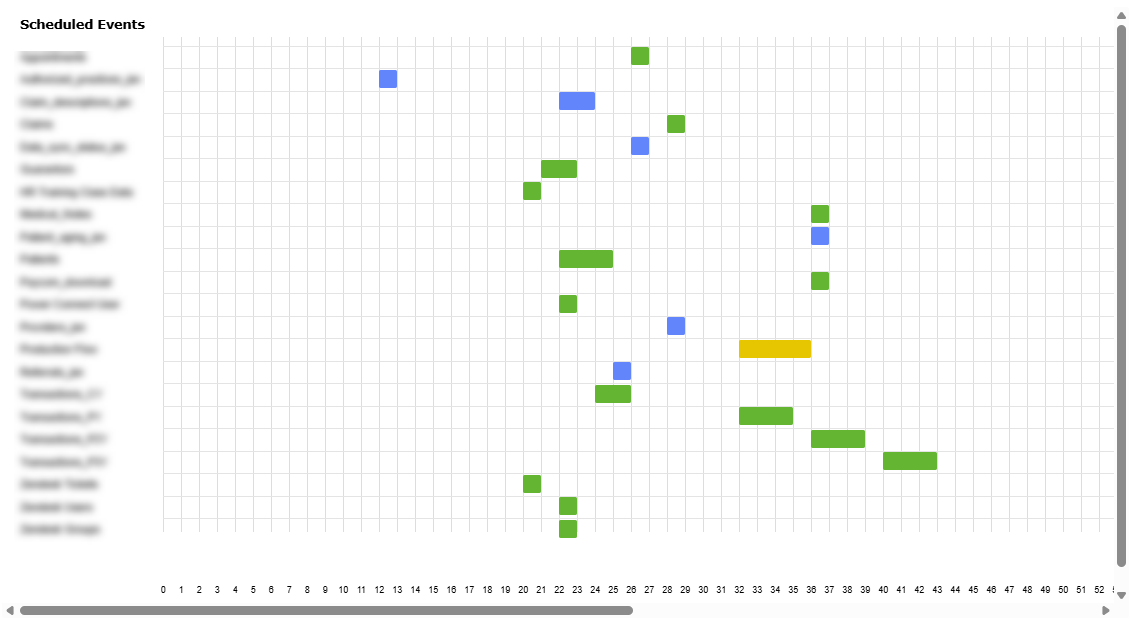
const dataset = [
    { Dataset: "Dataset_1", Type: "Jupyter", start: 26, end: 27 },
    { Dataset: "Dataset_2", Type: "JSN", start: 12, end: 13 },
    { Dataset: "Dataset_3", Type: "JSN", start: 22, end: 24 },
    { Dataset: "Dataset_4", Type: "Jupyter", start: 28, end: 29 },
    { Dataset: "Dataset_5", Type: "JSN", start: 26, end: 27 },
    { Dataset: "Dataset_6", Type: "Jupyter", start: 21, end: 23 },
    { Dataset: "Dataset_7", Type: "Jupyter", start: 20, end: 21 },
    { Dataset: "Dataset_8", Type: "Jupyter", start: 36, end: 37 },
    { Dataset: "Dataset_9", Type: "JSN", start: 36, end: 37 },
    { Dataset: "Dataset_10", Type: "Jupyter", start: 22, end: 25 }
];
Direct message me if you want a copy of my code.
Re: Any way to view schedule for dataflows?
I would recommend adding this to the
In our instance we derive this type of data from the dataflow history and then add tags to our datasets, such as: Update Schedule: Daily: Hourly
I would love to be able to surface this data in domostats rather than derive it from the history!

Re: 💎 Domopalooza 2026 — Registration LIVE!
Registered! ✅ Looking forward to seeing everyone from the Domo Community!
Re: Donut chart total in centre
Looks like @Data_Devon proved me wrong as I needed to reset my chart properties first, Great job Devon!
