Best Of
Re: Domo Governance Datasets Connector - Pages and Cards report
For that report the card must be on a page. If you remove your owner filter you will see all rows of data contain a Page ID - meaning that the card must be on a page to be included in the report. Also, if a card exists on multiple pages, it will have multiple rows of a repeating card ID (one for each page it is on).
Also, when you filter to an owner in Admin > Cards there isn't a way to filter to cards owned SOLELY by that individual, meaning you will see cards they co-own as well.
If you are just looking for a count of cards owned by an individual, I would recommend using the Domo Governance - Cards report and doing a COUNT(DISTINCT `Card ID`)

Re: Domo Governance Datasets Connector - Pages and Cards report
I just downloaded the Domo Governance Pages and Cards report and the only Owner information I seems to be to the pages, not the individual cards. This report also doesn't seem to list personal Overview pages, so that could be another reason for the discrepancy.
I think you are also correct about the pageless cards.
I would suggest using a different dataset. The Domo Governance connector is being phased out and you should look at the reports available in the DomoStats Connector.

Re: Making Sense of Wildly Unstructured Data
After creating what I think is a sample csv file, I've modified the code to this:
import pandas as pd

import re


# 1 Read raw CSV as text lines

with open(r'C:\Users\username\Projects\raw_events.csv', 'r', encoding='utf-8') as f:

    raw_lines = [line.strip() for line in f.readlines() if line.strip()]


# 2 Group lines into sessions (assuming blank line separates sessions)

sessions = []

current_session = []

for line in raw_lines:

    if line == '':

        if current_session:

            sessions.append(current_session)

            current_session = []

    else:

        current_session.append(line)

if current_session:

    sessions.append(current_session)


# 3 Parse a single session into key-value dictionary

def parse_session(lines):

    record = {}

    for line in lines:

        # Split line on commas

        parts = [p.strip() for p in line.split(',')]

        i = 0

        while i < len(parts):

            m = re.match(r'(.+?):\s*(.*)', parts[i])

            if m:

                key = m.group(1).strip()

                value = m.group(2).strip()

                # If value is empty, check next part

                if value == '' and i + 1 < len(parts):

                    value = parts[i+1].strip()

                    i += 1

                # If key already exists (e.g., multi-row), append

                if key in record and record[key]:

                    record[key] = str(record[key]) + ' | ' + value

                else:

                    record[key] = value

            i += 1

    return record


# 4 Parse all sessions

records = [parse_session(s) for s in sessions]


# 5 Convert to DataFrame

df_flat = pd.DataFrame(records)


# 6 Optional: Rename columns to match user-requested output

rename_map = {

    'ID number': 'Session ID and Title',

    'Site': 'Site',

    'Room Layout Comments': 'Room Layout Comments',

    'Start/End': 'Session Start/Session End',

    'Schedule Date': 'Schedule date',

    'Sponsor': 'Sponsor',

    'Booked By': 'Booked by',

    'Contact Person': 'Contact person',

    'Registration Start-End Date': 'Registration start/Registration end',

    'Fee': 'Fee',

    'Contract Amount': 'Contract amount',

    'Credits': 'Credits',

    'Comments of Internal': 'Comments of internal',

    'Confirmation Comments': 'Confirmation'

}


df_flat.rename(columns=rename_map, inplace=True)


# 7 Preview flattened table

print(df_flat.head())


# 8 Save to CSV

df_flat.to_csv('flattened_events.csv', index=False)

print("Flattened CSV saved as flattened_events.csv")
Using this file as raw_events.csv
Site: Main Hall,Room Layout Comments : Near stage

ID number: S001

Start/End,2025-11-10 09:00 - 2025-11-10 11:00,Schedule Date :,2025-11-10,Sponsor:,Acme Corp,Booked By:,John Doe,Contact Person :,Jane Smith,Registration Start-End Date : 2025-10-01 - 2025-11-01,Fee: 100,Contract Amount:,500,Credits: 2

Comments of Internal :,VIP session

Confirmation Comments: :,Confirmed


Site:, Conference Room B,Room Layout Comments :, U-shape

ID number:, S002

Start/End:, 2025-12-05 13:00 - 2025-12-05 16:00,Schedule Date:,2025-12-05,Sponsor:, Beta Inc,Booked By:, Alice Lee,Contact Person :, Bob Kim,Registration Start-End Date : 2025-11-01 - 2025-12-01,Fee:, 200,Contract Amount:, 800,Credits:, 3

Comments of Internal :,Internal meeting

Confirmation Comments: :,Pending


Site: Auditorium,Room Layout Comments : Theater

ID number: S003

Start/End,2025-11-15 10:00 - 2025-11-15 12:00,Schedule Date :,2025-11-15,Sponsor:, Gamma LLC,Booked By:,Maria Chen,Contact Person :,Mark Johnson,Registration Start-End Date : 2025-10-05 - 2025-11-05,Fee: 150,Contract Amount:,700,Credits: 2

Comments of Internal :,High priority

Confirmation Comments: :,Confirmed


Site:, Outdoor Stage,Room Layout Comments :, Cabaret

ID number:, S004

Start/End:, 2025-12-01 14:00 - 2025-12-01 17:00,Schedule Date:,2025-12-01,Sponsor:, Delta Org,Booked By:,David Smith,Contact Person :,Nancy White,Registration Start-End Date : 2025-11-01 - 2025-11-25,Fee:, 250,Contract Amount:,900,Credits:, 3

Comments of Internal :,

Confirmation Comments: :,Confirmed


Site: Conference Room A,Room Layout Comments : Boardroom

ID number: S005

Start/End,2025-11-20 09:00 - 2025-11-20 11:30,Schedule Date :,2025-11-20,Sponsor:, Epsilon Ltd,Booked By:,Alice Lee,Contact Person :,Lisa Wong,Registration Start-End Date : 2025-10-10 - 2025-11-10,Fee: 180,Contract Amount:,600,Credits: 2

Comments of Internal :,VIP session

Confirmation Comments: :,Pending
I get this output:
Site,Room Layout Comments,Session ID and Title,2025-11-10 09,Schedule date,Sponsor,Booked by,Contact person,Registration start/Registration end,Fee,Contract amount,Credits,Comments of internal,Confirmation,Session Start/Session End,2025-11-15 10,2025-11-20 09

Main Hall | Conference Room B | Auditorium | Outdoor Stage | Conference Room A,Near stage | U-shape | Theater | Cabaret | Boardroom,S001 | S002 | S003 | S004 | S005,00 - 2025-11-10 11:00,2025-11-10 | 2025-12-05 | 2025-11-15 | 2025-12-01 | 2025-11-20,Acme Corp | Beta Inc | Gamma LLC | Delta Org | Epsilon Ltd,John Doe | Alice Lee | Maria Chen | David Smith | Alice Lee,Jane Smith | Bob Kim | Mark Johnson | Nancy White | Lisa Wong,2025-10-01 - 2025-11-01 | 2025-11-01 - 2025-12-01 | 2025-10-05 - 2025-11-05 | 2025-11-01 - 2025-11-25 | 2025-10-10 - 2025-11-10,100 | 200 | 150 | 250 | 180,500 | 800 | 700 | 900 | 600,2 | 3 | 2 | 3 | 2,VIP session | Internal meeting | High priority |  | VIP session,: | : | : | : | :,2025-12-05 13:00 - 2025-12-05 16:00 | 2025-12-01 14:00 - 2025-12-01 17:00,00 - 2025-11-15 12:00,00 - 2025-11-20 11:30
Which looks like this in Excel


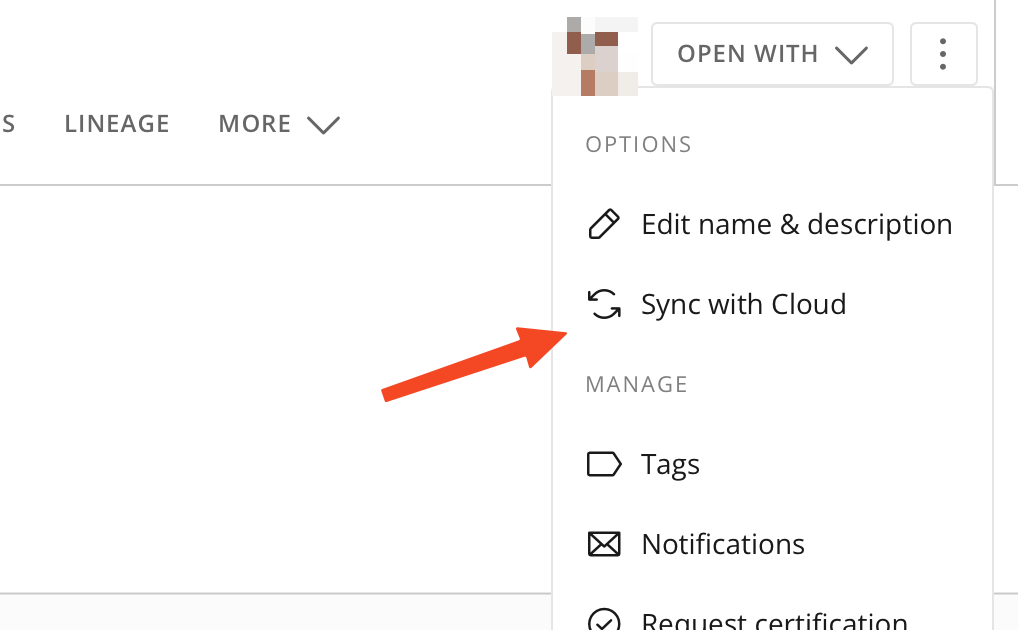
Sync with Cloud should only refresh single dataset
We have noticed that if you go to a dataset and hit "Sync with Cloud", it's not only refreshing the chosen dataset but it does so for all the tables in the Cloud Amplifier integration. This can have unexpected side effects and additional lookup costs on the Snowflake side and trigger downstream ETLs.
The manual refresh button on datasets should be separated from the integration itself and should only refresh the targeted dataset.
Now it is misleading, as it is an option for the datasets an not the whole integration. In reality, it does quite the opposite of what we would expect.Thank you for supporting this request!
 nsonny
Re: Any way to view schedule for dataflows?
Here's Python code (use in Domo Jupyter Workspace), to loop through the dataflow ids, extract JSON, and stores to csv. Modify if you want to store to a Domo dataset. End result of this code is shown below:

# --------------------------------------------------------------------------------

# Author        : Arbor Rose

# Date          : 10.28.25

# Description   : Loops through dataflow ids and pulls the trigger settings -

#                 saved as dataflow_trigger_settings_flattened.csv.

# --------------------------------------------------------------------------------

# Revision Date :

# Revision      :

# --------------------------------------------------------------------------------


# -----------------------------

# Imports and Setup

# -----------------------------


import os

import requests

import pandas as pd

import json

import sys

from getpass import getpass

import time


# -----------------------------

# Configuration

# -----------------------------

DOMO_INSTANCE = os.getenv("DOMO_INSTANCE", "YOUR_INSTANCE")

DOMO_DEV_TOKEN = os.getenv("DOMO_DEV_TOKEN")


# -----------------------------

# Helper: list all dataflow IDs

# -----------------------------

def list_dataflow_ids(instance, dev_token):

    url = f"https://{instance}.domo.com/api/dataprocessing/v1/dataflows"

    headers = {"x-domo-developer-token": dev_token, "Accept": "application/json"}

    resp = requests.get(url, headers=headers)

    resp.raise_for_status()

    batch = resp.json()

    ids = [df["id"] for df in batch if "id" in df]

    return ids


# -----------------------------

# Helper: fetch dataflow preview

# -----------------------------

def fetch_dataflow_preview(instance, df_id, dev_token, retries=3, backoff=1):

    url = f"https://{instance}.domo.com/api/dataprocessing/v2/dataflows/{df_id}"

    headers = {"x-domo-developer-token": dev_token, "Accept": "application/json"}

    params = {"validationType": "PREVIEW"}


    for attempt in range(1, retries+1):

        try:

            resp = requests.get(url, headers=headers, params=params, timeout=20)

            if resp.status_code == 200:

                return resp.json()

            else:

                print(f"[Attempt {attempt}] HTTP {resp.status_code} for {df_id}")

        except requests.RequestException as e:

            print(f"[Attempt {attempt}] Request error for {df_id}: {e}")

        time.sleep(backoff * attempt)

    return None


# -----------------------------

# Helper: extract triggerSettings

# -----------------------------

def extract_trigger_settings(df_json):

    if not df_json:

        return None

    ts = df_json.get("triggerSettings")

    if ts is None:

        # fallback search nested

        def find_key(d, key="triggerSettings"):

            if isinstance(d, dict):

                for k, v in d.items():

                    if k == key:

                        return v

                    res = find_key(v, key)

                    if res:

                        return res

            elif isinstance(d, list):

                for item in d:

                    res = find_key(item, key)

                    if res:

                        return res

            return None

        ts = find_key(df_json)

    return ts


# -----------------------------

# Main: loop through dataflows

# -----------------------------

dataflow_ids = list_dataflow_ids(DOMO_INSTANCE, DOMO_DEV_TOKEN)

print(f"Found {len(dataflow_ids)} dataflow IDs.\n")

sys.stdout.flush()


records = []

for idx, df_id in enumerate(dataflow_ids, start=1):

    print(f"[{idx}/{len(dataflow_ids)}] Fetching {df_id}")

    sys.stdout.flush()

    preview = fetch_dataflow_preview(DOMO_INSTANCE, df_id, DOMO_DEV_TOKEN)

    if preview:

        name = preview.get("displayName") or preview.get("name") or "<no name>"

        trigger = extract_trigger_settings(preview)

        records.append({

            "id": df_id,

            "name": name,

            "triggerSettings": json.dumps(trigger) if trigger else None

        })

        print(f"  Collected: {name}")

    else:

        print(f"  Failed to fetch {df_id}")

    sys.stdout.flush()


df = pd.DataFrame(records)

print(f"\n✅ Collected triggerSettings for {len(df)} dataflows.")


# -----------------------------

# Upload to Domo dataset (REST API)

# -----------------------------


# Save all triggerSettings to CSV in workspace

df.to_csv("dataflow_trigger_settings.csv", index=False)

# print("✅ Saved CSV to dataflow_trigger_settings.csv")


flattened_records = []


for _, row in df.iterrows():

    df_id = row['id']

    df_name = row['name']

    ts_json = row['triggerSettings']


    if pd.isna(ts_json):

        continue


    try:

        ts = json.loads(ts_json)

    except json.JSONDecodeError:

        continue


    triggers = ts.get("triggers", [])

    zoneId = ts.get("zoneId")

    locale = ts.get("locale")


    for trigger in triggers:

        trigger_title = trigger.get("title")

        trigger_id = trigger.get("triggerId")

        trigger_conditions = trigger.get("triggerConditions", [])


        events = trigger.get("triggerEvents", [])

        for event in events:

            # Capture schedule info if present

            schedule = event.get("schedule", {})

            flattened_records.append({

                "dataflow_id": df_id,

                "dataflow_name": df_name,

                "trigger_title": trigger_title,

                "trigger_id": trigger_id,

                "trigger_type": event.get("type"),

                "datasetId": event.get("datasetId") or event.get("id"),

                "triggerOnDataChanged": event.get("triggerOnDataChanged"),

                "schedule_second": schedule.get("second"),

                "schedule_minute": schedule.get("minute"),

                "schedule_hour": schedule.get("hour"),

                "schedule_dayOfMonth": schedule.get("dayOfMonth"),

                "schedule_month": schedule.get("month"),

                "schedule_dayOfWeek": schedule.get("dayOfWeek"),

                "schedule_year": schedule.get("year"),

                "zoneId": zoneId,

                "locale": locale

            })


flat_df = pd.DataFrame(flattened_records)

#print(flat_df.head())


flat_df.to_csv("dataflow_trigger_settings_flattened.csv", index=False)

print("✅ Flattened CSV saved: dataflow_trigger_settings_flattened.csv")
Re: Any way to view schedule for dataflows?
@nathankilcrease @ArborRose you guys beat me to it!!
@jetymas I love using the JSON no code connector for stuff like this. I created a short tutorial on how to get dataflow schedules with it:
 ellibot
Re: Any way to view schedule for dataflows?
Very nice. Give the man a point.
Here's python code to hit that endpoint. Note - a single data flow as described in that curl. Domo instance value would be the company name that appears before ".domo.com". In my example output I am calling dataflow id 564.
# Domo Dataflow schedule fetcher for Domo Jupyter Workspaces

# Anonymized instance: replace YOUR_INSTANCE with your Domo instance host prefix (no .domo.com)

# e.g. if your instance is henryscheinone.domo.com -> use "henryscheinone"


import os

import json

import time

import requests

from getpass import getpass

from typing import Optional


# -----------------------------

# Configuration - fill these

# -----------------------------
DOMO_INSTANCE = os.getenv("DOMO_INSTANCE", "YOUR_INSTANCE")   # <-- set this or export DOMO_INSTANCE

DATAFLOW_ID = "PUT_YOUR_DATAFLOW_ID_HERE"                    # <-- Replace with a real dataflow id (uuid-ish string)

# Token: either set DOMO_DEV_TOKEN env var or leave empty to be prompted securely at runtime

DOMO_DEV_TOKEN = os.getenv("DOMO_DEV_TOKEN", None)


# -----------------------------

# Helper: get token securely

# -----------------------------

def get_token() -> str:

    token = DOMO_DEV_TOKEN

    if token:

        return token.strip()

    token = os.getenv("DOMO_DEV_TOKEN")  # re-check

    if token:

        return token.strip()

    # If not set, prompt securely (works in Jupyter)

    return getpass("Enter Domo developer token (x-domo-developer-token): ").strip()


# -----------------------------

# Main function

# -----------------------------

def fetch_dataflow_preview(instance: str, dataflow_id: str, dev_token: str,

                           timeout: int = 20, retries: int = 3, backoff: float = 1.0) -> Optional[dict]:

    """

    Fetches the dataflow preview JSON from the undocumented endpoint:

    GET https://{instance}.domo.com/api/dataprocessing/v2/dataflows/{dataflow_id}?validationType=PREVIEW

    Returns parsed JSON dict on success, or None on failure.

    """

    base_url = f"https://{instance}.domo.com"

    endpoint = f"/api/dataprocessing/v2/dataflows/{dataflow_id}"

    params = {"validationType": "PREVIEW"}

    headers = {

        "x-domo-developer-token": dev_token,

        "Accept": "application/json",

        "User-Agent": "domo-jupyter-fetcher/1.0"

    }


    url = base_url + endpoint


    for attempt in range(1, retries + 1):

        try:

            resp = requests.get(url, headers=headers, params=params, timeout=timeout)

        except requests.RequestException as e:

            # network-level error

            print(f"[attempt {attempt}] Request error: {e}")

            if attempt < retries:

                time.sleep(backoff * attempt)

                continue

            return None


        if resp.status_code == 200:

            try:

                return resp.json()

            except ValueError:

                print("Received non-JSON response.")

                return None

        elif resp.status_code == 401:

            print("Unauthorized (401). Check your developer token.")

            return None

        elif resp.status_code == 404:

            print("Not found (404). Check instance and dataflow ID.")

            return None

        else:

            print(f"[attempt {attempt}] HTTP {resp.status_code}: {resp.text[:400]}")

            if attempt < retries:

                time.sleep(backoff * attempt)

                continue

            return None


# -----------------------------

# Utility: pretty-print triggerSettings

# -----------------------------

def show_trigger_settings(dataflow_json: dict):

    """

    Extracts and prints triggerSettings (schedule info). If not present, prints available top-level keys.

    """

    if not isinstance(dataflow_json, dict):

        print("No JSON data to inspect.")

        return


    # triggerSettings is expected somewhere near root (per user's cURL)

    ts = dataflow_json.get("triggerSettings") or dataflow_json.get("triggerSettings", None)

    if ts:

        print("triggerSettings (schedule information):\n")

        print(json.dumps(ts, indent=2))

        return


    # fallback: search nested keys that look like triggerSettings

    def find_key(d, keyname="triggerSettings"):

        if isinstance(d, dict):

            for k, v in d.items():

                if k == keyname:

                    return v

                res = find_key(v, keyname)

                if res is not None:

                    return res

        elif isinstance(d, list):

            for item in d:

                res = find_key(item, keyname)

                if res is not None:

                    return res

        return None


    found = find_key(dataflow_json, "triggerSettings")

    if found:

        print("Found nested triggerSettings:\n")

        print(json.dumps(found, indent=2))

        return


    print("No 'triggerSettings' key found in response. Top-level keys:\n")

    print(", ".join(dataflow_json.keys()))


# -----------------------------

# Usage

# -----------------------------

if __name__ == "__main__":

    token = get_token()

    if not token:

        raise SystemExit("No developer token provided.")


    print(f"Requesting dataflow preview for dataflow id: {DATAFLOW_ID} on instance: {DOMO_INSTANCE}.domo.com")

    resp_json = fetch_dataflow_preview(DOMO_INSTANCE, DATAFLOW_ID, token)

    if resp_json is None:

        print("Failed to fetch dataflow preview.")

    else:

        # show top-level name/id and triggerSettings if available

        name = resp_json.get("displayName") or resp_json.get("name") or resp_json.get("id", "<unknown>")

        print(f"\nDataflow: {name}\n")

        show_trigger_settings(resp_json)
Output from the above code:
Requesting dataflow preview for dataflow id: 564 on instance: YOURINSTANCE.domo.com


Dataflow: Queue_Performance.ipynb


triggerSettings (schedule information):


{

  "triggers": [

    {

      "title": "Trigger Title 1",

      "triggerEvents": [

        {

          "id": "XXXXXXXXXXXXXXXXXXXXXXXXXXXXXXXXXXX",

          "schedule": {

            "second": "0",

            "minute": "0",

            "hour": "9",

            "dayOfMonth": "?",

            "month": "*",

            "dayOfWeek": "MON",

            "year": "*"

          },

          "type": "SCHEDULE"

        }

      ],

      "triggerConditions": [],

      "triggerId": 1

    }

  ],

  "zoneId": "Africa/Bamako",

  "locale": "en_US"

}
Note - my instance is set as Africa/Bamako so it centers Domo on UTC time. ;)
Re: Any way to view schedule for dataflows?
Just in case you ever want to try it out - a brick is just an html page with a stylesheet and JavaScript (search 'blank brick' in AppStore). You copy each code type (html, css, or JavaScript) into the provided sections.
If you want the brick to interact with a dataset, you can change the sample datasets to point to your dataset as dataset0, dataset1, or dataset2 and write JavaScript to interact with your data.
Re: Any way to view schedule for dataflows?
Hey jetymas!
Although there is no official way to pull this data, you can hijack one of their undocumented endpoints to pull it :) Here's the GET cURL:
curl --location 'https://[Domain Name].domo.com/api/dataprocessing/v2/dataflows/[Dataflow ID]?validationType=PREVIEW' --header 'x-domo-developer-token: XXXXXXXXX'
The dataflow schedule will be under "triggerSettings". Hope this helps!