Best Of
Re: 'SendEmail' in Domo Workflows
Here it is attached, because that formatting got weird.

Re: 'SendEmail' in Domo Workflows
@KatieLuce - sorry I missed this over the holiday break. Here is the code that I use. If you have any questions, please let me know.
CODE BELOW
import codeengine
import json
import smtplib
import requests
from email.message import EmailMessage
def send_email(account, to_recipients, cc_recipients=None, subjectLine=None, mailBody=None, domo_file_id=None, domo_access_token_account=None):
"""
Send an email to multiple recipients.
Parameters:
- account: account object with SMTP credentials
- to_recipients: string of comma-separated email addresses for TO field
- cc_recipients: string of comma-separated email addresses for CC field (optional)
- subjectLine: email subject
- mailBody: html content of the email
- domo_file_id: (optional) file id to attach PDF from Domo
- domo_access_token_account: account object with Domo access token

"""
smtp_server = 'smtp.office365.com'
smtp_port = 587

# Get Domo Access Token if needed
domo_access_token = None
if domo_access_token_account:
    domo_access_token_creds = codeengine.get_account(domo_access_token_account["id"])
    domo_access_token = domo_access_token_creds['properties']['domoAccessToken']

# Get SMTP account credentials
accountCreds = codeengine.get_account(account["id"])
#print(accountCreds)
creds = json.loads(accountCreds["properties"]["credentials"])
username = creds["username"]
password = creds["password"]

# Convert comma-separated strings to lists and strip spaces
def parse_recipients(recipients_str):
    if not recipients_str:
        return []
    return [email.strip() for email in recipients_str.split(",") if email.strip()]

to_list = parse_recipients(to_recipients)
cc_list = parse_recipients(cc_recipients)

# Prepare EmailMessage
msg = EmailMessage()
msg['Subject'] = subjectLine if subjectLine else ""
msg['From'] = username
msg['To'] = ", ".join(to_list)

if cc_list:
    msg['Cc'] = ", ".join(cc_list)

# Set HTML content
msg.set_content(f"""\
# Attach PDF if requested
if domo_file_id and domo_access_token:
    try:
        url = f"https://domo.domo.com/api/data/v1/data-files/{domo_file_id}"
        headers = {'content-type': 'application/pdf', "X-Domo-Developer-Token": domo_access_token}
        response = requests.get(url, headers=headers)
        if response.status_code == 200:
            pdf_bytes = response.content
            print("PDF bytes retrieved successfully")
            filename = "ACEInternalProcess.pdf"
            maintype = "application"
            subtype = "pdf"
            msg.add_attachment(pdf_bytes, maintype=maintype, subtype=subtype, filename=filename)
            print(f"Attached file {filename}.")
        else:
            print(f"Failed to fetch PDF file. Status Code: {response.status_code}")
    except Exception as e:
        print(f"Failed to download or attach file from Domo: {e}")

# Combine TO and CC recipients for sending
all_recipients = to_list + cc_list

# Send the email
try:
    with smtplib.SMTP(smtp_server, smtp_port) as server:
        server.starttls()
        server.login(username, password)
        server.send_message(msg, from_addr=username, to_addrs=all_recipients)
    print("Email sent successfully!")
except Exception as e:
    print(f"Failed to send email: {e}")
<html>
<body>
<p>{mailBody}</p>
</body>
</html>
""", subtype='html')
CODE END
Please make sure you change the URL on line 67. This is for Office 365. If you create an abstract credential store account with the blob being an object of key value pairs for username and password (example below).
{"username": "yourEmailAddress",
"password": "yourEmailPassword"}
Re: Add scroll to HTML Table
@BenSchein : Kindly help us with this request on priority please. Or we need to get the color coding in Mega Table. Your kind & urgent assistance would be much appriciated.
Regards,
Tejal Govila

Re: Remove row from dataset
Adding to what Jason has stated…
Domo does not support deleting an individual row directly from an existing dataset, but you can effectively remove a bad row by republishing the dataset without it. A common approach is to use Python to read the current dataset via the Domo APIs, drop the offending row (for example, filtering out a row where a column equals its own header name or is mostly null), and then write the cleaned data back using a full replace. Alternatively, you can create a Magic ETL that filters out the problematic row and have downstream ETLs and cards point to the ETL output dataset instead. In both cases, the row isn’t deleted in place; the dataset is replaced or superseded with a version that no longer contains it.

Re: Calculating Time Difference
I forgot to reply and say thanks! This is exactly what I needed to get the visualization across the line!
 Jessary
Re: Pivot Woes - Losing Rows causes total to change
When you pivot in Domo, the pivot expects the incoming dataset to already be defined with the fields you want to pivot on. If you include extra fields, the pivot will collapse those rows and cause things to dissapear.
The "Group By" forces the dataset to the right fields before you pivot. You are aggregating (SUM, COUNT, AVG, etc) all the details. Which produces one row per Dept + Month + Actual/Budget so that the pivot doesn't have to aggregate.
Re: Your First Look at the Domopalooza 2026 Main Stage
Let's go!! Can't wait for my first DP 🙌

Re: Your First Look at the Domopalooza 2026 Main Stage
I will make sure to find you during one of the days, gotta make sure I meet the legendary @Data_Devon in person!
 ellibot
Re: Top N Filter Not Working as Expected in Multi-Series (Grouped) Bar Chart
Ahh.. If you are using the nested bar chart, you can accomplish this without any special fields.
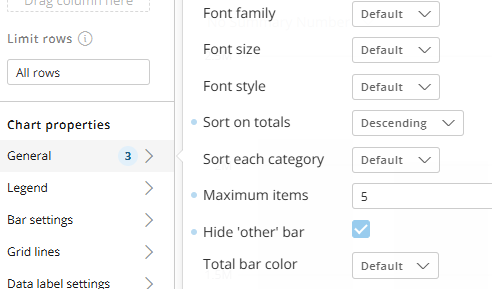
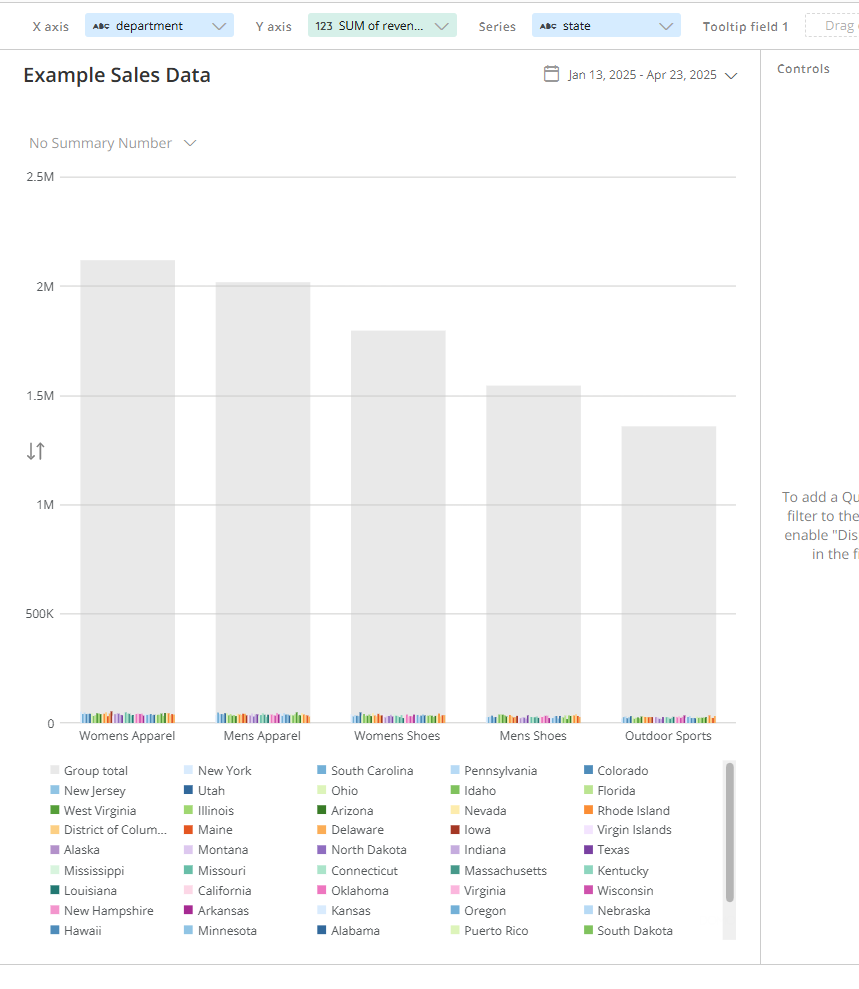
Remove the filtering and sorting and then go to chart properties - general and choose Sort on Totals Descending and Maximum Items 5. These two properties act differently than the Limit Rows and Sorting features and should get you what you want. You can see my screenshots below using the Example Sales Data.