Best Of
Re: ZIP code leading zeros being removed in dataset
If you are using Domo Workbench you can set the column type to string on the schema tab. If it is coming from somewhere else, you can add the zero back in Magic ETL by using a formula tile and the LPAD function like this:
LPAD(zipfield,5,'0')

Re: how do you open attachments entered in a form builder form
Makes sense. So the base url is specific to the form that was created.
For everyone's benefit out there, it is easiest to do a test entry and attach a file and then copy the URL that is being used for that form and then the final number at the end is the file id, which is stored as a value when the form is submitted. Use this combination to construct a URL that will download the document when viewing the responses in a table card.
Re: Is there a one-letter abbreviation for month?
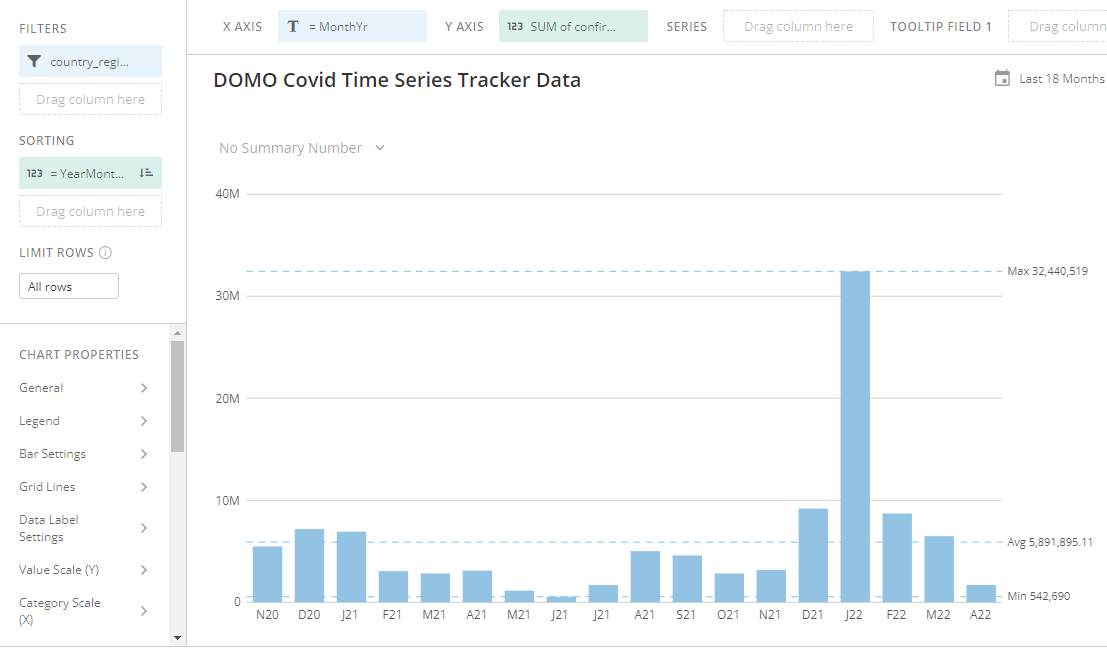
Try creating a beast mode called something like YearMonthNumeric with this as the formula:
YEAR(`date`)*100 + MONTH(`date`)
and then put this in the sorting. It should end up looking like this:
Re: Right way to utilize string operation on long date.
It is a bit odd why your Rent Last Changed field won't take the substring as it appears correct. Here's a few other options for you to try:
Utilize LEFT in a formula tile:
LEFT(`dRentLastChanged`, 10)
You could try to utilize a formula tile to convert it to a date:
DATE(TIMESTAMP(`dRentLastChanged`))
Alternatively you could utilize a regular expression:
REGEXP_REPLACE(`dRentLastChanged`, '^(\d{4}-\d\d-\d\d).*$', '$1')
Another method is to use SPLIT_PART in a formula tile:
SPLIT_PART(`dRentLastChanged`, 'T', 1)

Re: Can I make a "mother row" to assign values from?
You can combine these two datasets very easily in Magic ETL using the Join tile. In Magic ETL, add both datasets (your royalty dataset and your metadata dataset) as input datasets. Then add the join tile and join them on track title. You can then use the select columns tile to select the columns from the metadata dataset and have all the information you need. If you are unfamiliar with the join tile, you can read more about here:
https://domohelp.domo.com/hc/en-us/articles/360042923674-Understanding-Joins
https://domohelp.domo.com/hc/en-us/articles/360044876194-New-Magic-ETL-Tiles-Combine-Data#3.
Hope this helps.
Re: New Descrition format
I would suggest you open up a ticket with support so you will be the first to know when there is a fix for this.
Re: How to set the time for hourly data refresh?
Thank you @GrantSmith.
This is a data connector. So next time I need to pick a specific time to do the first upload?
 yli_2596
Re: Calculating existing delays , Off delays and new delays on manufacturing data
+1 with @MarkSnodgrass there is no reason to calculate your metrics in beast modes, it would just be a slow card with difficult rules.
You'll want to use a LAG or LEAD function which is explained here in Beast Modes, but the concept is consistent across Magic and SQL: https://www.youtube.com/watch?v=cnc6gMKZ9R8
Given the logic you're trying to create it may actually be easier to implement your solution on smaller datasets using MySQL and variables, but let me know if you can't sort yourself using Magic.

Re: has anyone had any luck creating dynamic columns in mysql
@BeastMode since you're asking a mysql question, stack overflow would probably be your best bet.
but... let's close the loop here. why you trying to dynamically add 'missing columns'?
how are you defining what's 'missing'?
buuuut before we even address that question.
if i had to quess you're trying to union multiple datasets together with different schemas.
if that's the case, you'll get faster performance doing a UNION operation using Magic 2.0
Re: Is it possible to Export the Data Table
When viewing a card, if you click on the name of the dataset below the card, it will take you to the data center dataset page. From there, you can click on the 3 dots in the upper right corner and choose Export Data.
