Best Of
How to set filter with scheduled reporting
I have a master domo card that has information pertaining to every single employee. I want to set up an automated schedule report that gets sent to each employee on a daily basis. How do I set the scheduled report so that when an employee receive it the filter is already applied? I do not want to create a seperate card for every single empoloyee. some of the employees are social users.
Re: Add a line option for symbols... and the ability to add multiple measure and a dimension to charts
Want to really rock their world, add multiple lines! Seeing a sales bar punch through forecast line, budget line, and some other goal line exceeding multiple expectations. Oh man. The more lines the better!
 G_Grey
Re: Getting the last field of a character-separated string
Yeah custom videos just make it easier than doing some examples sometime. I love the "We Got a Problem!"
Yeah your beast mode logic is good! You will soon be AllAmphibianHunter at this pace

Re: Map cropping out Scotland
Hi @louiswatson ,
It could be because Sir William Wallace needed to scream "FREEDOM" louder or potentially because the map card needs to be bigger. If you expand the height of it, does Scottland still not show?
Re: Delete dashboard
@damen more specifically you need the grant (defined by Roles) that allows you manage pages.
it's not specifically that you have to be an "admin" you just need the appropriate grant.
"Custom Roles" is a domo feature that needs to be enabled in your instance.

Re: Compare two peer groups
It's a pretty interesting scenario. Quick disclaimer that I haven't gotten deep into Variables yet so this would be my old school workaround.
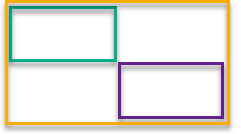
If you can afford to be a little wasteful and not bumping up against rows within your instance, I'd duplicate the dataset and append itself to itself, but with one set having column names changed to be "filter1.columnnames" and the other set of columns named "filter2.columnnames". (think of green box below as filter 1 rows/columns, purple box as filter 2 rows/columns, with the new yellow dataset being 2x the rows and 2x the columns of the original dataset) Then you could configure the filter1 to just look at the filter1.campaigns and filter2 to look at the filter2.campaigns, so that filter1.dollars and filter2.dollars could be represented as the first two series on the visualization and a beast that provides the variance series as deltas between the two dollar values. (you're just going to need to decide whether you want the variance to be group1 minus group 2 or group2-group1)
 Billobi