Best Of
Re: Removing Datasets
You could just make the dataset recursive and then you could remove the inputs.

Re: ETL - How to spread a Budget over two dates within a variable date range.
The easiest way would be to use a date dimension table and a cross join (Cartesian Product). Say you have your budget dataset.

You would join your date dimension table (a dataset that has a row for every day) with your budget dataset.

You would then filter to where dt (the day in your date dataset is >= start_date and < = end_date.
You can then calculate the number of days between your start and end dates. Note, you could also make use of the "Date Operations" tile if you wanted the number of working days between these dates. Then divide your total budget by the number of days to get the daily budget.
For the monthly the easiest way would be to connect this dataset to a card and then aggregate the daily total by month.

For example


Re: Compare to Budget - Actuals in one Dataset and Budget Values in second Dataset
You'll need to do some mapping to create a way to join. I would also personally recommend aggregating up to a daily budget/actual amount in your ETL. You would then need to join to a date dimension table to fill in data for days where there were no "Actual" sales, but there was a budget. Together this will enable you to create a dynamic and filterable budget vs actual for any time period.
Re: How to add a Toggle button to switch between different currencies at Dashboard Level.
Hi @Ken
Have you thought about stacking your data so you have a record in USD and another record in CAD and then use a filter card (radio button?) to allow the user to select a currency amount which would then filter your dataset to just that specific currency?

Re: Rolling Averages
Would be good to highlight that if you go the ETL route, things will go eerie if besides the selection of # of days, the users (or you) need to apply apply filters to the card level, as the Rank and Window Tiles won't be responsive to these filters and might end up throwing odd results (One of the key difference on when to use a ETL vs BeastMode).
Thinking a bit more on this, if creating a new Dataset is not a big problem for you, I think I got a solution:

Now let's deep dive on how this works:
You have a dataset that looks similar to your Google Sheet, a set of dates with a single value for each date:

You create a ETL that self joins the dataset into itself and then filters to keep only the previous dates next to the current one:

The to Join operations just add a 1 to each to do a product of multiplying the table by itself with the Join Data.
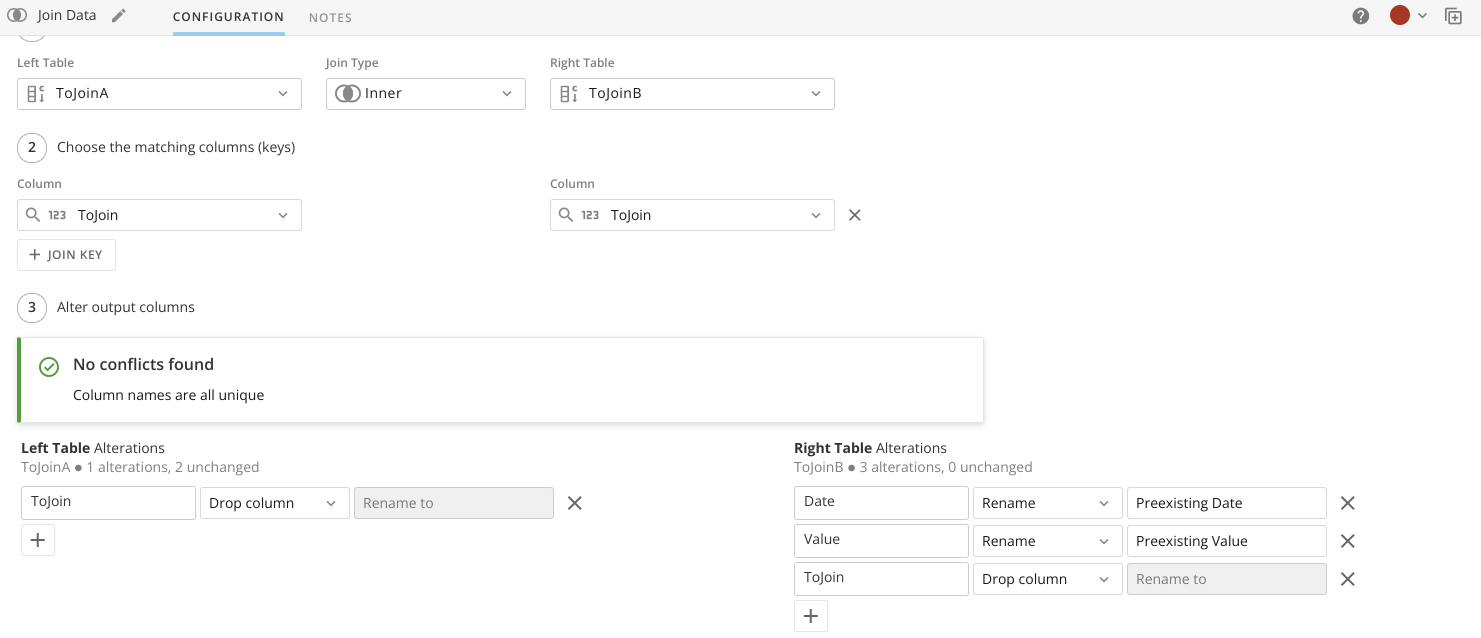
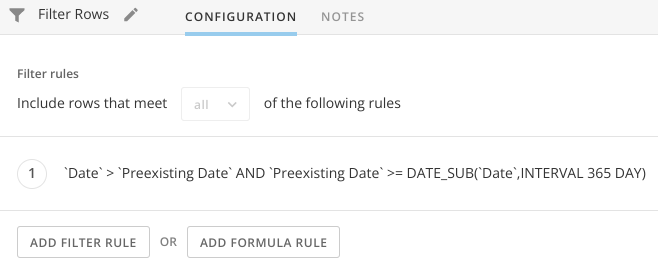
This returns way more rows than what we need, so now that we've renamed to old values as Preexisting, we filter those out prior to storing to the new Dataset. Since in your current example, you're not using the current date value as part of the Average calculation, we check that the Date needs to be higher than the preexisting one, and that the Preexisting one is greater than the Date moved 365 days back (since you mentioned this is the limit on how far back users will be able to update the range, if you want to allow to go even further back just change this to the right value).
With this you now have a Dataset that contains as many entries for each Day as there were entries that matched to be in the look back period. Something like:

From here, it is easy to build a card that will have a calculated field that leverages the Variable we created (`Days Threshold` in my case), to determine which values should be included as part of the average:

And then you just use it in your card as shown on the first screenshot.
This was a good thinking exercise prior to the weekend :)
PD. Keep in mind that the way the BeastMode was written is to simulate the function you had in Sheets, in which missing days won't affect the Average calculation and it'll be made only using the available data points, should you want to change this behavior, you would divide by the Variable instead. Also this will only show dates for which you have data, you'd need to adjust the ETL to fill in missing dates between the ToJoinA and Join Data Operations, this to prevent adding dates with no values as preexisting entries which would in turn affect the Beast Mode.

Re: How can I create a Beast Mode field which is a variable figure?
You could use the group by tile in MagicETL to create a new column for the most recent completed month (or last 30 days, or whatever period you want to use). Basically you would use the rank/window function to identify the top 5, then calculate their total in the period as a column, calculate the total for the entire period, and then use the Formula tile to divide those 2 columns to generate your % column. You can then use this column inside of Analyzer or in a Beast Mode.
Re: Formula for Combining Rows and Adding Columns
I was actually able to resolve this issue by duplicating the "Food" column with the Select Columns tile and using Join Data tile. I was able to do this with the Pivot tile successfully now that there was 2 duplicate food columns. Thank you for your help.

Re: Ability to duplicate page in App Studio
@Anna_Otake we are working on getting development work started to support import of app pages(copying app pages) in the next 4 weeks!
Re: If condition between two columns
You would use the Formula Tile in MagicETL and then use the code provided above. You can name this column whatever you want.
Re: Automatically share the content of the parent dashboard to users and groups added to sub-dashboard
Agreed! The parent page is added to their navigation, but content has the "request access" mask over it which feels sloppy if you forget to permission them to the parent page itself, too
