Best Of
Re: Help us make PDP better?
To start, I think this forum should be a place for open discussion, not surveys. I'm not going to use the Smartsheet form. Let's talk here.
And when I say "us," I'm referring to the community.
For the past few months, I've mostly stayed silent on the forum. During that time, I've watched the discussions decline and the questions become less frequent, while the forum has increasingly started to feel like a request site rather than a place for conversation. I'd like to see if we can change that.
Whether you're a Domo Coach, a longtime contributor, or hiding behind User_XXXX, I'd genuinely like to hear your voice—not an echo of mine. After this post, I intend to go back to being a mostly silent participant and let the community take the conversation wherever it goes.
With that said, I'll start.
I personally don't use PDP in Domo, even though controlling data access by user is a primary need for our company. When I initially set up our environment, I evaluated PDP and ultimately recommended that we use a different approach for our external users.
Sorry Dan, but I'm probably not the PDP success story you were hoping to hear from.
—
I want to start with something more fundamental than PDP itself.
When a customer tells you that a feature is confusing, difficult to administer, and ultimately something they have chosen not to use, I don't think the right starting point for the product manager is to explain why the implementation is actually good.
That's not a neutral position from which to evaluate the product. It immediately puts us into a discussion where I have to convince you that there is a problem before we can even discuss how to solve it.
If the goal is genuinely to improve Domo, I think the more useful question is:
Why did a customer who has a very obvious need for this feature decide it was easier not to use it?
Our use case could hardly be simpler.
Imagine a company with 100 locations. Employees at Location 17 should see Location 17's data. Someone responsible for Locations 17, 18, and 19 should see those three locations. Someone at the corporate level may need to see everything.
That's not an unusual or complicated permissions problem.
From our perspective, Domo took that very simple business rule and turned it into a much more complicated system of PDP policies, datasets, groups, permissions, exceptions, and administrative rules that we have to understand and maintain.
The problem isn't that PDP can't technically accomplish this.
The problem is that Domo made us think about security in Domo's terms instead of our business's terms.
I shouldn't have to think:
"What PDP policies does this user need on these datasets?"
I should be able to tell Domo:
"John belongs to Location 17."
That's the business rule.
Domo should take care of translating that business rule into the appropriate data restrictions.
If John moves from Location 17 to Location 22, I should change 17 to 22 in one place. I shouldn't have to think about every dataset, dashboard, policy, group, or other place where that change might have consequences.
That's what makes PDP frustrating to us (me). The administrative model doesn't correspond naturally to the way organizations actually work.
And with security, complexity isn't merely an inconvenience.
Complexity creates risk.
If a dashboard is difficult to build, someone gets annoyed.
If a security model is difficult to understand, someone can see data they aren't supposed to see.
So I think the standard for a permissions system should be unusually high. An administrator should be able to answer two questions immediately:
What can this user see?
Why can they see it?
If answering either question requires tracing policies across datasets, groups, roles, and exceptions, then I would argue the permissions system has failed an important usability test, regardless of how technically capable it may be.
That's why I wouldn't begin the conversation by defending PDP. I'd begin by asking why customers with an extremely straightforward need for row-level security can look at PDP and conclude that the safer and easier option is simply not to use it.
To me, that's the product problem worth solving.

Re: Clear Filters button while keeping one page filter selected in App Studio
There's currently no "exclude this one filter" option in the Clear Filters interaction itself.
However, instead of setting the button's interaction to Clear Filters, try setting it to Open content → Open page in app, and pick the current page as the destination — leaving Persist filters unchecked. This reloads the page to its default state rather than blanking it out. Since your Month filter's "latest month" behavior comes from a default Filter View (the Beast Mode + Filter View approach from that community post), reloading the page should re-trigger that default, while Region/Country/Language/Search Surface fall back to unfiltered.

Re: Can an "orphaned" output dataset be re-added to a dataflow?
You have three options:
1 - Revert your ETL to a prior version that had these versions in it on the Versions tab of your dataflow. If you made additional changes to the ETL after removing these datasets, you'll have to reapply your changes.
2 - Delete the old historical dataset and just create new testing/validation datasets
3 - Add new output datasets to your ETL and then hack the JSON definition of the dataset to change the output to the old dataset IDs. This is a far more complex and risky route as you may end up invalidating your ETL and requires understanding API definitions and concepts.

Re: Help us make PDP better?
I think part of the issue for me is that Domo makes some fairly fundamental data/reporting concepts more difficult than I believe they need to be—particularly variables and permissions.
Variables are a good example. In SQL, if I want a date parameter to default to today, I can simply use something like GETDATE(). If I want the first day of the current month or year, that's also straightforward. In Domo, there are ways to accomplish these things, but they often require workarounds or additional logic for something that should be a basic capability of a variable. From a user perspective, the important distinction isn't whether something can be done; it's how naturally and reliably it can be done.
Permissions/PDP is another example. Suppose a surgeon is associated with Practice 177. Conceptually, I want to maintain that relationship once—User X has access to Practice 177—and then have datasets, queries, and reporting consistently respect that relationship. In a traditional data environment, that can be a relatively straightforward relationship to establish and apply. With PDP, accomplishing the equivalent across Domo can become considerably more complicated to design, maintain, and troubleshoot.
I realize some of this is the result of how Domo has evolved and that there are legacy architectural considerations. But I also think it's important to question whether existing approaches are still the best approaches rather than assuming that, because the platform provides a way to accomplish something, the problem is solved.
For me, usability and maintainability are part of functionality. If accomplishing something inside Domo requires substantially more effort than accomplishing the same thing elsewhere, I am naturally going to process it elsewhere. Similarly, if you're trying to understand why customers aren't using certain platform capabilities, I think complexity and friction have to be considered alongside whether the capability technically exists.
That's really the feedback I would want the product team to take from this: there are areas where I think Domo could benefit from stepping back and reconsidering the user experience from first principles—especially around variables, dynamic defaults, and permission management.
SELECT *

FROM Transactions

WHERE PracticeID = 177;
SELECT t.*

FROM Transactions t

INNER JOIN UserPractices up

    ON t.PracticeID = up.PracticeID

WHERE up.UserID = @CurrentUserID;
AI is today’s buzzword, but basic permissions and tables matter more to users.
Re: Pivot Table with Dimension column
Is the customer's address not the same across branches?
I would imagine this setup would make more sense:
Rows: Branch
Columns: Customer, Customer_Address
Value: SUM(Sales $)
I also prefer tall tables to wide tables, and I would imagine you have a lot more customers than branches, so I would probably switch it to this:
Rows: Customer, Customer_Address
Columns: Branch
Value: SUM(Sales $)
But if you truly do need text values in the pivot table, then, yes, it's possible, but you have to trick the BeastMode into believing it is an aggregated value. I don't know the exact rules, but if I have some kind of math and a CONCAT() around my text, it usually works. For example you could create a BeastMode to combine your two value dimensions that I think would work:
CONCAT('$', ROUND(SUM(`Sales $` ), 2), ' - ', `Customer_Address`)
This thread has an example of me using this to trick some color into the Pivot table:

Re: Variables Have Been Broken for Months
For anyone looking for a workaround, this seems to be working: add the new variable value, save it, then immediately Save and Close the card. Open the card again in Analyzer and Save and Close again. At that point, the new value should be saved.
@DavidChurchman's answer also works but obviously that only saves the value to the page configuration of the variable so it won't be available on the card detail view or across other cards on the dataset.
 chapman
Re: How to manage ~20 KPIs with different formats without tab overflow?
Approach 1 - cards as nav:
You can fit 20 cards on the page and configure their actions to go to a page with more details. You can hide those pages from navigation to prevent clutter in your main navigation bar. Those 20 cards can be simple text cards with your KPI titles, or they could be summary cards that the user can click for more.
Approach 2 - variables:
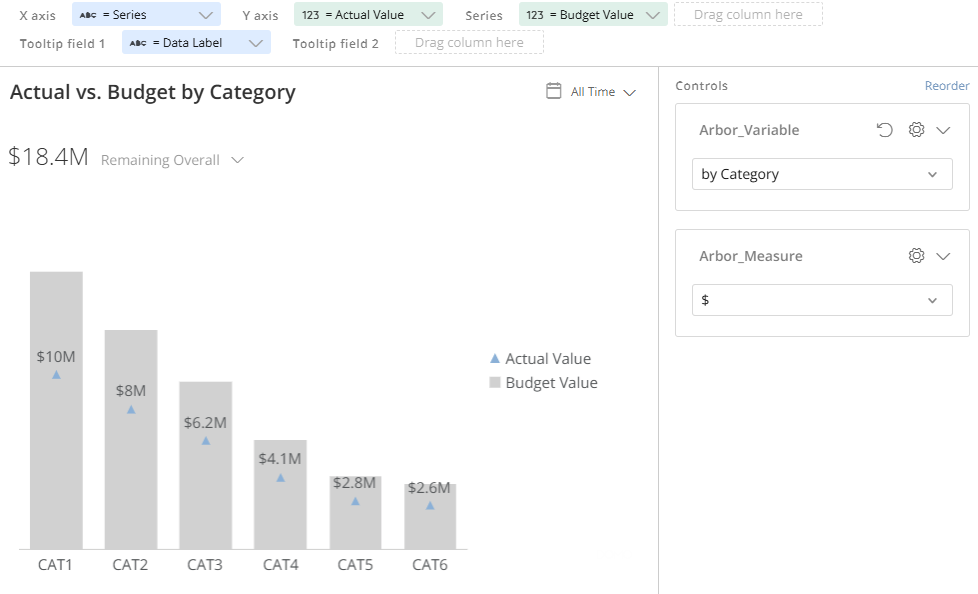
You can use variables with different metric types. You can use one BeastMode for the metric values that are plotted and another for the metric labels that you place in a tooltip and use in the data-label settings.
Here's a simple example. I have a variable with options of $, %, and Ratio. My BeastMode for the value:
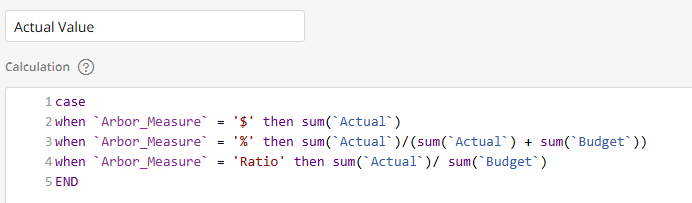
and a BeastMode for the label:
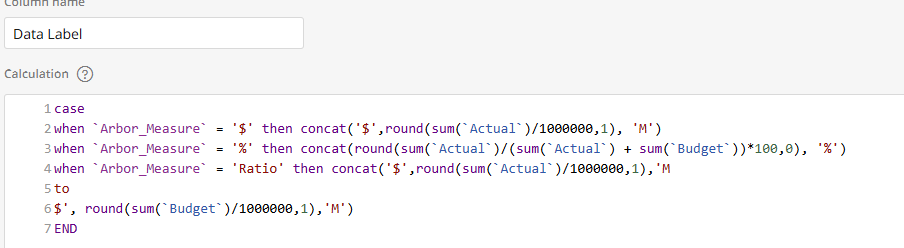
Here's the graph with $ selected:
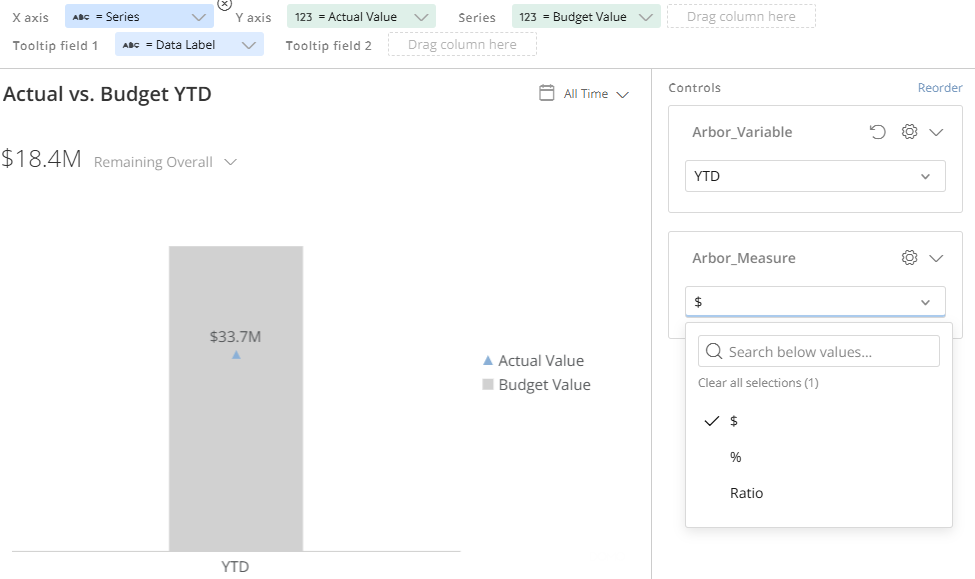
Or % selected:
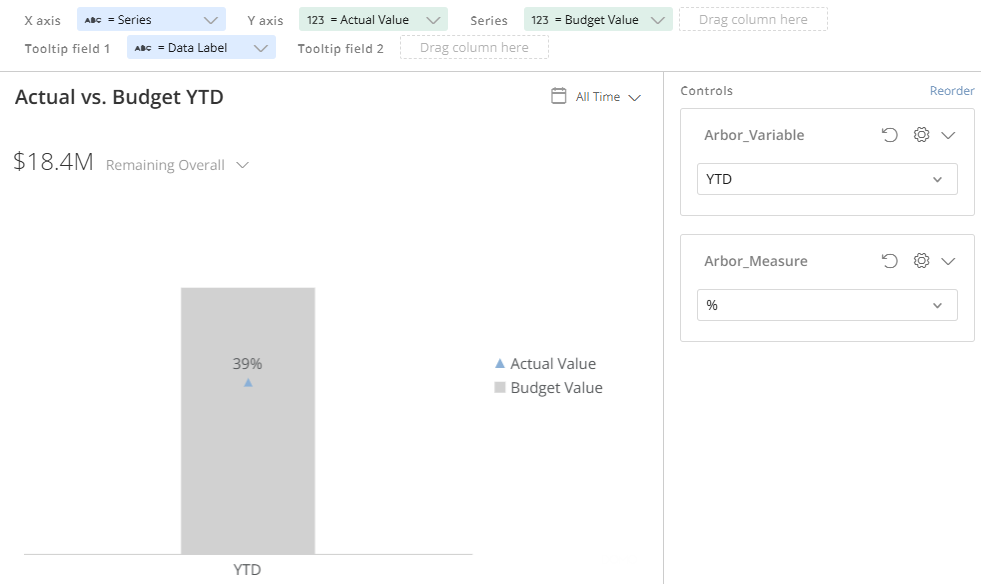
I like to extend that approach by adding a series, allowing for different groupings, like if instead of looking at YTD, I wanted the same 3 metrics by product category. Now I have 6 different measures available to the user. 3 metrics x 2 categories. You can see how that can be extended to a very large number of potential measures while taking up minimal screen real estate:
Approach 3 - focus the measures for the right audiences:
There's very little chance that there is anyone that really cares about all 20 of your KPIs (expect maybe you). I recommend doing some interviews to determine which KPIs users actually look at and depend on, and adjust your dashboard accordingly. I recommend this book for some tools to conduct those interviews and how to apply them to different types of dasbhoards:
Re: July Community Forum Recap
@DavidChurchman and @GrantSmith just casually earning twice as many points as the person in 3rd 😁. Congrats gentlemen!! Always appreciate your thoughtful responses and years of experience.
 ellibot
Re: How many X did we do in Y?
Howdy all. Love the convo!
At Turo I did two things that dramatically reduced ad-hoc requests:
1. Determined which tables in DB were used to answer the mass of the requests (it was like 5 core tables) & then just add those as a table on an App Studio page with the top 5-6 filters at the top of the page. People just use that to aggregate, filter and self-enable. Access only to those we were ok downloading CSVs. The majority of ad-hoc led to CSV then Pivot Tables.
2. I created a COE of Data Champions in each department & taught them how to build in Domo + best practices on validation & hygiene.
There's nuance around the size of tables & how many columns… but these two things dropped adhoc from around 20-40 requests per month down to single digits.

Re: How many X did we do in Y?
One of my favorite things about being a solutions engineer and former Domo customer is getting to see how different organizations use Domo on a daily basis. I can confidently say AI features such as AI chat, AI service layer endpoints, and the agent tile in workflows can help with ad-hoc analysis and data discovery. I also think some core components around this conversation are (1) opportunity cost and (2) the idea that the data pie can always get bigger, so you don't need to worry too much about how it gets sliced.
(1) Opportunity Cost and Scarcity
Data teams (and really anyone in business) should be obsessed with opportunity cost, or the idea that when you spend time on one thing, you give up spending time on the next-best alternative. I'm of the belief that data teams are usually pretty lean for the amount of work they are expected to do. A lot of this work will be ad-hoc analysis, but not all ad-hoc analysis is created equal. If my entire job were just answering questions like "How many x did we do last year?" or "Who did the most y?", I would not still be in data 😄.
In my opinion, this is an excellent use case for AI to become involved. AI chat can do a great job answering these kinds of deterministic questions, and it will never get frustrated with the amount of follow-up questions that are asked, as it has an unlimited amount of time to spend with the user and their questions. It's also nice because AI can help answer questions at any hour of the day, which can be particularly useful for global teams. I've seen examples of AI chat being used at 2 AM to help answer valuable questions that couldn't be answered by a dashboard. I don't know about everyone else, but I'm a big believer in work-life balance and firmly believe that there will always be scarcity when it comes to data needs. The question is whether you believe AI can help minimize that scarcity.
On a practical note, using AI chat + the AI Chat Sessions DomoStats report can actually help you create a sort of "data flywheel", helping you get insights into what your end-users are asking when they're not submitting tickets for ad-hoc requests. I've also found using the AI service layer endpoints + AppDB to store user sessions can provide great insights into the needs of your end-users before they even ask you anything.
(2) The Data Pie Can Always Get Bigger
When it comes to AI with data, I don't believe it needs to be an "either/or" discussion. Why do you believe if you incorporate AI, that suddenly means you won't have as strong relationships with your stakeholders or will miss out on opportunities to build connections? In practice, I have not seen this to be the case.
I'm a firm believer in focusing on value creation above all else, and that working in data actually involves much more soft skills and a strategic mindset than we sometimes like to think. So many data teams are bogged down in resolving tickets, getting the sprint done, etc. when they should be focusing on getting in the room with their partners and having strategic conversations about the business.
Can the data pie get bigger if you incorporate AI? Right now I'm leaning towards think so, but I'd love to hear others thoughts on this as well. Like I mentioned before, I've worked for several Domo customers and have tried to conduct these sort of experiments with varying degrees of success. I'm not sure exactly how to define success or how to measure it. Again, it all comes back to driving real business outcomes, and I do think AI can help you find more time to focus on higher order problems.
ellibot