Best Of
Dojo Contest is LIVE!
*NOW CLOSED*
Winners announced at the bottom of this post.
Each user that participates will be entered to win one of five randomly selected $200 Amazon Gift cards! Read through this post and comment below what you're looking forward to using the Dojo for and you'll receive a limited-edition "Dojo Contest" badge. This contest will run from August 31st until September 14th.
RANKINGS
Rankings in the Dojo are a reflection of activity and engagement on the Dojo. The rank structure resembles the Karate Belt System 🥋 ⛩. Upon registration, each member is given the 'White Belt' rank. A white Belt indicates "a birth of new light," or someone that's just joined the Dojo.
As you ask questions, receive reactions on your posts, and answer other discussions, you will accumulate points. The more points you have = the higher rank association you earn! Receiving positive reactions, answering questions, and earning badges earn you the most points.
A Black Belt signifies the "darkness beyond the sun" -- those that have knowledge continue to pass it on. Black Belt's on the Dojo are our highest level of Super Users 🥷. Members who reach the Blue Belt level and above receive special privileges, including access to a Dojo private board, weekly virtual meet-ups, and exclusive rewards at Domopalooza.
Each time you rank up, you'll receive an award!
Rank Structure (in order) & Rewards:
White Belt ⚪️ A badge for joining the community
Yellow Belt 🟡 Access to an exclusive hosted Domo insider video
Orange Belt 🟠 $15 Door dash gift card
Green Belt 🟢 $50 Amazon Gift Card
Purple Belt 🟣 Access to Private Super User board
Blue Belt 🔵 Insider Super User weekly meeting group invite, Super User Badge
Brown Belt 🟤 $100 Amazon gift card
Red Belt 🔴 Free ticket to Domopalooza (if in person), ability to add new tags names to the community
Black Belt ⚫️ Physical black belt display with your name embroidered, VIP Spotlight article on Dojo, Black belt Badge, Domopalooza Rewards and Events
BADGES
There are over 100 types of badges available to be awarded to YOU based on certain criteria. Badges are available for hitting a minimum metric number (EX: 3 solutions, 100th like, 5 LOL's) and attending events (EX: Domopalooza 2020). The more engaged you are on the Dojo, the more badges you can earn. All badges earn you points. Visit your profile page to see what badges you have earned already.
Visit this page to see a list of all possible badges available to earn on the community.
If you are missing a custom badge that you've earned, go here > click on the badge you are missing > click "Request Badge." From here, moderators can approve your request and you will get the badge if you rightfully earned it!
PRIVATE COMPANY BOARD
Private company boards in the Dojo are the best way to communicate specific Domo cases internally. This board is only visible to Dojo users that log in from your company.
One of the best perks to using the Dojo to communicate internally is the Rich editor. Rich editor allows you to easily format text, embed code, embed media links, attach photos, use headings, and upload files to posts. It covers all the bases needed for conversation around Domo product questions . Learn how to use Rich editor here.
Unlike using slack or other communication services, conversations are easy to go back and reference. Each conversation stays in a thread and can have a marked "accepted answer" which can be helpful for later search and problem solving.
Contact your CSM or AE to request setting up a private company board in the Dojo.
Now, comment below what you're looking forward to using the Dojo for and you'll receive the limited-edition Dojo Contest badge, and be entered to win one of five $200 Amazon gift cards! 👇🏼
Five Randomly Selected Winners: @reid_sanchez , @Sell_the_Wings , @GrantSmith , @cbalter5 , @mcgeete , CONGRATS!

How can I create an anchor so that I can create links within a dashboard
I want to build a small Navigation menu at the top of my dashboard and then have links in that menu that link to different sections within the same dashboard. So, how can I create anchors at the individual sections on my dashboard and then create links to those anchors within my navigtion menu?
Something like this...The sections, Introduction, Top Revenue, and Top Attendance are all on the same dashboard, as is the Navigation Menu. When I click on Introduction, it take me down the dashboard to the Introduction section. Is there a way to do this?
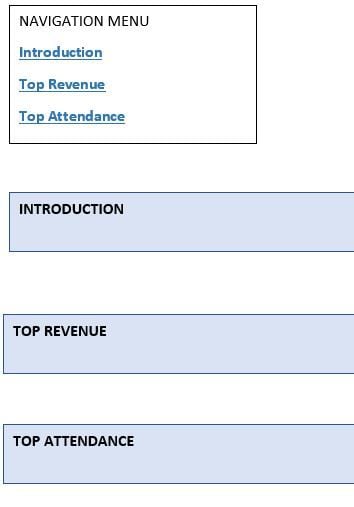
 AttuAk
Allow ONLY HEADER text to wrap in table card
Please give us a chart property for mega tables to allow ONLY HEADER TEXT to wrap.
Allowing the whole thing to wrap can cause uneven sized rows, which is really hard to read. But, a longer header can cause a wider-than-needed column.
I've played with setting the column sizes via chart properties, but that can cause headers to cut off to ellipses, which might be worse:

 RobynLinden
Chart Types Search in Analyzer
We keep getting more and more charts to utilize within Domo which is great but it's also more difficult to find the exact chart I'm looking for. It'd be great if there was a search bar for the different chart types within Analyzer.
 GrantSmith
Custom Roles - Delete
I like a clean instance. Sometimes a custom role is created but no longer needed and I'd like to delete these out of the system instead of having them persist and potentially having someone misuse them when assigning roles.
Mass Update "Chart Properties" Option
It would be nice to be able to mass update the "Chart Properties" for selected cards of the same Card Type. I got through creating 40 multi-select filter cards where i left the "Show Search" as "Default" and after creation realized that on certain screen sizes the Search Bar showed. I do not want this, so now i have to manually open up all 40 cards one at a time and switch "Show Search" to "Never". It would be a huge time savings to be able to do this all at once.
Open Page from Admin Pages List
It would be helpful to be able to click on a page in the Admin Pages List (Admin > Content > Pages) and to show a link to that page in the details pane that opens on the right, like we can with the Cards list. Currently we have to navigate back to Dashboards and scroll back through the user's list to do this.
This would also make an admin user's Manage Pages list easier to manage since they would not have to share every page with themselves to view it.

Re: Dojo Contest is LIVE!
I love seeing other users' use cases and innovative ways that Domo is being used. Dojo is a great place to connect with others, learn about Domo, and get questions answered.
 zcameron