Best Of
Re: Budget Account Descriptions
Append to dataset looks for a delimiter, a dataset and values. The dataset is what you want to append to. The values is a list of values to write to a dataset. If your dataset has 5 columns, you need to write 5 values. The delimter is to allow you to stipulate what seperates your values. Comma is default, but sometimes your values have commas.
So if you want to write 3 values to a dataset, you could have your values be:
value 1, value 2, value 3
And your delimiter would be a comma. However, if one of your values had a comma in it, using comma as a delimiter would return more than 3 columns.
value,1, value 2, value 3
for example would show up as 4 columns. In that case, you'd want to use a different delimiter, like maybe a pipe. So you could pass
value,1|value 2|value 3
with a | as the delimiter and it would write 3 values to your 3 columns.
Does that make sense?
Re: Budget Account Descriptions
1 - That works.
2 - No, they do not. It will write them to whatever dataset you instruct it to.
3 - You could have a function make a UUID and then include it in what you pass to the dataset. You can also grab metadata from the workflow, such as who started the workflow and include it in what you write to the dataset.
Re: Using Sum vs AVG for period Comparison
JasonAltenburg
I figured out a solution, I basically had to sum the column then divide the column to get the results to be static for that month.
Solution is as follows
IFNULL(CASE
WHEN Comparison Type = 'Revenue' THEN
ROUND(SUM(CASE
WHEN LAST_DAY(Fiscal Months) = LAST_DAY(CURDATE()) THEN Revenue
ELSE 0
END), 0)
WHEN `Comparison Type` = 'Driving%' THEN

    ROUND(

        SUM(CASE

            WHEN LAST_DAY(`Fiscal Months`) = LAST_DAY(CURDATE()) THEN `Driving%`

            ELSE 0

        END)

        / COUNT(CASE

            WHEN LAST_DAY(`Fiscal Months`) = LAST_DAY(CURDATE())

            THEN `DriverName`

        END) * 100, 2

    )


WHEN `Comparison Type` = 'Empty%' THEN

    ROUND(

        SUM(CASE

            WHEN LAST_DAY(`Fiscal Months`) = LAST_DAY(CURDATE()) THEN `Emptypercent`

            ELSE 0

        END)

        / COUNT(CASE

            WHEN LAST_DAY(`Fiscal Months`) = LAST_DAY(CURDATE())

            THEN `DriverName`

        END) * 100, 2

    )
END,0)
Re: Card Name vs Card Title (for cards that have the same title)
I second this. There are a number of applications that allow for an internal title and a display title. Beastmodes have this ability. The dashboards for my company share many of the same control cards but are forced to interact with joined tables differently. At this point, it can be quite confusing to assign the correct control to the right dashboard or app.
 ZachF
Re: beast mode to show how many updates every 6 hours
@DashboardDude You rock! Just watched the video and this is what is needed. Just signed up to the newsletter as I do actually want to know more about DOMO.
Thank you again for the assistance and have a wonderful weekend!
 AbeB
Re: View as user or view as role
Hi, @JasonAltenburg, @DataMaven, @afranklin, @Kyrsten and everyone. Thank you all for being engaged in the Community Forum and for posting here in the Ideas Exchange!
While I know this particular ideas thread is about "view as", we've also heard feedback that there are use cases for taking action as another user: "act as". Here's a hypothetical use case: "I want to create a carefully curated experience for our new CFO that we're onboarding to the Domo platform. Of course I want to make sure they have access to all the right apps and data; but I also want to validate that they have the right role/grants to use Domo the way they need; and I want to add a few important cards to their Favorites."
I've appreciated the opportunity to talk at length with some of you about this and with your help I think we've found a good path forward; Let me provide some insight into how we're approaching this.
We're still working through some solution design considerations, but we're hoping to move forward with User Impersonation. This new capability to impersonate another Domo user would be limited to admin-type users (controlled by a new admin-level grant), and start/end and justification for impersonation would be logged. During the time-limited impersonation session, the admin-type user would be able to both view Domo as the user, and also act in Domo on that user's behalf.
Using this approach, we would be able to address both the need to view and act as another user. And while it may seem counterintuitive, we believe this is also our most efficient approach. So, don't worry: we wouldn't be delaying "view as" while we build "act as".
Finally, I imagine some Domo customers may not want to allow this functionality at all. For those customers we'll be able to entirely disable the feature.
That's a wall of text. If you made it this far - thanks for reading! Obviously, please feel free to share additional ideas and feedback here. I'll try to provide updates, too. And again, thanks for being part of the Domo Community!

Re: MTD & YTD Toggle
With your sample data, I think this does what you were asking for:
Create a control variable:

Create a beastmode reference your variable (when YTD, finding the cumulative sum by year, else find the regular sum):
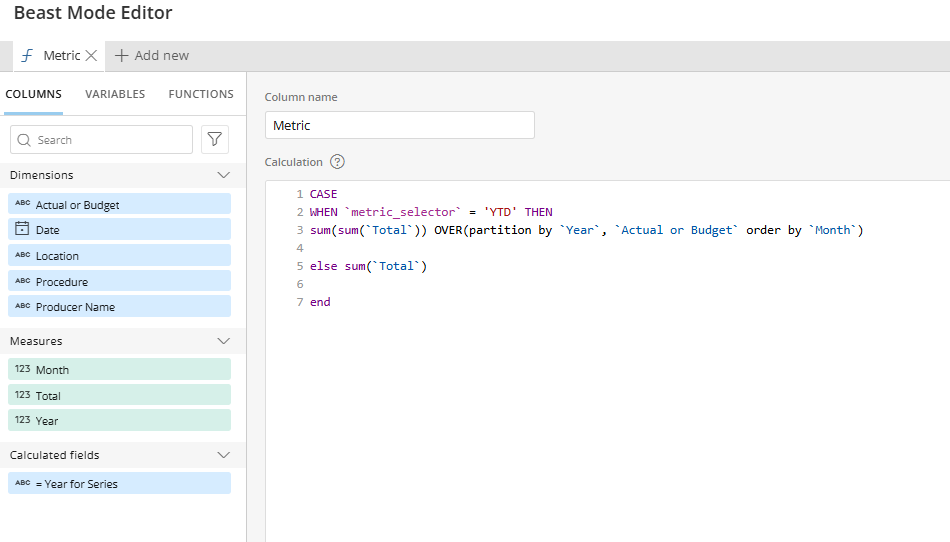
Add the variable control and you should be able to toggle between MTD and YTD calculations:


Re: Is it possible to create a grouped bullet chart by Month?
Yeah, I want to be able to do this, too, and posted this idea about it. Upvote/comment on it to keep it in the running, because it didn't get much love:
In the meantime, I also recommend this recent discussion, which has some ideas on alternatives/different ways to use bullets:
https://community-forums.domo.com/main/discussion/comment/100908
Re: View as user or view as role
DomoSupport can already do this. Making it available to customers would be fantastic.
Re: View as user or view as role
This feature is extremely important to the successful adoption of Domo within our company. It would provide the ability to validate our security policies, greatly reduce the time spent trouble-shooting access related issues, and improve the user's overall experience.
reydeler