Best Of
Re: Return most recent row/date
@AdamC You should be able to accomplish this with the Rank & Window tile using a Rank function, ordered by EVENTTIME (descending), and partitioned by EQUIPMENT_NUMBER. This will return the most recent event for each piece of equipment with a rank of 1.
https://domohelp.domo.com/hc/en-us/articles/360044876094-Magic-ETL-Tiles-Aggregate#4.1.

Re: Add a vertical line on the chart between actual and forecast dates
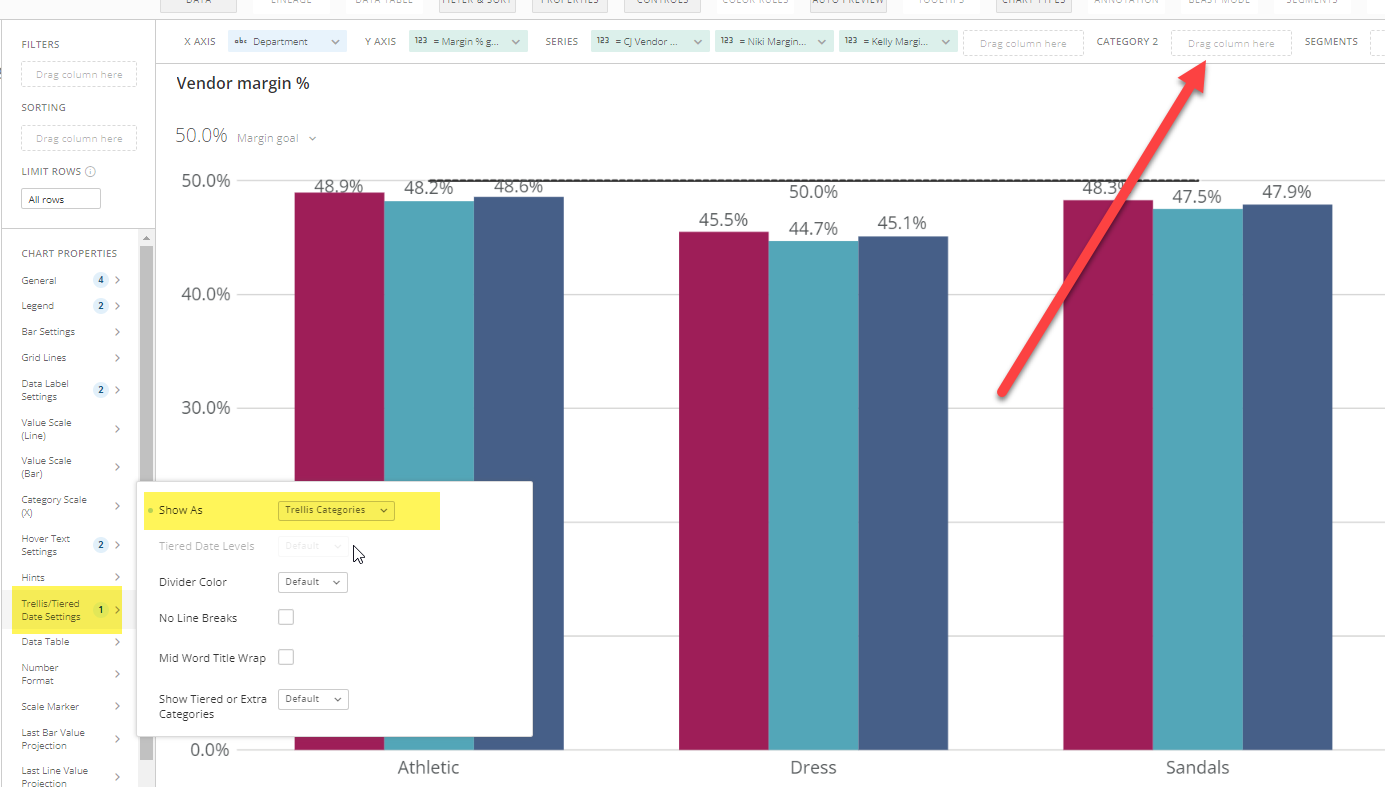
This can be done with "Trellis/Tiered Date Settings" in the chart properties section of a card. First you will need a field that defines the two (or more) categories. In your example, "Actuals" vs "Forecast". This could even be a beastmode:
CASE WHEN `DATE_FIELD` < CURDATE() THEN 'Actuals' ELSE 'Forecast' END
You would then use this field as "Category 2".

Re: How do I remove the "Warning: Not All the Data is Shown" from a filter?
Yes, I often add the same field into the optional group by and choose to count.
You can accept your answer so that people know it is not an outstanding question and it will help others that run into the same issue.

Re: Warning: Not all the data is shown
Hi @arav are you seeing this message in the analyzer (Card builder) screen as you're building the drill down or are you seeing this after you select a value on the top level of the card and then drill through? I would think that a filter applied at the top level would filter it enough to show all the records (Especially with only 1k rows). Maybe some screenshots of what you're seeing?

Re: DDX Demo: How To Implement a Custom "Tab" Navigation Element in Your App
@NoahFinberg I LOVE THIS!!!

Re: Line Chart with Weekends Denoted
There isn’t a way to switch the color on a single line however I’ve used two lines with the same values and a beast mode to conditionally display certain values. You’d use your metric as the weekday which would display the weekend and weekdays.
CASE WHEN WEEKDAY(`Date`) IN (1,7) then `Metric` END
you’ll have to play around with the order in which they’re listed as values in your chart but it would allow you to have a “line” that alternates colors. Just set the color on your metric as the color for the weekday and the beast mode color as your weekend color

Re: Why have the dates changed?
@damen I have run into issues where I have a lot of historical data and if the date range filter is set to graph by year, it does not go all the way back. Support once told me that it has to do with their calendar system behind the scenes.
I was able to get around it by creating a beast mode that extracts the year from the date field that is on the x-axis and then put that beast mode field on the x-axis. The beast mode is simply YEAR(`datefield`) . See if that works for you.
Re: Flow for dates
Can I answer awesome 10 times? Thank you so much Mark. This was truly helpful and thanks for making a video so it is even clearer.
 mroker
Re: Flow for dates
You are going to want to utilize the Domo Dimensions Connector and the Calendar dataset to build out your months that are in between your start and end dates to create new rows. You would do this in Magic ETL. I've created a video that shows you how to do it.
This is what your ETL would look like.

Hope this helps.
Re: Create beast mode dates
The STR_TO_DATE function is going to be your friend in this case. Try this for your beast modes.
Start
STR_TO_DATE(
  CONCAT(
    REPLACE(
      REPLACE(
        REPLACE(
          REPLACE(`Start`,'th','')
          ,'st','')
        ,'nd','')
      ,'rd','')
    ,' ',YEAR(CURRENT_DATE())
    ),'%b %d %Y')
Stop
STR_TO_DATE(
  CONCAT(
    REPLACE(
      REPLACE(
        REPLACE(
          REPLACE(`Stop`,'th','')
          ,'st','')
        ,'nd','')
      ,'rd','')
    ,' ',YEAR(CURRENT_DATE())
    ),'%b %d %Y')
Here's the breakdown of what I'm doing from the inside out.
Use the replace function multiple times to remove the th, rd, st, nd from the day of the month.
Add the current year by using the year function and the current date function so you have a complete date.
Use the concat function to build a string that would look something like this: Apr 4 2022
Use the str_to_date function to convert that to a standard date. The %b %d %Y informs the function what format the string is currently in.
Hope that makes sense.