Best Of
Re: Is it possible to add context to legend entries
@Travis I don't believe there's a way to add hover text to legends. There could be a way of doing it with DDX bricks but there's nothing for normal cards. You could include the different definitions in the card description.

Re: Is it possible to add context to legend entries
You can define a beast mode to conditionally set the context description and then drag that beast mode to the tooltip section o. The tip of analyzer. You may need to click the tooltip icon on the top to display the tooltip option. Then in your hover text setting on the card you can include the TOOLTIP1 variable in the text

Re: Filter Page via URL?
Can this really cool functionality be applied to a single card as well?
 Duc
Duc
Re: Adding Hyperlink to table values
@LiliRestrepo adding the target="_blank" argument in the HTML code should do this for you.
It would look like this:
CONCAT('<div><a href="', 'https://yourinstance.domo.com/datasources/', `Dataset ID`, '/details/overview', '"', '"target="_blank">', `Name`, '</a></div>')
^^This is one I use in our instance to provide a clickable link on dataset names.
 mhouston
Re: Understanding TOTAL rows used in Domo instance
In the Data Center, you can click on the Warehouse icon (the cube) which displays the spinning graphic of your data sources. In the upper right corner, it shows the total rows, number of data sets, number of data sources.

Re: How to Deal with Multiple Date Fields
@pstrauss There a couple of options for handling different columns. Here's an article on appending and differing rows:
The best way to guarantee that everything works together would be to select the specific columns from each table that you'll be using, and if certain tables don't have a specific column, just adding that column to the other tables with a null value before the append. Depending on the columns in each dataset, you can also experiment in the Append Rows tile with the options for what columns to use.
Re: How to Deal with Multiple Date Fields
@pstrauss If you just have single charts for each interaction (Emails, Chats, Phone Calls, etc.) then you can just graph by the interaction specific data. If you want everything to function off of a single date (all Emails, Chats, and Phone Calls for Jun 2022), then you'll have to stack your data. Instead of joining, you would append or union the tables with an additional column for each table that identifies what that table is. Then your chat date, call date, etc. all fall in a single date column, and your data would be organized like this:
You'll then need to create beast modes to count each type of interaction:
SUM(case when 'Type' = 'Email' then 1 else 0 end)
Re: Trying to create a nested Case statement with multiple conditions
@WorldWarHulk I think I answered the current quarter question in your post you created a little bit ago:
For combining that with your current beast mode, I think the following should work:
case when QUARTER('Date')<>QUARTER(Curdate()) and YEAR('Date')<>YEAR(Curdate()) then 'False' else (your current beast mode pasted inside parentheses) end
Or you could do it as two separate filters, a current quarter and then your beast mode in case you want to look at the same criteria for different time periods.
Re: how to capture the current quarter using beastmode
You could do this:
case when QUARTER('Date')=QUARTER(Curdate()) and YEAR('Date')=YEAR(Curdate()) then 'True' else 'False' end
Re: Aggregate measures not grouping by Date Field
Make sure your date range is set to graph by month and that you don't have the date field in your sorting properties as that will keep it from aggregating properly.

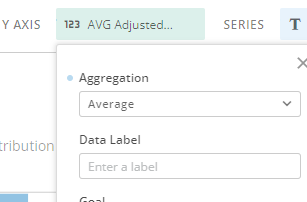
Also, make sure metric is set to Average in the aggregation type.