Best Of
Re: Any way to get text value from one column based on text value of another column?
@aarguijo The apostraphe is likely what's causing the syntax error. Instead of CONTAINS, you would want to use the LIKE operator like this:
case when DP Response 2 LIKE ‘DP: Sorry%’ then User Question 2 end

Re: Remove warning on Tree Map
Currently no, this doesn't appear to be an option to remove it. If you can, perhaps filter out the negative values from your dataset.

Re: Table card percentages
@ggountanis You'll need to use a FIXED() function to get the total of all the categories combined:
SUM(1)/SUM(SUM(1)FIXED()) -This assumes that your data is at the employee level

Re: Creating new field by summing two values from existing field
Create a beast mode/calculated field that looks like this:
CASE WHEN joinmethod in ('PhoneAutomatedPin','LiveStream') THEN ‘Unassisted Entry’ ELSE joinmethod END
Drag this beast mode into your series instead of the joinmethod and the chart will do the rest.

Re: Toggle series in bar chart
@jrtomici Yes, variables can be set as controls that users can change on controls and dashboards.
Re: Export Data Option - Exports WITH Selected Filters
Sounds like you are exporting from the dataset rather than viewing it on a card/dashboard. As @MichelleH points out, when you view it the other way the filter is applied.

Re: Removing banner from email
There is an option with the premium Brand Kit which allows you to white-label your outgoing emails with some features still in Beta. I'd recommend reaching out to your AE to discuss it with them.
Re: Schedule Report - Weekly data report every Friday
@zgranperc If your report is only going to be sent out on Fridays, then you can set your card date range to Last 8 Days and use this beast mode to filter out today's data:
case when DateField = CURRENT_DATE() then ‘Exclude’ else ‘Include’ end
Re: Compare last 12 complete months to prior 12 months
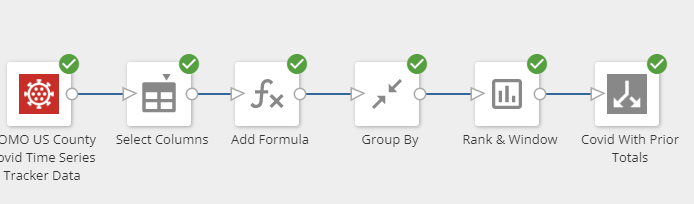
@NathanDorsch I was able to accomplish what you want to do by developing the period over period comparison in Magic ETL. I created a video that walk you through it, which is below.
In Magic ETL, you just need a few tiles:
Formula tile to create a common month/year date using the LAST_DAY() function
Group by tile to sum up your data by that common date and any other fields that you might want to filter by (state, country, for example)
Rank & Window tile to perform the Lag function, using an offset of 12 to get 12 months ago.
This assumes your data doesn't have gaps, such as missing months or else the offset will be off and you would need to inject missing months prior to the lag.
In Analyzer, you can then create a beast mode to control if you want to show incomplete months or not, like this:
case when LAST_DAY(month_year) = LAST_DAY(CURRENT_DATE()) THEN 'Incomplete Month'

ELSE 'Complete Month'

END
In the video, I added additional lags of 3, 6, and 9 months and then used the variables feature to allow the user viewing the dashboard to choose different comparison periods and the card will dynamically change.
Hope this helps!
Re: Top Sales Week by Closer
@lb1234 How are you planning on visualizing this data? If you don't need to display the rank number then it would be simpler to graph count(distinct Opportunity Id) the data by the week of Project.SaleDate then sorting high to low by COUNT(distinct Opportunity Id).