Best Of
Period Over Period use as interactive filter only filter to the Date Range set in Analyzer?
I have a Period Over Period Grouped Bar with:
x = Last Day Month
y = Sales
Date Range = This Year
Graph by = Quarter
Compare to: Year Over Year, 1 year ago, 2 year ago, 3 year ago
When clicking a historical quarter such as 2024-Q2 on my Period Over Period Grouped Bar chart, the App filter is resolving to the current year equivalent (2027-Q2) rather than the selected period.
Any other options that I can show same period over the years and users can select any period shows in the card to filter/drill into that relatively easy to implement?
Re: Can an "orphaned" output dataset be re-added to a dataflow?
Can you explain more about #3? That sounds interesting.
 ccccc4
Clear Filters button while keeping one page filter selected in App Studio
I have an App Studio page with several dropdown filters: Month, Region, Country, Language, and Search Surface. The Month filter defaults to Latest Month, and I need at least one month to always be selected on this page.

(For additional context, I’m implementing the latest-month default and displaying the latest available month based on the approach described in this community post.)
I also have a button using the Clear Filters interaction. Currently, clicking it clears all page filters, including Month. This causes the cards to aggregate across all months, which is not desirable.
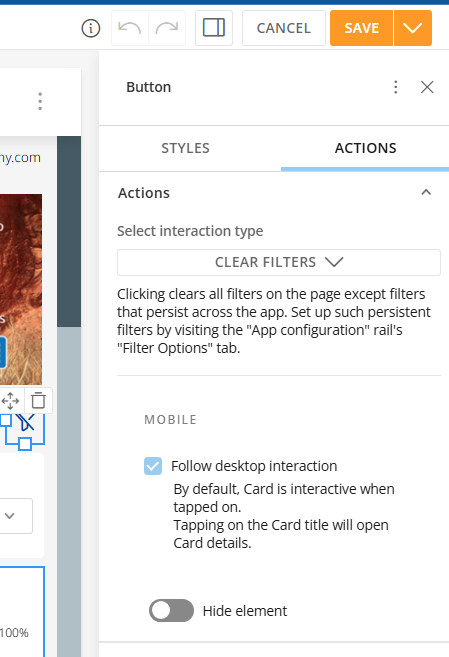
Is there a way to configure the Clear Filters action so that it clears Region, Country, Language, and Search Surface, but leaves the Month filter unchanged or resets it to Latest Month?
I looked at using a persistent filter for Month, but that doesn't work well for this app because other pages contain monthly trend views where I don't want a single Month selection to persist and filter the trend.
Ideally, I need page-level behavior where Month remains selected or resets to Latest Month, while Region, Country, Language, and Search Surface are cleared.
Is this possible in App Studio using Clear Filters or another approach?
vash_ps
Re: Help us make PDP better?
To start, I think this forum should be a place for open discussion, not surveys. I'm not going to use the Smartsheet form. Let's talk here.
And when I say "us," I'm referring to the community.
For the past few months, I've mostly stayed silent on the forum. During that time, I've watched the discussions decline and the questions become less frequent, while the forum has increasingly started to feel like a request site rather than a place for conversation. I'd like to see if we can change that.
Whether you're a Domo Coach, a longtime contributor, or hiding behind User_XXXX, I'd genuinely like to hear your voice—not an echo of mine. After this post, I intend to go back to being a mostly silent participant and let the community take the conversation wherever it goes.
With that said, I'll start.
I personally don't use PDP in Domo, even though controlling data access by user is a primary need for our company. When I initially set up our environment, I evaluated PDP and ultimately recommended that we use a different approach for our external users.
Sorry Dan, but I'm probably not the PDP success story you were hoping to hear from.
—
I want to start with something more fundamental than PDP itself.
When a customer tells you that a feature is confusing, difficult to administer, and ultimately something they have chosen not to use, I don't think the right starting point for the product manager is to explain why the implementation is actually good.
That's not a neutral position from which to evaluate the product. It immediately puts us into a discussion where I have to convince you that there is a problem before we can even discuss how to solve it.
If the goal is genuinely to improve Domo, I think the more useful question is:
Why did a customer who has a very obvious need for this feature decide it was easier not to use it?
Our use case could hardly be simpler.
Imagine a company with 100 locations. Employees at Location 17 should see Location 17's data. Someone responsible for Locations 17, 18, and 19 should see those three locations. Someone at the corporate level may need to see everything.
That's not an unusual or complicated permissions problem.
From our perspective, Domo took that very simple business rule and turned it into a much more complicated system of PDP policies, datasets, groups, permissions, exceptions, and administrative rules that we have to understand and maintain.
The problem isn't that PDP can't technically accomplish this.
The problem is that Domo made us think about security in Domo's terms instead of our business's terms.
I shouldn't have to think:
"What PDP policies does this user need on these datasets?"
I should be able to tell Domo:
"John belongs to Location 17."
That's the business rule.
Domo should take care of translating that business rule into the appropriate data restrictions.
If John moves from Location 17 to Location 22, I should change 17 to 22 in one place. I shouldn't have to think about every dataset, dashboard, policy, group, or other place where that change might have consequences.
That's what makes PDP frustrating to us (me). The administrative model doesn't correspond naturally to the way organizations actually work.
And with security, complexity isn't merely an inconvenience.
Complexity creates risk.
If a dashboard is difficult to build, someone gets annoyed.
If a security model is difficult to understand, someone can see data they aren't supposed to see.
So I think the standard for a permissions system should be unusually high. An administrator should be able to answer two questions immediately:
What can this user see?
Why can they see it?
If answering either question requires tracing policies across datasets, groups, roles, and exceptions, then I would argue the permissions system has failed an important usability test, regardless of how technically capable it may be.
That's why I wouldn't begin the conversation by defending PDP. I'd begin by asking why customers with an extremely straightforward need for row-level security can look at PDP and conclude that the safer and easier option is simply not to use it.
To me, that's the product problem worth solving.

Variables Have Been Broken for Months
Adding a new value to an existing variable is not possible. If you add the value, click save and navigate away, it has not actually been saved. If you click save twice, you can actually see the new value disappear.
Is anyone else experiencing this issue? I'm hoping someone has found a workaround.
I reached out to Domo support back in June and they confirmed the bug and are releasing a fix in September, but it has been almost two months and still have another month to go. Meanwhile, there seems to be nothing I can do.
 chapman
How can an App Studio month filter dynamically default to and visibly display the latest available m
I have a monthly dashboard in Domo App Studio where I need the reporting month filter to automatically default to the latest month available in the dataset whenever new data arrives.
My dataset already contains a Latest Available Month column derived from the maximum Month. I also created a Beast Mode called Dynamic Default Month Filter, following this general logic:
CASE
    WHEN `Month` = `Latest Available Month`
        THEN CONCAT(DATE_FORMAT(`Month`, '%b''%y'), ' (Latest Month)')
    ELSE DATE_FORMAT(`Month`, '%b''%y')
END
So the values in the drop down filter show like below (with July 2026 as the latest month available in the dataset)
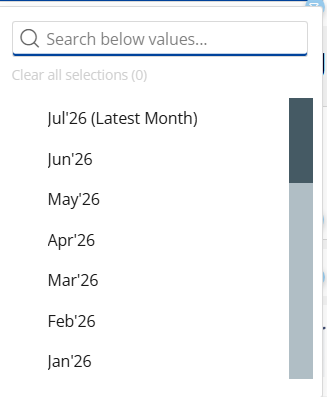
In the default Filter View, I apply:
Dynamic Default Month Filter contains "Latest Month"
This successfully filters the dashboard to the latest available month and automatically advances when a new month is added.
The problem is the filter’s display behavior. When users initially open the dashboard, the visible Month dropdown remains blank and displays Select instead of the resolved value, such as Jul'26 (Latest Month).

If the user manually selects Jul'26 (Latest Month), the numbers remain unchanged because the latest-month condition was already applied in the background. This is potentially confusing, prompting anyone to think why not pre-load the Month filter box with the latest month value filter instead of showing blank.
The desired behavior is for the dashboard to dynamically select the latest available month and show the resolved value, such as Jul'26 (Latest Month) in the Month dropdown when the page loads. It should continue updating automatically as new monthly data becomes available while allowing users to select prior months.
Is there a supported way for an App Studio filter to display the value resolved by a condition-based default Filter View, without requiring a manual monthly update?
vash_ps
Facebook Ads connector — upcoming Facebook breakdown change (effective August 6, 2026)
Facebook recently announced a change to how they handle three specific breakdowns in their Ads Insights API, and it affects the Domo Facebook Ads Insights connector. We wanted to give you a heads-up ahead of the effective date.
What's changing
Starting August 6, 2026, Facebook will require these breakdowns to be enabled per Ad Account before their API returns any data for them:
impression_device(and any breakdown combination that includes it)hourly_stats_aggregated_by_audience_time_zonefrequency_value
Until an Ad Account is enabled, Facebook's API — both synchronous and asynchronous — will return no results for these breakdowns. This is a Facebook-side restriction, not a Domo connector issue.
Does this affect you?
If you use the Facebook Ads, Facebook Ads Advanced, or the Facebook Ads Advanced Multi Account connector, and have selected any of these three breakdowns — including via the "apply to all Facebook accounts" option — you'll want to take action before August 6. If you don't use these breakdowns, no action is needed.
What to do
Enable the breakdown for each affected Ad Account in Facebook Ads Manager. This has to be done on the Facebook side, per Ad Account — Domo doesn't have a way to enable it for you.
If you have Ad Accounts you're not sure are enabled, check Ads Manager directly, or reach out to your Facebook account rep.
Questions? Drop them below or reach out to Domo Support.
Tasleema
Looking for Guidance on Google Analytics and LinkedIn Analytics Reporting in Domo
@MarkSnodgrass and I have been working on a Member Engagement Dashboard and have had success connecting Salesforce Marketing Cloud. However, we've run into some challenges with Google Analytics and LinkedIn Analytics. We've attempted to build the connections ourselves, but the reports and available data don't seem to align with the metrics we're hoping to track. We thought we'd reach out to the Domo community to see if others have encountered similar challenges or have recommendations on the best approach.
Our goal is to create a consolidated view of member engagement across:
- Website activity (Google Analytics)
- Email engagement (Salesforce Marketing Cloud)
- Social media engagement (LinkedIn)
Some of the metrics we're hoping to track include:
- Website sessions and page views
- Traffic to key member resources and program pages
- Email opens, clicks, and engagement trends
- LinkedIn impressions, engagement, and follower growth
- Overall trends that help us understand how members are interacting with our content across channels
We're specifically looking for recommendations on:
- The best connectors or datasets to use
- Whether we're accessing the correct reports within Google Analytics and LinkedIn
- Any ETL transformations that may be necessary
- Best practices for structuring a dashboard that combines engagement data across these channels
For context, this dashboard is intended to help us better understand how members engage with our digital content and communications over time.
Any guidance would be greatly appreciated. Thank you!
Significant improvements to AI Chat
For participants in the AI Library beta, we are excited to announce some significant improvements to AI Chat.
Users now have the ability to ask complex, multi-part questions about their data, enabling more nuanced and detailed inquiries.
Additionally, the system can now handle questions that span across multiple DataSets. While cross-dataset joins and unions are not supported, the system can query multiple datasets independently and synthesize the results to provide comprehensive answers.
AI Chat can perform more in-depth analysis with longer conversations, giving users the ability to engage in extended discussions about their data without losing context.
AI Chat now includes support for unstructured data in the form of Documents, broadening the types of information that can be analyzed and queried.
Finally, AI Chat fully supports visualizations of your data. You can now ask AI Chat to ‘Show’ you a card or ‘Create’ a card on your current dashboard or App.

Re: Need to display total count to be displayed on Grouped bar chart.
One trick you can do is turn on tooltips. Put something in there you can count like names or an ID. Then go to dataset labels in text put in %_TOOTIP1
Made you a video on it:
If you or anyone else wants to see more of my Domo tips, you can signup for my newslettere here:
AND / OR subscribe to my YouTube channel:
